Unsere Top 3 Microsoft 365 Summer-Special-Tipps

Unsere Top 3 Microsoft 365 Summer-Special-Tipps

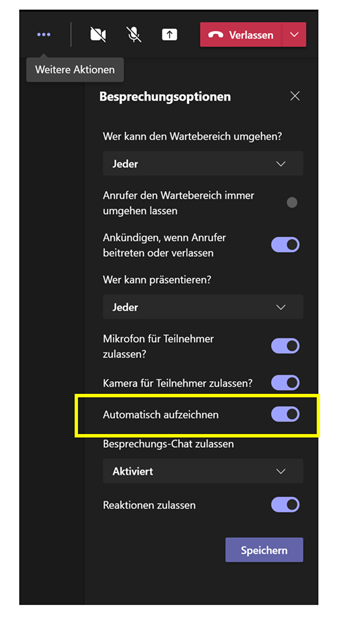
Damit ihr auch während des Sommers mit hilfreichen und guten Microsoft 365 Tipps versorgt seid, haben wir für euch unsere Top 3 New Feature Tipps zusammengefasst, die euch in eurer täglichen digitalen Arbeit unterstützen sollen. Automatisches Aufzeichnen von Microsoft Teams Meetings Wenn ihr auf Nummer sicher gehen und nicht vergessen wollt eine wichtige Besprechung aufzuzeichnen, gibt es ab nun in den Besprechungsoptionen eine neue Umschaltfläche Automatisch aufzeichnen. Tritt vor Beginn der jeweiligen Microsoft Teams Besprechung dem Meeting bei. Klicke oben rechts innerhalb der Besprechung auf Weitere Aktionen und wähle Automatisch Aufzeichnen aus, indem du den Schieberegler nach rechts schiebst und somit aktivierst Wenn die Besprechung beginnt, startet Microsoft Teams automatisch die Aufzeichnung Nach ****Beendigung der Besprechung steht dir die Aufzeichnung im Besprechungschat, wie gewohnt, via Microsoft Stream zur Verfügung ...

August 3, 2021 · 2 min · Mercedes Orasch
Organisiere deine tägliche Arbeit auf deine Weise mit der Outlook Kalender Board Ansicht für Outlook Web

Organisiere deine tägliche Arbeit auf deine Weise mit der Outlook Kalender Board Ansicht für Outlook Web

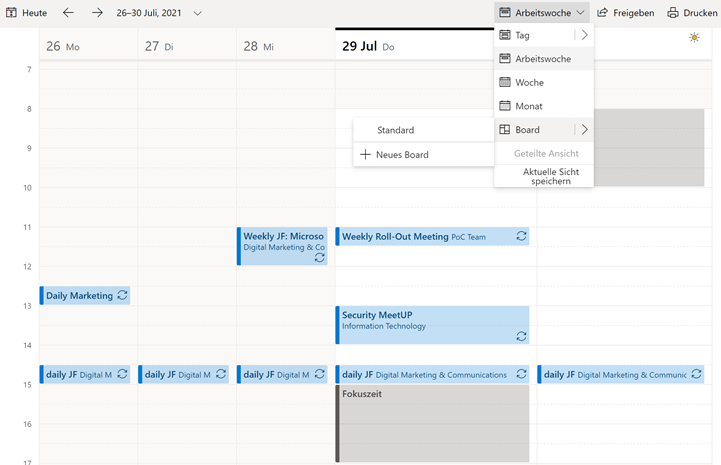
Damit ihr eure Aufgaben und Ereignisse noch besser verwalten könnt, gibt es eine neue Ansicht für Outlook – die Board Ansicht. Die Board Ansicht ist wie eine unendlich große Leinwand, auf der du Inhalte, wie Kalender, Aufgaben, Ziele, Links, Notizen und Dateien zusammenführen und strukturieren kannst. In diesem Artikel zeigen wir dir, jede einzelne Option, die du zu deinem Board hinzufügen und was du damit machen kannst. Dein Weg zur Outlook Kalender Board Ansicht Da der Outlook Kalender ein Teil von Outlook Web ist, kannst du du über outlook.office.com darauf zugreifen. Tipp: versehe die URL outlook.office.com/calendar/view/board mit einem Lesezeichen, um sofort auf das Board zugreifen zu können. ...

July 30, 2021 · 5 min · Mercedes Orasch
Delegate365 changelog 9.2.3-Add users to groups

Delegate365 changelog 9.2.3-Add users to groups

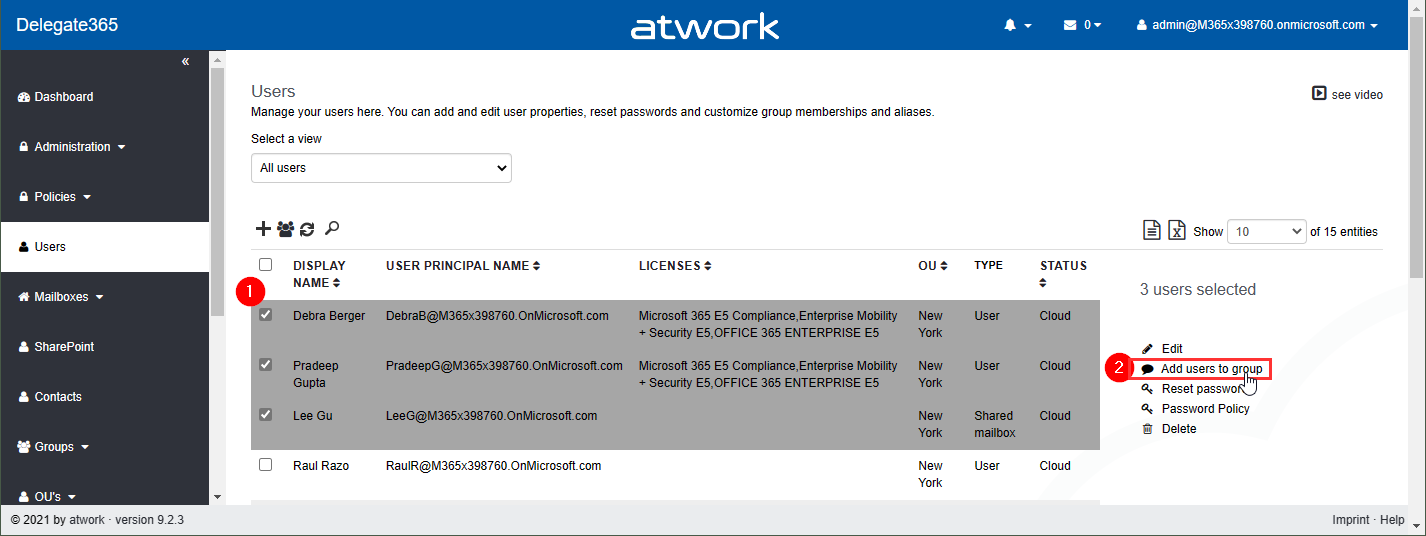
Delegate365 v9.2.3 brings a fix for the Message Trace function and offers a mechanism to add multiple users to one or more groups directly from the user list. See it here. Bulk add users to groups: In the users list, select more than one user. The menu on the right then shows the new option “Add users to group”. In this sample, 3 users are selected: Debra, Pradeep and Lee. The panel “Add users to group” opens and allows to select multiple groups of all types: Security groups, Distribution Groups, and Microsoft 365 Groups. The admin can search for the groups and add them to the Groups picker. By clicking on the Save button, a confirmation popup appears. When clicking Ok, the selected users will be added as members to these groups. A quick toast message shows the result in the bottom right corner. If the user already was a member of a group, this is ignored. ...

July 26, 2021 · 2 min · Toni Pohl
atwork launched Cloud Hub  the first Microsoft Teams App that lets you receive important news directly from your Microsoft Tenant

atwork launched Cloud Hub the first Microsoft Teams App that lets you receive important news directly from your Microsoft Tenant

The atwork-team is beyond excited that we recently launched our first Microsoft Teams App – Cloud Hub. With Microsoft 365 being an evergreen service, it is sometimes hard to keep up with everything which comes into your Tenant. Cloud Hub solves access regulations to the Message center and provides anytime access for Change Managers and Operations to be always informed about what is new. Cloud Hub supports your evergreening and target operating model with instant information for your Team. ...

July 19, 2021 · 2 min · Mercedes Orasch
Microsoft Teams Tip set a status message in guest tenants

Microsoft Teams Tip set a status message in guest tenants

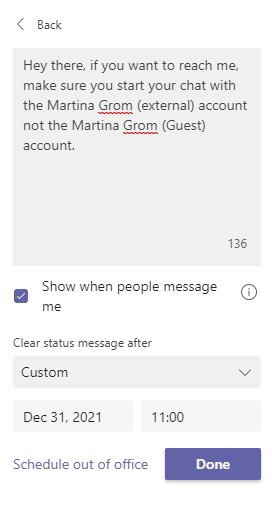
Some of us are part of many Microsoft Teams Tenants as guests. At least for me it happens very often that people try to reach me in their home tenants and they start a chat with my Martina Grom (Guest) account. Those messages likely get a reply from me only if I am currently signed-in into those tenants – most part of the day I am just signed into my home tenant. So the idea for using Microsoft Teams as an instant messaging service is failing here. ...

July 14, 2021 · 1 min · Martina Grom
Message Trace in Delegate365

Message Trace in Delegate365

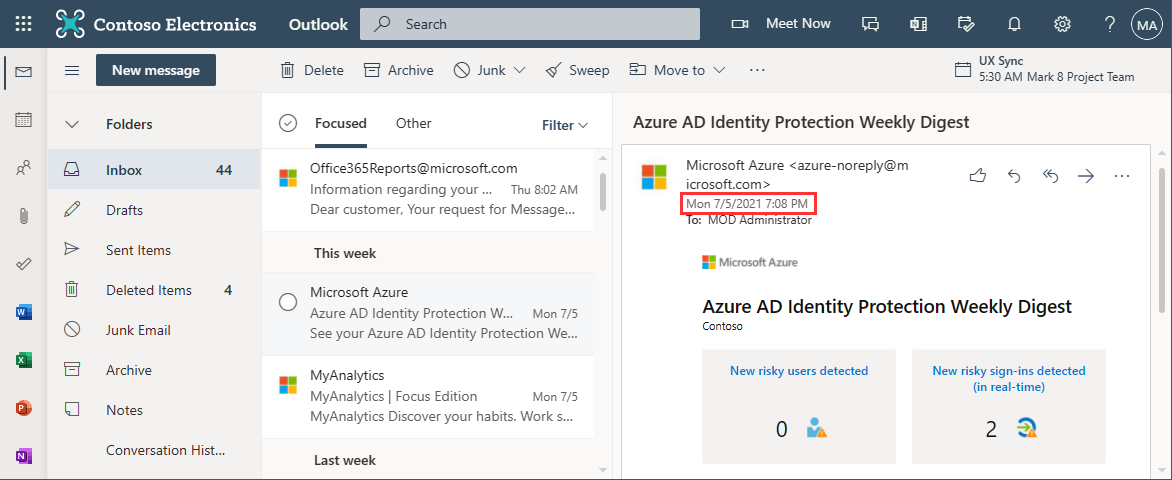
When you run a message trace operation to get status information about specific emails, the result can vary, depending on time zone settings. See a sample here. Show messages in the mail client In this sample, we work with an email sent from azure-noreply@microsoft.com. In Outlook we see the timestamp at Mon 7/5/2021 7:08 PM (2021-07-05 19:08). Message Trace in Delegate365 In Delegate365, admins can run a message trace to get information about the delivery status. When we run the message trace with the filter Startdate 2021-07-05 to Enddate 2021-07-05 - just this one day - and that user as recipient… ...

July 9, 2021 · 4 min · Toni Pohl
Power Platform Environments and Governance Tips

Power Platform Environments and Governance Tips

The Microsoft Power Platform enables individual solutions to be developed and business processes to be easily automated. When it comes to controlling the solutions, it is important to establish an IT governance in the organization. There are many areas and details about it. For this reason, I’ve put together a summary here with some news and helpful tips. The Microsoft Power Platform includes Power BI, Power Apps, Power Automate, and Power Virtual agents, leveraging the common infrastructure of the Microsoft Dataverse (the former Common Data Service) and Data Connectors. Dynamics 365 and the Power Platform are both deeply coupled with Dataverse and are held in containers called environments. A governance strategy usually starts with organizing the environments accordingly. Environments allow to separate Production, Test and Development. See more at Environments overview and at Microsoft Power Platform guidance documentation. ...

July 5, 2021 · 5 min · Toni Pohl
Unsere Microsoft 365 Success Story Adoption in Zeiten von Distance Learning mit Diakonie - Eine Welt

Unsere Microsoft 365 Success Story Adoption in Zeiten von Distance Learning mit Diakonie - Eine Welt

“In einer herausfordernden Zeit konnten wir mit atwork schnell und professionell eine funktionierende Lösung für Home-Schooling und Home-Office in Betrieb nehmen. Die Kompetenzen auf technischer und organisatorischer Ebene haben einen unkomplizierten und raschen Start in Microsoft Teams ermöglicht. Auch bei weiteren Projekten konnten wir uns voll auf das Knowhow von atwork verlassen. Wir freuen uns einen langfristigen Partner für Microsoft Cloud Services zu haben.” Benjamin Böhm (Head of IT, Diakonie – Eine Welt) ...

July 5, 2021 · 3 min · Mercedes Orasch
PowerPoint Live in Microsoft Teams mit Laserpointer und Textmarker nutzen

PowerPoint Live in Microsoft Teams mit Laserpointer und Textmarker nutzen

Microsoft Teams hat wieder eine neue Funktion veröffentlicht, die wir gleich getestet haben: Laserpointer und Textmarker-Funktion in PowerPoint Live für Microsoft Teams. Um es kurz zu machen, bedeutet es, dass man mit dem Laserpointer auf PowerPoint Folien zeigen kann, sowie diese mit Tinte und Textmarker (in verschiedenen Farben & Stärken) beschriften kann, um wichtige Inhalte hervorzuheben. Daneben kann man auch den Radierer verwenden, um den Textmarker oder Stift wieder zu entfernen. ...

July 2, 2021 · 3 min · Mercedes Orasch
Delegate365 changelog 9.2.2-Manage group owners

Delegate365 changelog 9.2.2-Manage group owners

Delegate365 v9.2.2 allows to manage group owners. The permission policies have been extended and the current admin can add him- or herself or additional group owners for Security Groups and Microsoft 365 Groups. See a description of the latest features here. Enable (or disable) the manage owner feature: To enable the “manage owner” feature, you have to set the corresponding permission policies in the Groups - Security Groups - Manage owner from No to Yes, as here. Then, click on the Save button at the page end of the permission panel. By default, this new setting is disabled. So, don´t forget to switch it on, if your admins shall be able to set the group owner for security groups (in the same way as for Microsoft 365 Groups). Once the setting is set, it will be effective for all admins that have that permission policy assigned. To learn more about setting permission policies, see here. ...

June 16, 2021 · 4 min · Toni Pohl