Delegate365 changelog version 7.4-additional reports with risk events and Microsoft Teams, OneDrive shared with and groups as members

Delegate365 changelog version 7.4-additional reports with risk events and Microsoft Teams, OneDrive shared with and groups as members

With Delegate365 version 7.3 a new reporting engine was introduced. With this update, additional reports are available in Delegate365 version 7.4. The new reports deliver a new report category with risk events, as for example impossible travel risk events or suspicious IP risk events, new Microsoft Teams statistics reports and more. Also, OneDrive usage per user and Shared-With information is now available as a report. Mail Enabled Security Groups can now be assigned with permissions in Resources (rooms and equipment mailboxes) and Shared Mailboxes. See the details and descriptions of all reports here. ...

February 15, 2018 · 7 min · Toni Pohl
Delegate365 changelog version 7.3-new reports

Delegate365 changelog version 7.3-new reports

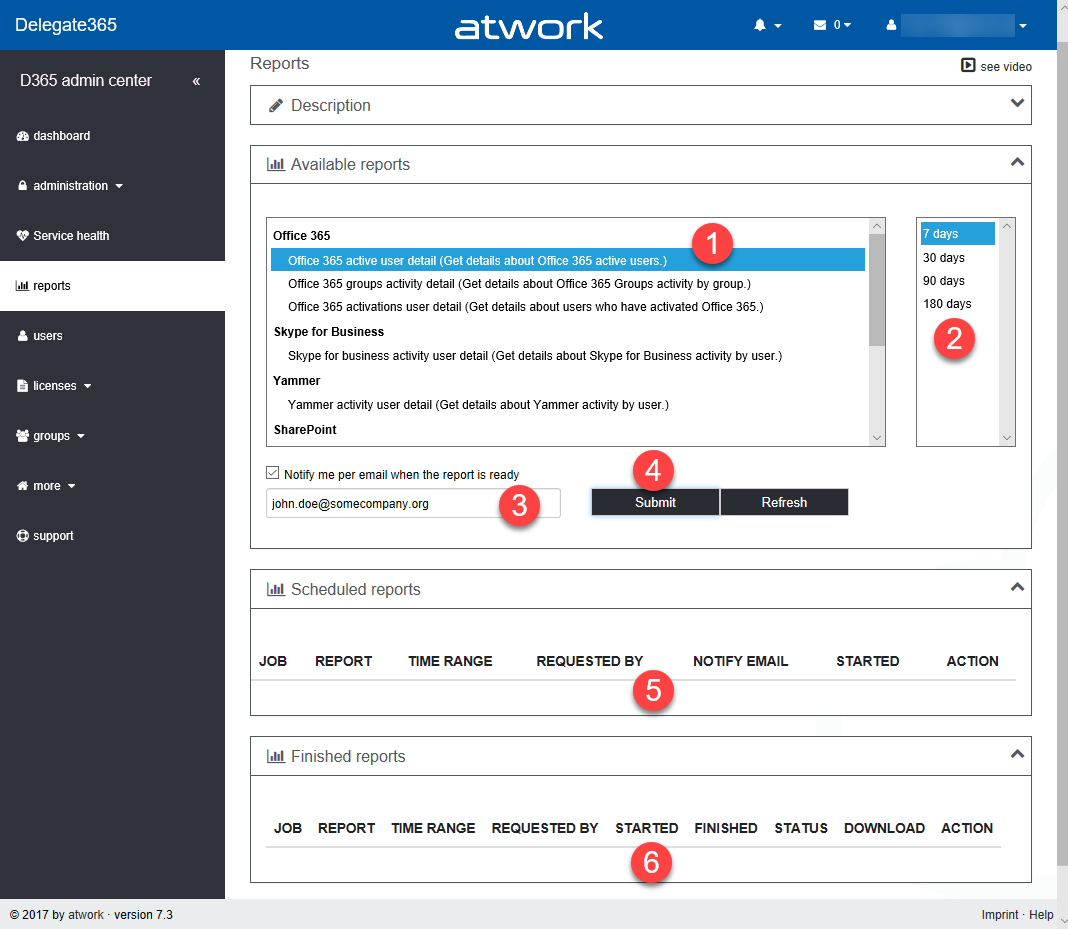
The newest version 7.3 of Delegate365 provides a complete new reports module that replaces the old reports section. See the benefits and the details of the new Delegate365 reporting engine and how to use it for all your Delegate365 admins with just their entitled data. Learn about the details here. New reports menu: The old reports menu was replaced by the new module. Now, there are four boxes with a description, the available reports, scheduled reports and finished reports. All Delegate365 Admins can now select from new reports (1 and 2), activate a notification when finished (3) and start a report job with the Submit button (4). This creates a task in the schedules reports list (5). A job picks that task and executes it after a couple of minutes. When the report has been created, a notification can be sent to the report owner and the report shows up in the finished reports list (6). Refresh updates the reports boxes (5 and 6) with the current status if needed. ...

February 12, 2018 · 6 min · Toni Pohl
Project Online Workflow error when reading flag field

Project Online Workflow error when reading flag field

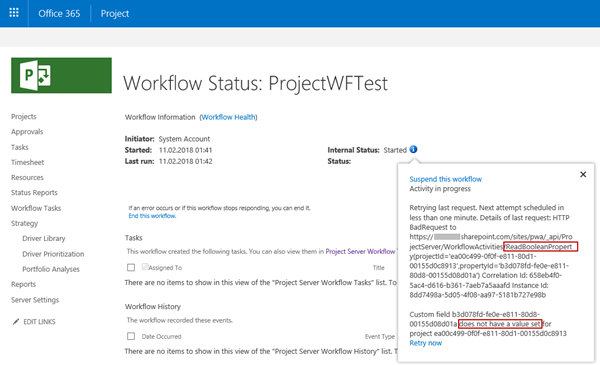
In November 2017, a support article was published how to Troubleshoot Project Online workflows. One described error is “Custom field CUSTOM_FIELD_GUID does not have a value set for project PROJECT_GUID”. There is a special case when reading an Enterprise Custom Field of type Flag, as mentioned in a Note. Flag fields have one special behavior: You can’t set a default value for this type of fields. The value is blank, until you changed it manually at least one time – even if it is displayed as No on Project Detail Page or in Project client. Therefore, you can’t access this value from within a SharePoint Designer workflow until the first change. ...

February 11, 2018 · 6 min · Barbara Henhapl
Joining the Microsoft Graph Community Calls

Joining the Microsoft Graph Community Calls

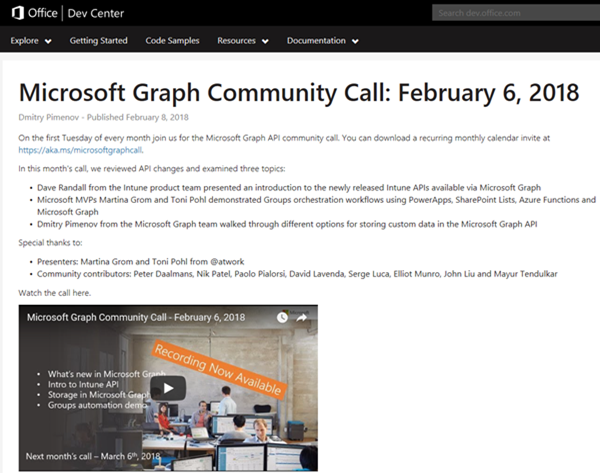
Microsoft Graph is the unified endpoint to programmatically access resources and services in Office 365 and Azure Active Directory. To inform the developer community with the latest news, the Microsoft Graph team organizes a monthly Microsoft Graph API community call. We, Toni and I, were happy to contribute a use case at the last call showing a scenario of an Office 365 Group orchestration workflow with PowerApps, SharePoint Lists, Azure Functions and Microsoft Graph. ...

February 10, 2018 · 2 min · Martina Grom
Microsoft Project Leistungssteuerung  Ändern von Ressourcenzuordnungen

Microsoft Project Leistungssteuerung Ändern von Ressourcenzuordnungen

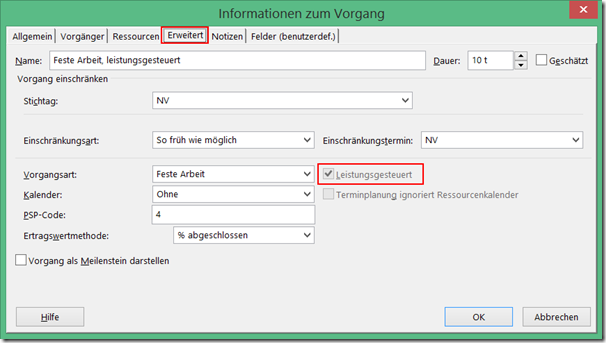
Neben den Vorgangsarten beeinflusst auch die Einstellung für Leistungsgesteuert das Verhalten von Project, wenn Sie die Anzahl der zugeordneten Ressourcen zu einem Vorgang ändern. Bei leistungsgesteuerten Vorgängen behält Project für die gesamte Arbeit für den Vorgang den aktuellen Wert bei, unabhängig davon, wie viele Ressourcen dem Vorgang zugeordnet sind. Leistungsgesteuert bedeutet, dass Project für den Vorgang den Wert für Arbeit nicht verändert. Der aktuelle Wert für Arbeit wird bei der der Änderung von zugeordneten Ressourcen zu einem Vorgang aufgeteilt. Wenn leistungsgesteuert deaktiviert ist, wird die vorhandene Arbeit nicht aufgeteilt, sondern die Arbeit gemäß der Zuordnungseinheiten der neu zugeordneten Ressource erhöht. In den aktuellen Versionen von Project ist diese Option im Standard deaktiviert. Sie finden die Einstellung zur Leistungssteuerung unter anderem im Dialogfenster Informationen zum Vorgang auf der Registerkarte Erweitert. Das Feld steht auch als Spalte zum Einfügen in Gantt-Ansichten zur Verfügung. ...

February 9, 2018 · 3 min · Barbara Henhapl
Microsoft Project Zuordnungseinheiten in Project ab Version 2010

Microsoft Project Zuordnungseinheiten in Project ab Version 2010

Heute äußere mich einmal zu einem Thema, bei dem ich nicht voll hinter den Entscheidungen der Project Product Group stehe . Mit der Version Project 2010 wurde die Anzeige der Zuordnungseinheiten bei Einheiten geändert. Bis Project 2007 Wer mit Project in den Versionen bis 2007 arbeitet oder gearbeitet hat, kennt folgendes Verhalten: Wir haben einen Vorgang mit der Dauer von 5 Tagen und einer Ressourcenzuordnung von 100%. Die Vorgangsart ist Feste Arbeit. ...

February 8, 2018 · 3 min · Barbara Henhapl
Multiple Users in Microsoft Teams and other Office 365 services with the same name

Multiple Users in Microsoft Teams and other Office 365 services with the same name

Recently a colleague asked me: “How can you deal with users in large Enterprise Tenants, who share the same name? How do you know who is who?” Indeed, this can happen, as soon as your Office 365 Tenant has a lot of users in it. There are some very common names in each language, so you should know who you add to your Microsoft Team. From an organizational perspective, this should be solved with a proper identity management: Users have a unique e-mail address, but it does not end here: there are some other fields that need to be filled, like Job Title, Department and a lot more. But in fact: which fields is the Microsoft Teams user dialog using here? ...

February 8, 2018 · 3 min · Martina Grom
Microsoft Project Vorgangsarten  der Einfluss auf Ressourcenplanung

Microsoft Project Vorgangsarten der Einfluss auf Ressourcenplanung

Ich komme oft in Situationen, in denen ich erläutern darf, wie Project im Hintergrund funktioniert. Wer kennt das nicht: man ändert etwas an einem Vorgang und es passiert etwas, was man so nicht erwartet. Und nein, Project macht selten etwas anderes, als man ihm “sagt”. Nur ist einem oft nicht bewusst, dass man eine Anweisung gegeben hat. Haben Sie diese Erfahrung auch schon gemacht? Sie haben einem Vorgang eine Ressource zu einem Prozentsatz zugeordnet, zum Beispiel 50%. Jetzt erhöhen Sie die Arbeit um wenige Stunden. Ist ja kein Problem, von 50% auf 100% ist ja noch viel Spiel, wird ja deswegen nicht gleich länger dauern – denkt man. Aber was tut Project? Es verlängert den Vorgang! Fazit: Project macht immer was es will und das ganz unlogisch. ...

February 6, 2018 · 5 min · Barbara Henhapl
Download the free Azure Serverless Computing Cookbook

Download the free Azure Serverless Computing Cookbook

Serverless Computing is popular. With Microsoft Azure, IT people can concentrate on their tasks and apps without taking care of managing any server infrastructure. One of the key Platform-as-a-Service (PaaS) components from Microsoft is the new, extensive Azure Functions service. Learn how to use Azure Functions with the cost-free Azure Serverless Computing Cookbook! The “Azure Serverless Computing Cookbook” book was written by Praveen Kumar Sreeram and reviewed by our colleague Florian Klaffenbach, published by Packt Publishing Ltd. last fall. You can download the free ebook in the Azure Resource Center at Azure Serverless Computing Cookbook. ...

February 3, 2018 · 1 min · Martina Grom
Working with Exchange Mailboxes and Groups as members

Working with Exchange Mailboxes and Groups as members

When working with Office 365 and Exchange services, it can be helpful to work with groups instead of users, for example, for allowing a group to have full access to a shared mailbox. In this case, there are some things to consider. See the working result in this documentation. The scenario First of all, I need to clarify, I’m not an Exchange guy. So, perhaps I’m describing a scenario that’s fully clear for Exchange Admins but I think, this could be helpful for other Office 365 Admins. This sample is my summary to show the solution for that specific request: How to set full access permissions to a shared mailbox, a resource or a distribution list for a group (and therefore to all members of that group). ...

February 2, 2018 · 3 min · Toni Pohl