Delegate365 changelog version 7.2-additional sync rules and more

Delegate365 changelog version 7.2-additional sync rules and more

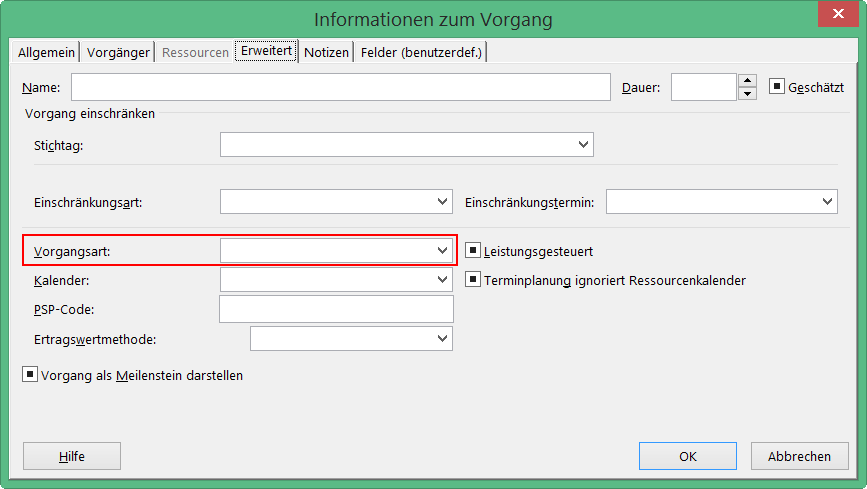
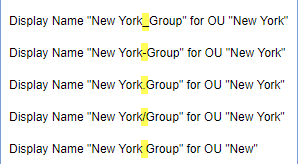
With Delegate version 7.2 there come some new and useful features especially in the sync rules. See the details described here. Sync Rules: Groups OU-assignment by new name rules: All group rules now offer additional options in the Property dropdown allowing to assign a group to an OU by its name. To get the OU name out of the group name, the OU name must be the prefix of a name and a predefined separator must be used. The options include the following separators: [space] , [underscore] , [hyphen] –, [point] ., and [slash] /. To clarify the mechanism, the options show a sample. So, if a group Display Name is set to “New York_Group”, the sync rule strips down by the separator “” and uses “New York” as OU name and “Group” as group name. So, group “Group” is automatically assigned to OU “New York”. Take care when using a normal space character as separator: Then, the OU name can only be one word, for example: “New York Group” would result in an OU “New” and the group name is “York Group”. As workaround, the OU-name could be named with a hyphen “New-York” or similar. That’s the purpose, to use a Display Name for automatic OU-assignment instead of object properties. Now, admins can use this feature additionally if needed for the following objects: Distribution Groups, Office 365 Groups, Contacts, Resources, Shared Mailboxes and Security Groups as marked red in the following screenshot. ...

January 31, 2018 · 6 min · Toni Pohl
How to restrict access and to connect to a single SQL Azure database only

How to restrict access and to connect to a single SQL Azure database only

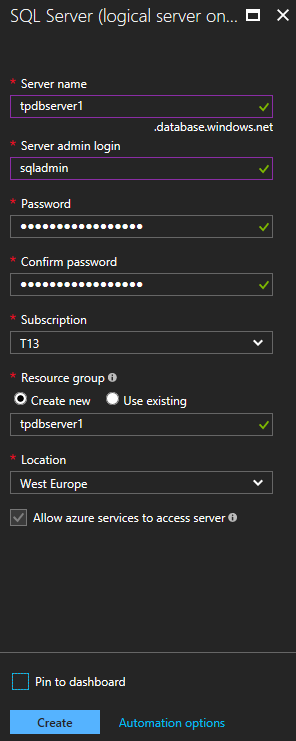
As of today, many organizations use various Microsoft Azure services. SQL Azure databases are popular among them. Often, IT Administrators want to allow departments or vendors full access to just one specific SQL Azure database and to restrict their access to other resources. See here how this works. Use SQL Management Studio or SQL Operations Studio When working with SQL databases, installing the SQL Management Studio (SSMS) is very helpful. You can get the latest version from Download SQL Server Management Studio (SSMS) for free. Alternatively, you can use the new lightweight and cost free SQL Operations Studio. ...

January 27, 2018 · 4 min · Toni Pohl
Snapshots of SharePoint Saturday Bremen 2018

Snapshots of SharePoint Saturday Bremen 2018

This weekend, on the January 20th, the first SPS North Germany/Bremen took place with great sessions in a very cool location. See some snapshots here. For #SPSBRE, we had a very cool location in the Bremen Harbor at Schuppen Eins (“shed one”). When entering the former harbor storehouse building that was built in 1959, the automobile Oldtimer Boulevard hits you with more than 60 unique cars, embedded in a modernized glass structure with a cafe, shops and a garage specialized in repairing old-timers. So, we had a lot to watch – and to learn. ...

January 21, 2018 · 1 min · Toni Pohl

CU at SharePoint Saturday Bremen 2018

We are looking forward to see you at the SharePoint, Office 365 and Azure community event next week on January 20, at the first SharePoint Saturday North Germany 2018, in the city of Bremen. There will be a lot of interesting sessions and a great speaker’s lineup. CU there! SharePoint Saturday North Germany / Bremen 2018 Saturday, January 20, 2018 Schuppen Eins, Konsul-Smidt-Str. 22, 28215 Bremen SPS Bremen will deliver a bunch of hot topics, see speakers and sessions! We from atwork have three sessions and will inform about these topics: ...

January 14, 2018 · 1 min · Toni Pohl
Delegated Administration in Exchange Online

Delegated Administration in Exchange Online

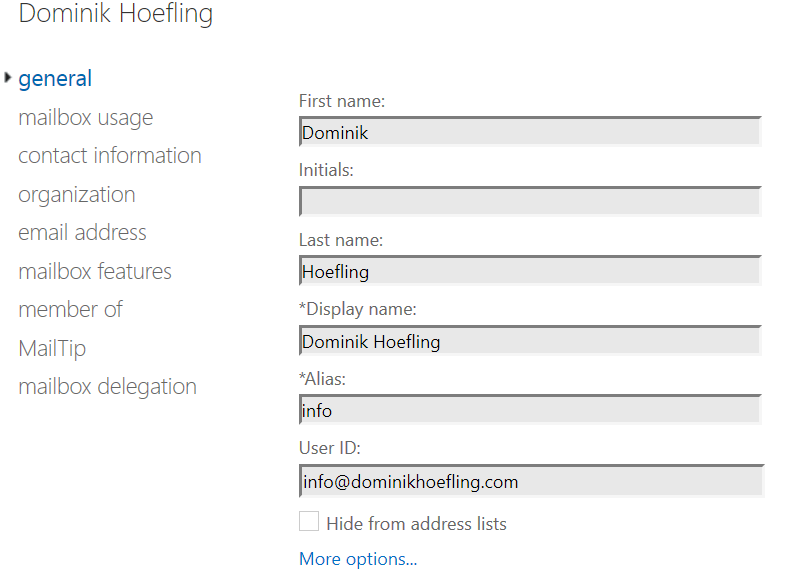
My colleagues and I are working on a (pilot) multi-forest Exchange hybrid environment with a single Office 365 tenant. In this early stage of the project we will have two companies, each with their own on-premises environment. One of the requirement is a delegated administrative concept for Exchange Online, which means administrators and helpdesk workers should only manage and configure settings for their specific domains. This blog post will show you how to handle this with Role Based Access Control (RBAC). ...

January 10, 2018 · 6 min · Dominik Höfling
Troubleshooting Active Directory Federation Services

Troubleshooting Active Directory Federation Services

Enabling single sign-on for your users must not be a big deal. There are multiple hybrid identity authentication scenarios available to obtain single sign-on capabilities to your users: Active Directory Federation Services (AD FS): single sign-on, based on one identity in your on-premises Active Directory and publishes on-premises and cloud web applications. This is the most complex scenario and often used by organizations with 250+ seats. They are not only using Office 365 applications for single sign-on, but also for other Intranet and Internet applications to achieve SSO user experience. Password Hash Sync (PHS): same sign-on, which means you must authenticate again with your on-premises credentials accessing Office 365 services. Pass-through authentication (PTA): single sign-on, allows your users to sign in to Azure Active Directory directly validating the users’ passwords against your on-premises Active Directory. Seamless single sign-on: single sign-on, automatically signs your users in when they are on their corporate devices connected to your corporate network. Can be combined with either PHS or PTA. When should I use AD FS instead of other hybrid authentication methods? ...

January 4, 2018 · 4 min · Dominik Höfling
1st MVP Award for Dominik Höfling

1st MVP Award for Dominik Höfling

We are very happy to announce that Dominik Hoefling was awarded for the 1st Microsoft MVP Award for Office Servers and Services! Dominik has expertise in Microsoft Office 365 and is a recognized expert, MSL (Microsoft Learning) author, blogger, and conference speaker. See Dominik’s MVP profile. Dominik (@DominikHoefling) is a Senior Consultant for atwork deutschland GmbH. He currently works in Microsoft technologies, especially in Microsoft Exchange, Exchange Online and Office 365. He holds several Microsoft certifications including MCSA for Office 365, MCSE Messaging and MCITP Enterprise Administrator for Windows Server. Dominik also write technical blog posts for international companies and various topics about Exchange Hybrid deployments and Office 365. ...

January 2, 2018 · 1 min · Toni Pohl
How Azure Security Center protects your data against cyber attacks

How Azure Security Center protects your data against cyber attacks

In many scenarios, public cloud services allow a high grade of elasticity, flexibility and cost effectiveness combined with standardization. On the other hand, every customer needs to build trust to the desired platform and that all his services and data are protected against any attacks. So, it’s very interesting to see, what kind of mechanisms the large cloud providers as Microsoft are using to keep data safe and how they detect attacks and what countermeasures they execute. ...

January 1, 2018 · 1 min · Toni Pohl
How to access files stored in OneDrive or in a SharePoint site with Microsoft Graph and the Excel API

How to access files stored in OneDrive or in a SharePoint site with Microsoft Graph and the Excel API

The Microsoft Graph API is the new unified endpoint for developers accessing data from an Office 365 tenant. Amongst many other features, you can work with OneDrive and SharePoint files with the Graph REST API. Additionally, you can directly work with Excel files through the Graph Excel API. Since all samples I found just use the personal OneDrive for Business (OFB) file storage, I wanted to document how to access files that are stored in a SharePoint Online site (SPO) as well. So, here we go! ...

December 29, 2017 · 6 min · Toni Pohl
Cleaning up file storage with 7Zip, PowerShell and OneDrive

Cleaning up file storage with 7Zip, PowerShell and OneDrive

Holidays are a good time for cleaning up. For migrating an old on-premises file storage to the cloud, I used some tools and invested some time. See my scenario and the tools here. The scenario I had a Virtual Machine (I connected to remote via RDS from my holiday location into the company) with an iSCSI storage to a NAS system where old project files were stored. This storage was used over the last years. You can imagine … the mess. To make it short: In that VM, the file storage was connected with a network drive P: (for Projects). With my work account, I have 1TB personal cloud storage. Since this should be an archive for my coworkers as well, I decided to use a SharePoint Online site (SPO). I created an Office 365 group - with a SPO for storing the documents - named “projects” and installed the OneDrive.exe client. Then, I created a new Document Library and synchronized that (empty) list to the local computer. ...

December 26, 2017 · 4 min · Toni Pohl