Webcasts rund um Sicherheit in Azure und Office 365

Webcasts rund um Sicherheit in Azure und Office 365

Rund um Sicherheit in Azure und Office 365 stellt Microsoft nun mehrere Webcast Termine im Mai und Juni 2015 bereit, wo alle Interessierten herzlich eingeladen sind, Fragen zu stellen und sich auszutauschen. Hier die Themenblöcke: Informationssicherheit in der Azure Cloud, Rainer Stropek, 22.05.2015. 09:00-10:00 Uhr Cloud Computing ist zu großen Teilen Vertrauenssache. Firmen, die sich für die Cloud entscheiden, legen größten Wert auf Eigenschaften wie Vertraulichkeit, Integrität, Verfügbarkeit, Nachvollziehbarkeit etc. In diesem Event geht Rainer Stropek, Azure MVP der ersten Stunde, darauf ein, welche Mechanismen die Microsoft Azure Cloud in Sachen Informationssicherheit mitbringt. Das Thema wird sowohl organisatorisch als auch technisch behandelt. Kenntnisse über Microsoft Azure setzt Rainer keine voraus. Ein gewisses, grundlegendes Verständnis über die Prinzipien von Cloud Computing wäre allerdings von Vorteil. ...

June 1, 2015 · 2 min · Martina Grom
Windows 10 kommt

Windows 10 kommt

…schon bald, nämlich am 29. Juli! Terry Myerson, Microsoft’s Executive Vice President of Operating Systems, hat die frohe Botschaft heute in “Blogging Windows” in Hello World: Windows 10 Available on July 29 bekannt gegeben. Wer Windows 10 schon jetzt in der aktuellsten Technical Preview testen möchte, kann dies auf https://insider.windows.com/ jederzeit ausprobieren. Microsoft wird Besitzern von Windows 7 und Windows 8.x Lizenzen bis 29. Juli 2016 – also für die Dauer eines Jahres ab Verfügbarkeit - ein kostenfreies Upgrade auf Windows 10 anbieten, siehe Upgrade to Windows 10 for free. ...

June 1, 2015 · 2 min · Toni Pohl
Recap of SPSParis

Recap of SPSParis

We had a great time at SharePoint Saturday Paris (www.spsevents.org/city/Paris/Paris2015)! Thanks a lot to the organizers Benoit, Gokan and Patrick! The event was well organized and we had a lot of fun being part of the french and the international SharePoint community at this event. #SPSParis took place in Tour Montparnasse, which was the tallest skyscraper in France until 2011. We had a fantastic view from the 40th level over Paris, wow! We enjoyed the great speaker dinner and the event itself and all activities around it. ...

May 31, 2015 · 2 min · Toni Pohl
Delegate365 changelog version 3.8-Password Policies and Reports

Delegate365 changelog version 3.8-Password Policies and Reports

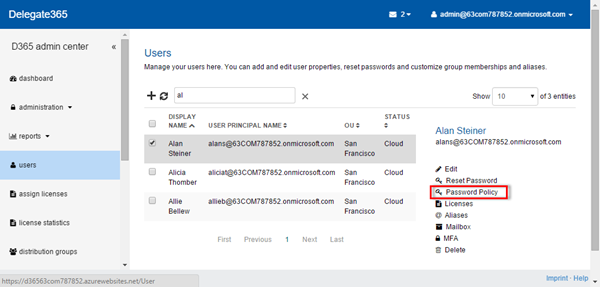
We had a busy May! Delegate’s next version 3.8 brings some more new features. See the details here: User Password Policy: Now Administrators can set a the Password Policy for each user. If at least one user is selected, on the right side panel the new function “Password Policy” is shown, as in the screenshot below. The Task Pane loads the current settings of the selected user and enables the setting “Password never expires” for the Admin. When clicking “Save” the setting will update the password policy for this particular user. ...

May 27, 2015 · 3 min · Toni Pohl
Looking forward to SPSParis

Looking forward to SPSParis

Martina and I have been on Microsoft Ignite Conference in Chicago recently. There we met Patrick Guimonet, Microsoft MVP and Regional Director in France and spoke briefly about Build and Ignite Conference and about our session at SharePoint Saturday Paris (#SPSParis). SPSParis happens this Saturday, on 30th of May, at Montparnasse Tower and will host a lot of interesting sessions about the newest trends and technologies around SharePoint and Office 365. See the details here: https://www.spsevents.org/city/paris/paris2015 ...

May 26, 2015 · 1 min · Toni Pohl
How to fix wrong folder names in Outlook

How to fix wrong folder names in Outlook

Since some time some folder names in my mailbox have been “wrong” in Outlook. What do I mean by wrong? Well, they had names like “Junk-E-Mail1” and “RSS-Feeds1” and I could not rename or delete them (because these are “default folders”). Also I had a mix of english and german folder names, because I had once a german mailbox, then this was migrated to Office365 and then I used to switch between german and english versions of Outlook. ...

May 24, 2015 · 1 min · Toni Pohl
Delegate365 changelog version 3.7-New user interface, Bulk operations and much more

Delegate365 changelog version 3.7-New user interface, Bulk operations and much more

Delegate365 version 3.7 brings a bunch of new features! Again, this version is a major milestone for our Office365 Add-On product. First of all, the management of all lists has been improved. We now use a Side Panel for all options for the selected objects which eases the usage. With that there are new bulk operations available. Some features have been improved and changed as well. See the details here. ...

May 20, 2015 · 6 min · Toni Pohl
Delegate365 changelog version 3.6-United UnAssign

Delegate365 changelog version 3.6-United UnAssign

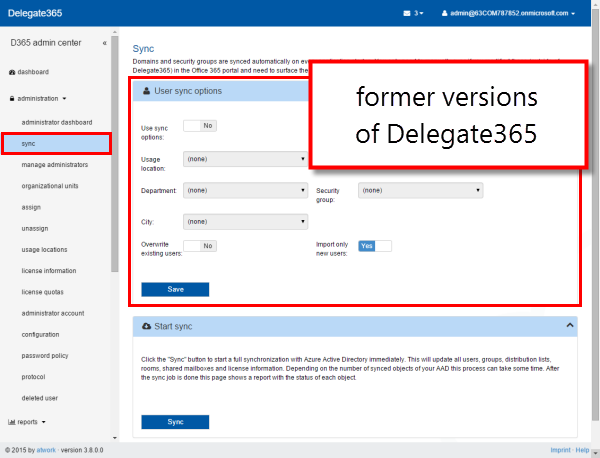
Shortly we launched Delegate365 version 3.6. There were some changes and more features added. In the administration menu the modules for assigning and unassigning have been combined, Administrators now can set their default values for creating users and the support address is now configurable. Administration: Assign: The assign module is used to set the OU for users, groups, contacts, etc. Since we had many single modules for assigning objects to an OU… …we decided to unite them into one new module “assign” which reduces the modules list in the administration menu (see also here). Now there’s the selectable region and the assign-actions below. You can open the corresponding group to select the objects and then choose the OU for the assignment. As before each object in D365 belongs to one OU (see also virtual OU’s for multiple management here - Important security change in group membership selections:). With the new module it’s easy to select (unassigned) users, distribution groups, security groups, contacts, shared mailboxes and rooms to assign them to a specific OU. Once that is done the items show up in the corresponding lists for the scope admins to manage. ...

May 19, 2015 · 3 min · Toni Pohl
Office 2016 Preview für Office 365 Abonnenten bereits verfügbar

Office 2016 Preview für Office 365 Abonnenten bereits verfügbar

Ein kurzer Tipp für alle, die Office 2016 Preview bereits jetzt ausprobieren wollen und ein Office 365 Abo haben: das neue Office steht für alle Office 365 Abonnenten bereits zum Download zur Verfügung. Voraussetzung ist im Enterprise Bereich, dass First Release aktiviert ist. So aktivieren Sie First Release: Melden Sie sich als Administrator im Administrationsportal von Office 365 an. Links finden Sie den Menüpunkt Service Settings die Einstellungen zu First Release. ...

May 19, 2015 · 1 min · Martina Grom
Free E-Books from Microsoft Press

Free E-Books from Microsoft Press

There are a lot of new, free E-Books available from Microsoft Press. Topics are around Windows 10, Microsoft Azure, App Development, Microsoft System Center and a lot more. It’s definitely worth to bookmark this page. Some highlights: Introducing Windows 10 for IT Professionals, Preview Edition, May 2015, Ed Bott Microsoft Azure Essentials: Azure Machine Learning, April 2015, Jeff Barnes Microsoft Azure Essentials: Azure Automation, April 2015, Michael McKeown Creating Mobile Apps with Xamarin.Forms, Preview Edition 2, April 2015, Charles Petzold ...

May 18, 2015 · 1 min · Martina Grom