How to manage self service password reset for users in Delegate365

How to manage self service password reset for users in Delegate365

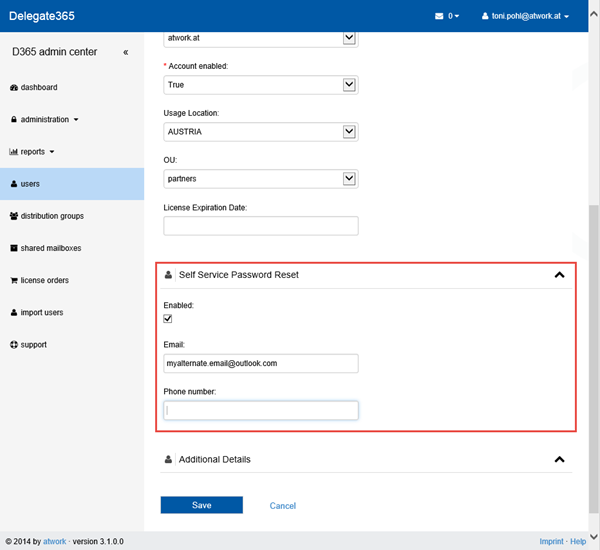
Delegate365 provides a user self service password reset (SSPR) function since version 2.1. If an user forgot his Office 365 password – and the admins allowed that function – he can self reset his password easily with D365. The SSPR feature comes automatically with Delegate365 at no additional costs. In contrast there´s Azure Active Directory in three editions (Free, Basic and Premium) where SSPR starts with the premium and basic features, see Self-service password reset for users in Azure Active Directory Editions. ...

February 6, 2015 · 4 min · Toni Pohl
How to use Office 365 MFA in Delegate365

How to use Office 365 MFA in Delegate365

In Office 365 IT Admins can define Multi Factor Authentication (MFA) for their users to secure access for all or special user accounts. The good news is that Delegate365 supports the usage of MFA for the login process by default. MFA works exactly in the same way as usual. MFA consists of usually two factors: Something you know (typically a password) Something you have (a trusted device that is not easily duplicated, like a phone) ...

February 6, 2015 · 2 min · Toni Pohl
Free eBook Developers Guide to the New .NET

Free eBook Developers Guide to the New .NET

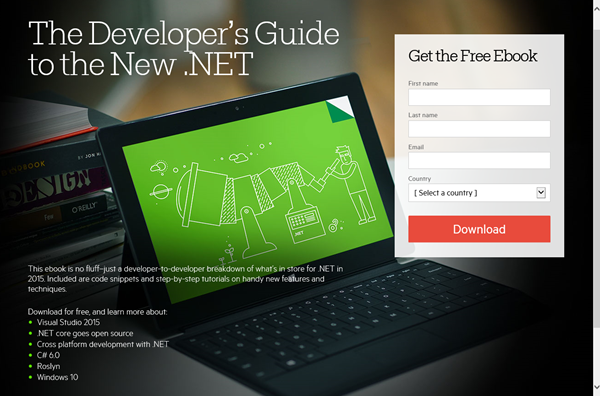
Auf .NET Developer kommt viel Neues zu. Der Tools-Hersteller Telerik bietet ein kostenfreies eBook an, welches über die wichtigsten Neuerungen in .Net informiert. Das ansprechende eBook wurde von Michael Crump und Sam Basu geschrieben und ist 49 Seiten stark. Es ist nur eine Angabe des Namens, einer E-Mail Adresse und des Landes erforderlich, dann startet der Download des 16MB eBooks: The Developer’s Guide to the New .NET Die Zukunft des “neuen” .NET startete letzten November mit der Open Source-Ankündigung auf dem Connect(); Microsoft Visual Studio vNext & Azure Online-Event (siehe auch unsere Zusammenfassung hier). ...

January 30, 2015 · 1 min · Toni Pohl
Delegate365 changelog version 3.1

Delegate365 changelog version 3.1

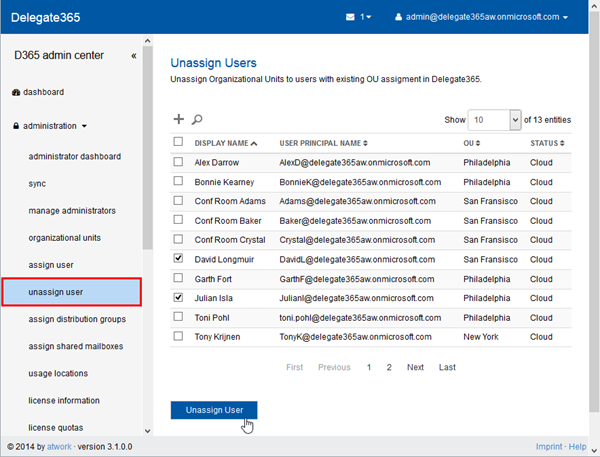
Delegate365 version 3.1 brings improvements and new features. As already announced in Delegate365 version 3.1 outlook we have some new modules and an unified user interface. Here´s a list of the main changes. New: Unassign users in the administrator menu: With this new module users who are already assigned to an OU can be unassigned. This module is only available for portal admins and works exactly in the same way as the assign users module: Search the users, mark them and click the “Unassign” button. ...

January 28, 2015 · 4 min · Toni Pohl
Eigene Apps in den App Launcher von Office 365 integrieren

Eigene Apps in den App Launcher von Office 365 integrieren

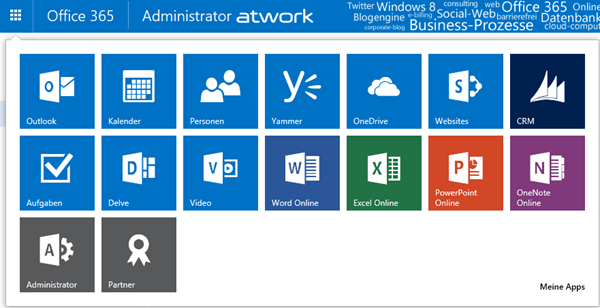
Seit kurzem ist in den Office 365 Webs der App Launcher (in deutsch das “App-Startfeld”) in der linken oberen Ecke verfügbar. Dieser zeigt jederzeit wichtige Apps für den angemeldeten Benutzer an, für die er berechtigt ist, ganz gleich welche Web-Anwendung geöffnet ist. Somit ist der App Launcher sozusagen das Office 365 “Startmenü” – bye bye Bookmarks. App Launcher erweitern Der App Launcher zeigt die wichtigsten Apps auf einen Blick und sieht standardmäßig - je nach Lizenzen und Berechtigungen - so aus: Jede App wird als Kachel angezeigt und kann mit einem Klick gestartet werden. ...

January 26, 2015 · 7 min · Martina Grom
Statistiken zur Office 365 Konferenz in Köln

Statistiken zur Office 365 Konferenz in Köln

Anfang Januar fand die Office 365 Konferenz (office365konferenz.net) in Köln statt. Ergänzend zu unseren Artikeln hier im Blog (siehe Wrap-up Office 365 Konferenz in Köln, Office 365 Konferenz Interviews und #office365konf on Twitter) hier ein paar Zahlen zum Event. Die Veranstaltung war mit insgesamt 130 Teilnehmern an beiden Tagen ausgebucht. 26 Sprecher (davon 16 Microsoft MVP´s) hielten 25 Sessions plus Keynote und eine FAQ-Runde. Die Konferenzbewertungen waren durch die Bank sehr gut. Das größte Manko war, dass die Location für die Teilnehmeranzahl teilweise zu eng war – das werden wir beim nächsten Event besser planen. ...

January 24, 2015 · 2 min · Toni Pohl
Download Windows 10 Technical Preview ISO

Download Windows 10 Technical Preview ISO

Since today the Download of Windows 10 Technical Preview ISO is available for members of the Windows Insider program. Follow the link here: https://windows.microsoft.com/en-us/windows/preview-iso The x64 download is 3.92 GB and the x86 3.01 GB. Happy downloading and testing! For news about Windows 10 check out Windows 10: The Next Chapter event webcast!

January 23, 2015 · 1 min · Toni Pohl

Delegate365 version 3.1 outlook

Delegate365 is continuously improving. We were busy and implemented new features and optimized some code in the Delegate365 solution. So, in the next version we will have some improvements, here´s a first outlook: We have completely rewritten the logging operations and are now using a new event store for protocoling detailed actions of operations. This means with version 3.1 the event sourcing is made step by step and saves all changed fields with old and new values. Starting with v3.1 all operations in D365 are protocolled step by step. Additionally we are developing an additional protocol source which delivers an overview and is good readable for humans. ...

January 22, 2015 · 3 min · Toni Pohl
Freies GitHub Student Developer Pack von Microsoft

Freies GitHub Student Developer Pack von Microsoft

In der Open-Source Development Community werden viele Projekte in GitHub bereitgestellt. Microsoft beginnt nun ebenso diese populäre Plattform zu nutzen und stellt viele Open Source Projekte auf GitHub bereit, wie etwa das .NET Core Framework. Für Studenten gibt es nun ein ganz aktuelles Angebot von Microsoft, welches eine Vielzahl an tollen Tools und Services von GitHub zur kostenfreien Verfügung stellt, das GitHub Student Developer Pack und Visual Studio Community 2013. Diese Pakete sind ganz auf Studenten zugeschnitten, schreibt Steve “Guggs” Guggenheimer in Microsoft & GitHub: Free tools for student developers. ...

January 21, 2015 · 2 min · Toni Pohl
Ready for Windows 10 Briefing

Ready for Windows 10 Briefing

Wie hier angekündigt, findet diese Woche, am 21. Januar 2015, der Live Webcast des “Windows 10 media briefings” statt. Der Webcast startet in unserer Zeitzone um 18:00 und kann online angesehen werden. Unter anderem werden Terry Myerson, Joe Belfiore und Phil Spencer von der Operating Systems Group und auch CEO Satya Nadella sprechen. Hier geht’s am Mittwoch, 21.1., 18:00 zum Webcast: https://news.microsoft.com/windows10story Für alle jene, die nicht live dabei sein können, wird es kurz danach unter derselben Adresse eine on-demand Version geben, schreibt Brandon LeBlanc in Live webcast details for our Windows 10 media briefing. ...

January 20, 2015 · 1 min · Martina Grom