Erste Schritte mit Docker-Teil 2

Erste Schritte mit Docker-Teil 2

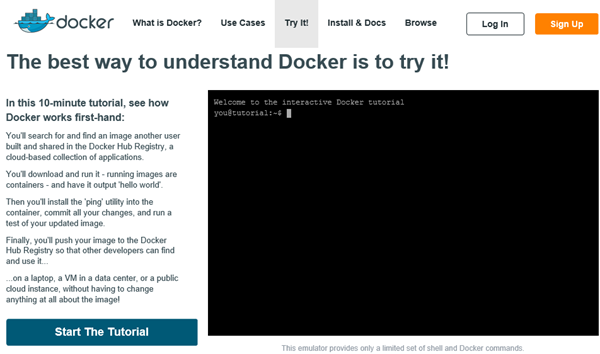
Docker ist eine Applikationsplattform, die (bald) auch unter Windows verwendet werden kann. Wie in Teil 1 beschrieben besteht Docker aus mehreren Komponenten. Um die Anwendung von Docker zu erlernen und die Funktionen anzusehen, ist es am einfachsten, das Online-Tutorial durchzugehen. Wie Docker funktioniert seht ihr nun hier in Teil 2. Try it Auf https://docker.com/tryit/ kann die Basisfunktionalität von Docker gleich ausprobiert werden. Das Tutorial dauert etwa 10 Minuten und zeigt, wie man ein Image aus der Docker Hub Registry lädt (download) und startet. Danach wird ein zusätzliches Utility in den Container installiert, getestet und die Änderungen in ein neues Image in die Docker Hub Registry gespeichert, damit andere Benutzer dieses verwenden können. ...

November 30, 2014 · 4 min · Toni Pohl
Erste Schritte mit Docker-Teil 1

Erste Schritte mit Docker-Teil 1

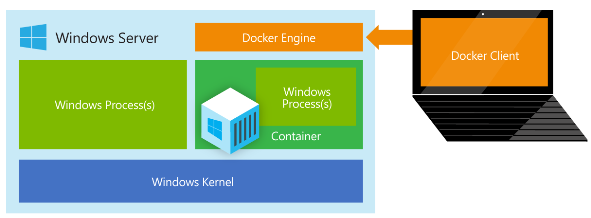
Im Oktober (u.a. rund um TechEd Europe) wurde eine Partnerschaft zwischen Microsoft und Docker bekanntgegeben. Microsoft wird Unterstützung von Docker in Azure und Windows Server einbauen, so präsentierte es Mark Russinovich bei der TEE14 Keynote und Jason Zander im Azure-Blog in New Windows Server containers and Azure support for Docker. Was ist eigentlich Docker? Docker ist eine Open Plattform um Applikationen in eigenen Prozessen geschützt laufen zu lassen und zu verwalten. Eine Applikation läuft in einem “lightweight container” auf einer Virtualisierungs-Plattform, ähnlich wie in einer virtuellen Maschine (VM), nur ist alles viel “schlanker”. Und wesentlich schneller. ...

November 28, 2014 · 5 min · Toni Pohl
Delegate365 changelog version 2.9Setup Wizard

Delegate365 changelog version 2.9Setup Wizard

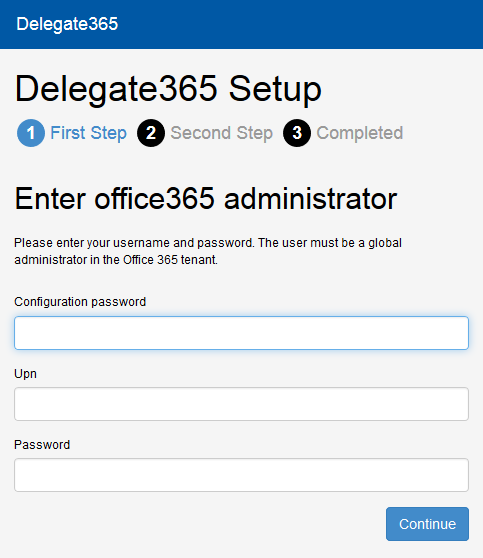
In Delegate365 version 2.9 the setup wizard for the primary configuration was slightly changed. The setup process must be run to configure D365 with any (existing) Office 365 tenant. The only things you need are the configuration password (provided by atwork) and the login and password of a global administrator of your Office 365 tenant, see also here. Do I need to run the setup? If you already received a Trial of Delegate365 with a new, preconfigured Office 365 tenant these steps are not necessary. This setup process is for organizations who want to use their own Office 365 (demo) tenant or for renewal of the D365 Service Account. If you got an email by atwork with the setup URL and a configuration password (code) you are able to complete the described steps here. ...

November 20, 2014 · 3 min · Toni Pohl
Delegate365 changelog version 2.9Shared Mailboxes support

Delegate365 changelog version 2.9Shared Mailboxes support

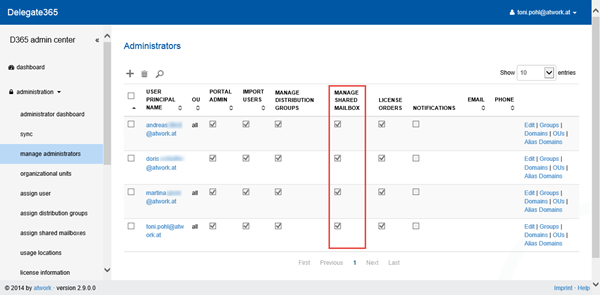
As described here we are pleased to announce the new Shared Mailboxes support in D365 version 2.9. Shared Mailboxes are an Exchange feature where many users can access a common mailbox, f.e. for departments or customer contact etc. Admins who are entitled to use this function now easily can manage Shared Mailboxes in D365. Besides, Shared Mailboxes do not need an Office 365 license since it´s a common mailbox for multiple (licensed) users. ...

November 19, 2014 · 4 min · Toni Pohl
Delegate365 changelog version 2.9 - New Design

Delegate365 changelog version 2.9 - New Design

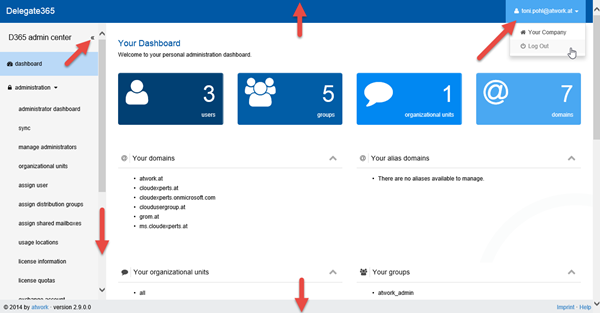
As described here we are pleased to announce the new design of our D365 portal in D365 version 2.9. We completely rebuilt the design and optimized the website performance to reduce load time. We now make use of the latest Bootstrap framework and optimized all Client-side Styles and Code to reduce load time as well as using the Javascript framework AngularJS and SignalR for receiving a great website performance. The whole website now uses these technics for a good user experience with immediate response times – the user sees what´s going on, f.e. when opening a distribution list manipulating members of a distribution list or when syncing data. ...

November 18, 2014 · 4 min · Toni Pohl
Delegate365 changelog version 2.9 announcementNew Design, New Sync and Shared Mailboxes support

Delegate365 changelog version 2.9 announcementNew Design, New Sync and Shared Mailboxes support

Delegate365 version 2.9 is a new milestone in the evolution process of our Office 365 Delegation Add-On product. Have a look at the great new features: New Design We completely rebuilt the design and optimized the website performance. We now make use of the latest Bootstrap framework and optimized all Client-side Styles and Code to reduce load time as well as using the Javascript framework AngularJS and SignalR for receiving a great website performance. The whole website now uses these technics for a good user experience with immediate response times – the user sees what´s going on, f.e. when opening a distribution list manipulating members of a distribution list or when syncing data. The page setup is renewed and the menu has been cleaned up somewhat. See the details here. ...

November 18, 2014 · 2 min · Toni Pohl
Delegate365 changelog version 2.9New Sync

Delegate365 changelog version 2.9New Sync

As described here we are pleased to announce the new synchronization function in D365 version 2.9. We completely rebuilt the sync process and added rules for automatic user assignment to specific OU´s. Why Sync? Since D365 needs to deal with (ten)thousands of users in an AAD D365 uses an cache layer to deliver a good user experience and performance. So changes which are made outside of D365 - like in the Office 365 portal, via PowerShell or another App – may not be visible immediately in D365. ...

November 18, 2014 · 8 min · Toni Pohl
Get the Visual Studio Community 2013 edition

Get the Visual Studio Community 2013 edition

Since yesterday the new edition “Visual Studio Community 2013” is available for download on the Visual Studio product website Visual Studio Community 2013 - A Full-Featured IDE – FREE. Visual Studio Community 2013 includes the full functionality of Visual Studio Professional 2013! This version is FREE – for non commercial use! Details: vs_community.exe is a small downloader. If you have installed VS Professional 2013 you have to uninstall it before. This version corresponds to Visual Studio Professional 2013 and includes Update 4. ...

November 14, 2014 · 2 min · Toni Pohl
Connectday one at a glance

Connectday one at a glance

Today Microsoft Connect(); Event Day 1 took place in New York. The Keynote and the sessions can be watched or downloaded at channel9.msdn.com/Events/Visual-Studio/Connect-event-2014/011. Microsoft had a lot of announcements for developers. See a short summary in screenshots here! ScottGu opened the event (in his classic red poloshirt and jeans). As of today Microsoft runs 19 datacenters worldwide (much more than Amazon and Google). Microsoft wants to push .NET and developers using .NET, Visual Studio and Azure. The numbers are impressive. ...

November 13, 2014 · 2 min · Toni Pohl
MVPSummit 2014 on Twitter

MVPSummit 2014 on Twitter

So we (@magrom and @atwork) had a really great week at MVP Summit 2014 on Microsoft Campus in Redmond. We learned a lot and had a lot of fun. Since the content of the summit was under NDA the participants tweeted a lot about stuff around the event. Here´s some statistics from Twitter with hashtag #mvpsummit. There were more than 8.000 tweets made by about 2.500 users. About half of all tweets have been retweets. ...

November 7, 2014 · 1 min · Toni Pohl