Delegate365 changelog version 2.5. There´s a new feature concerning distribution lists built in.
We got the request that it would be useful to integrate existing distribution lists into other distribution lists (DL) in D365, so that all members of a DL automatically receive emails if their DL is member of one or more other DL(´s).
So now in D365 v2.5 it is possible to put existing DL´s as member into another DL. This feature is handy and reduces potential synchronization steps and eases the organizational tasks for the admins.The steps to put one DL in another DL are as followed:
First create the DL´s like here: Berlin, Vienna and All.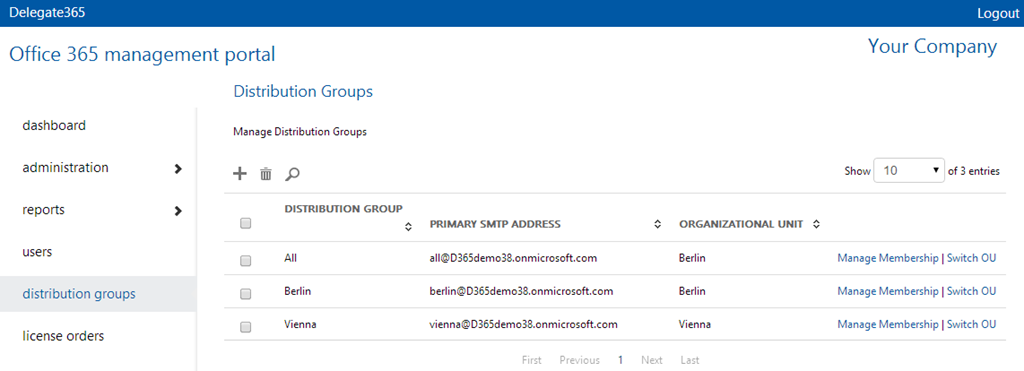
Now click “Manage Membership” – in our sample in the line of DL “All” and click the plus symbol for adding members in that group.
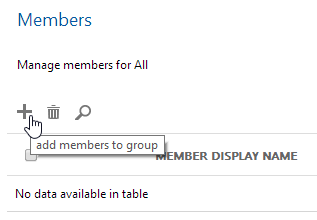
Other DL´s (in your assigned OU´s) are now visible in the member-picker – as well as the users.
Mark the users and DL´s (marked red - that´s new) you want to add and click OK.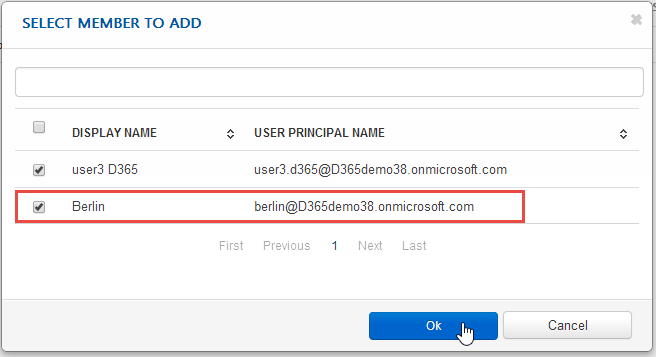
We recommend to test the distribution by sending a test email to the superordinate DL (in our sample to “all@….”) to see if all recipients in the subordinate DL (here: members of DL “berlin@…”) also receive the test email.


That´s it. Hope you like the new DL-feature!
D365 v2.5 will be rolled out for existing customers in the next days.
PS: Interested in managing users and licenses in Office 365? Have look at Delegate365.com!