Understanding what changes are happening in your Microsoft 365 environment is essential for governance, compliance, and troubleshooting. With the new Audit Log experience in Delegate365, administrators now can analyze their audit data stored in Azure Log Analytics using the power of Kusto Query Language (KQL).
Audit Log Retention and Storage
As described in our recent articles (see below) about the new Audit Logging and Event Grid integration, Delegate365 can now write audit events directly to Azure Log Analytics. This provides a scalable, searchable, and highly flexible auditing solution for all Delegate365 activities.
Delegate365 includes 90 days of audit log retention by default. If your organization requires a longer retention period, we offer one year of storage for the audit reports for an additional fee. Just let us know.
- Delegate365 Audit Logging Update
- Send Delegate365 Audit Log to Azure Event Grid
- Delegate365 v11 Update
Audit Data at Your Fingertips
The new Audit Log page in Delegate365 makes these logs accessible directly from the Delegate365 portal. Administrators can execute custom KQL queries, view the results in an interactive grid, and export data to Excel or CSV for further analysis.
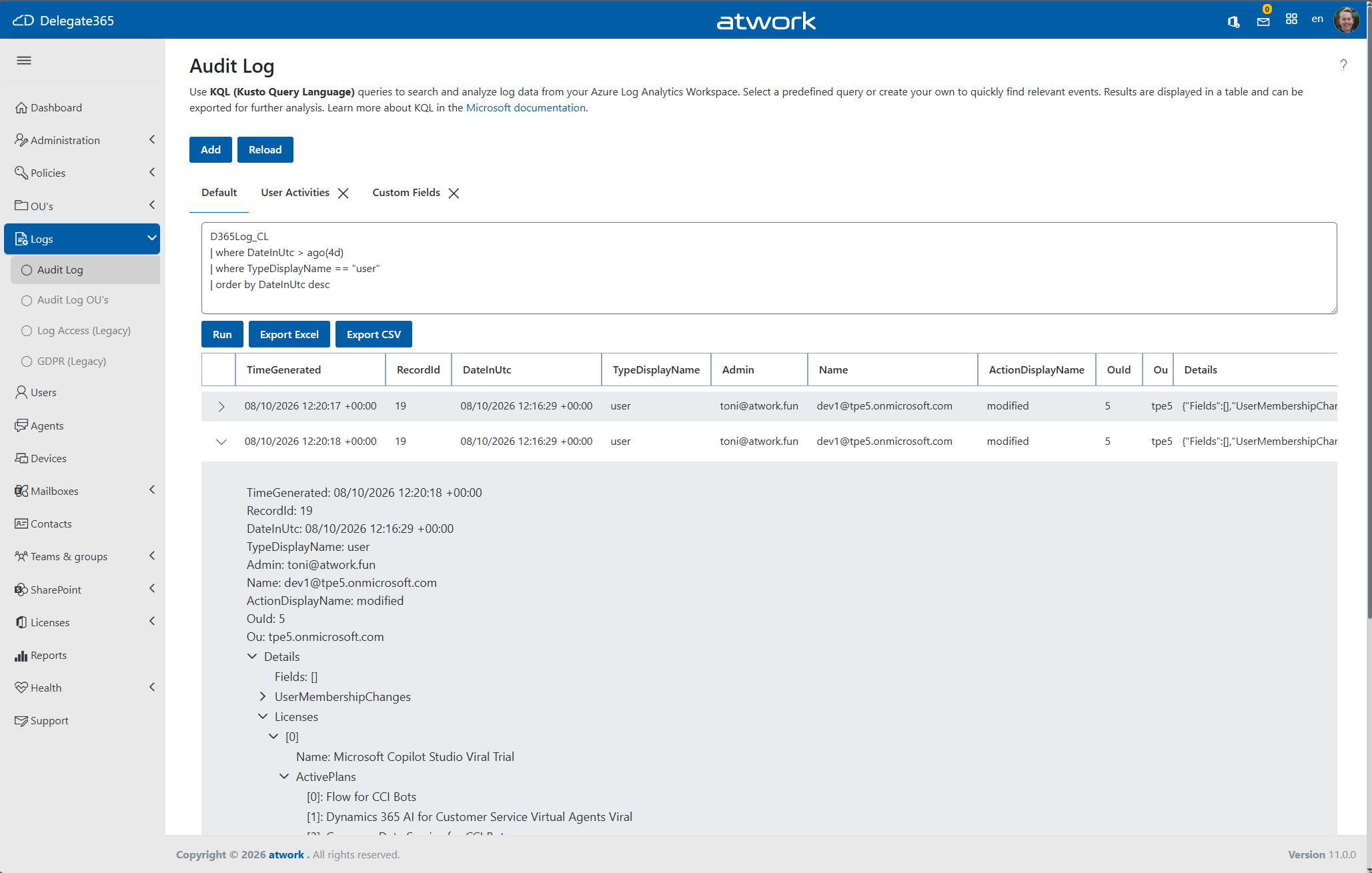
Whether you are looking for user management activities, license changes, guest account updates, or other administrative actions, you can quickly find the information you need using familiar KQL syntax.
You can resize table columns using drag and drop to customize the view.
The generated data can also be exported to CSV or Excel for further analysis.
Create Your Own Queries
You can run predefined KQL queries. Also, one of the most powerful features of the new Audit Log experience is the ability to create and save custom queries. Delegate365 Logging data is stored in table D365Log_CL.
Administrators can define KQL queries tailored to their organization’s requirements and save them directly in Delegate365. Saved queries appear as tabs for quick access, making recurring investigations just a single click away.
For example, a simple query showing user-related activities from the last day might look like this:
D365Log_CL
| where DateInUtc > ago(1d)
| where TypeDisplayName == "user"
| order by DateInUtc desc
This makes it easy to create reusable reports for frequently monitored activities.
Note: KQL (Kusto Query Language) in Azure Log Analytics is case-sensitive for table names, column names, and many operators (but it also provides case-insensitive comparison operators when needed).
For example, ensure to use the table name “D365Log_CL” instead of “D365log_cl”, and field names “Ou”, and not “OU”, “TimeGenerated”, and not “Timegenerated”, etc. Otherwise an error with Status: 400 (Bad Request) and a message “The request had some invalid properties” will occur. The query must be syntactically correct.
Share Queries Across Administrators
Saved queries can also be marked as Global Queries. Click Update to save a new query or modify an existing one. In the panel, enable the Global Query switch to make the query available globally within Delegate365.
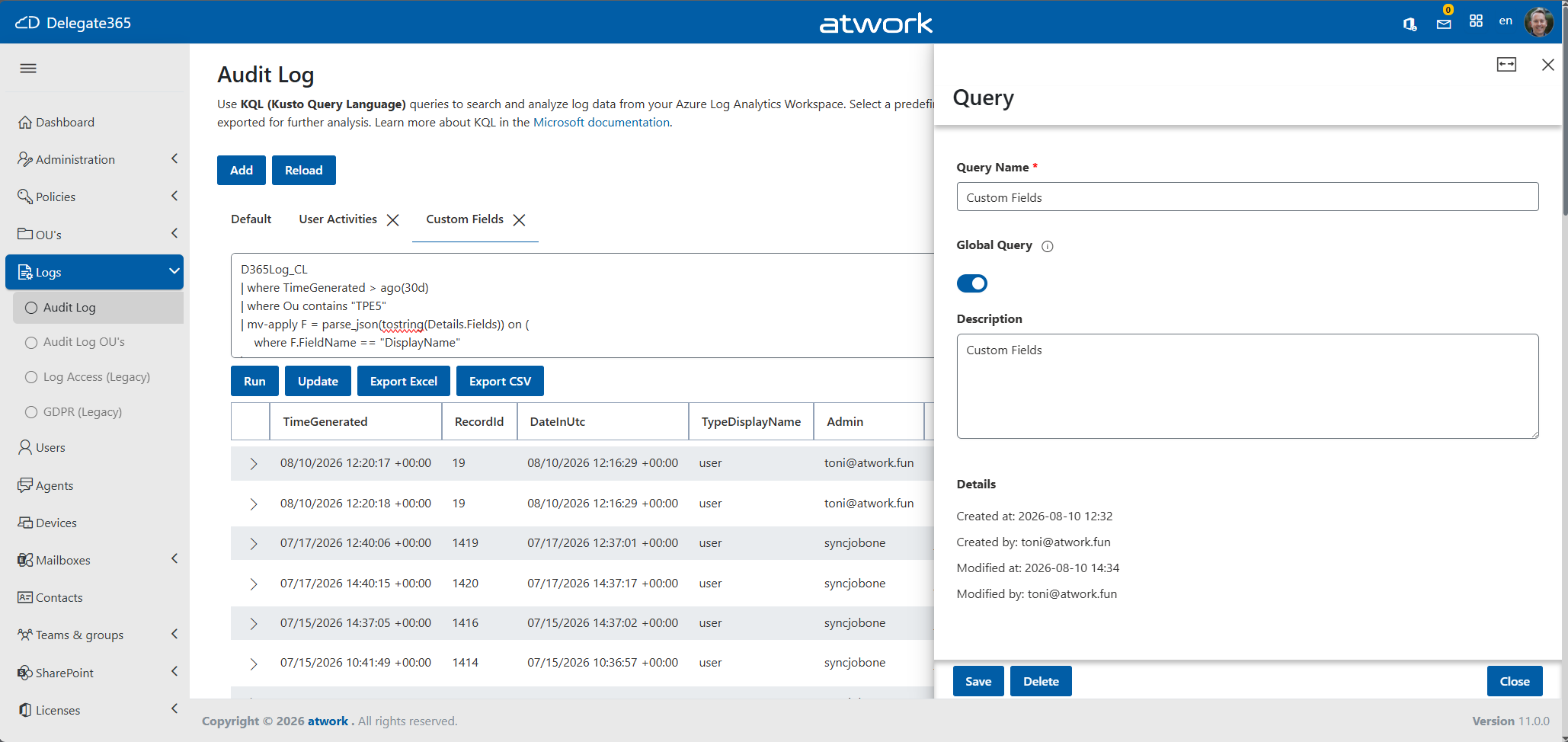
Global queries are available to other Delegate365 administrators within the organization, allowing teams to standardize reporting and troubleshooting processes. Instead of each administrator creating their own queries, organizations can maintain a shared library of commonly used reports. This enables a consistent auditing experience across the entire administration team.
Note: If an administrator deletes a global query, it is permanently removed for all administrators who have access to it.
Advanced Filtering with Dynamic Fields
Unlike traditional audit log viewers, Delegate365 provides direct access to the underlying data model. Administrators are not limited to predefined filters and can use advanced KQL functionality to analyze dynamic data structures.
For example, the following query searches activities in a specific organizational unit and extracts data from dynamic fields:
D365Log_CL
| where TimeGenerated > ago(30d)
| where Ou == "atwork"
| mv-apply F = parse_json(tostring(Details.Fields)) on (
    where F.FieldName == "DisplayName"
)
Note: mv-apply is used when a column contains an array of objects. It iterates through each element of that array and creates temporary rows for processing. In this case, it shows only record where the Details.Fields array contains at least one element whose FieldName is “DisplayName”.
Administrators can build sophisticated reports without any changes to Delegate365 itself.
Export and Analyze
As mentioned above, query results are displayed in a tabular view and can be exported directly to an Excel file and a CSV file. This allows further processing, reporting, or integration with existing governance and compliance processes.
Permissions
The Audit Log OUs module provides the same functionality but is intended for Scope Administrators. It automatically filters results based on the administrator’s assigned OUs.
In contrast, the Audit Log module is designed for Portal Administrators and does not apply any OU-based filters to the queries.
Access to both modules requires explicit permissions in the Permission Policies.
Summary
The new Audit Log experience in Delegate365 combines the flexibility of Azure Log Analytics with an easy-to-use interface directly in Delegate365. By supporting custom KQL queries, reusable query templates, shared global queries, and advanced dynamic field analysis, administrators gain complete control over how they search, analyze, and report on audit data.
Whether you need a quick overview of recent activities or a complex audit investigation across thousands of records, Delegate365 now provides the tools to get the answers you need.
Note: This feature is included in Delegate365 v11. If your organization is not yet using Delegate365 v11, please book an appointment to upgrade. Learn more at Delegate365 v11 Update.