Changing the owner of a Copilot Studio agent is an important part of agent lifecycle management. This can become necessary when responsibilities change, project ownership is transferred, or the original owner leaves a project. One option is to perform the reassignment programmatically by creating a flow with the Power Automate action Power Platform for Admins V2: Reassign the owner of the bot, based on the Bots - Reassign Copilot Agent Power Platform API.
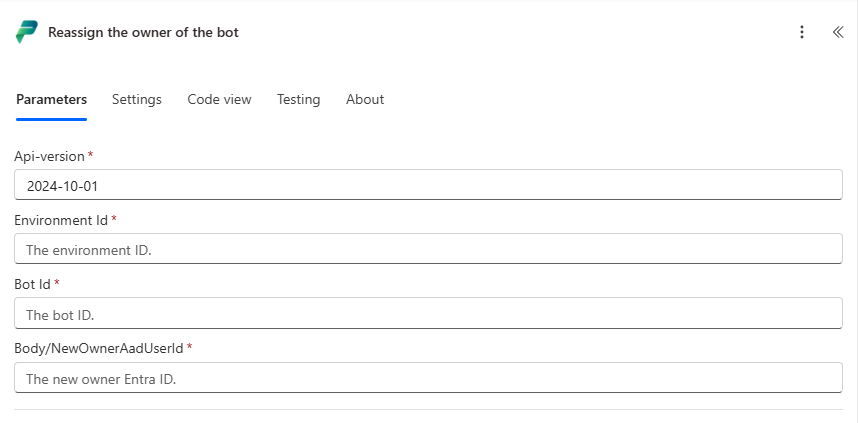
Setup
Before running the action, make sure the following requirements are met:
- The account used by the Power Automate connection must have the System Administrator role in the target environment.
- The future owner of the agent must temporarily have the System Customizer role in the target environment.
The second requirement can be easy to miss because the error messages returned by the action can be a bit confusing!
Finding the Required IDs
The action itself requires the following information:
- Environment ID
- Copilot ID
- Entra ID of the future owner
The Environment ID and Copilot ID can be found in the Power Platform admin center:
- Open the Power Platform admin center.
- Navigate to Manage.
- Open Copilot Studio.
- Locate the agent details.
Important: Use the Copilot Item ID, not the Microsoft Entra Agent ID.
Alternatively, both IDs can be extracted directly from the Copilot Studio URL:
https://copilotstudio.microsoft.com/environments/(ENVIRONMENTID)/copilots/(COPILOTID)/details
The Entra ID of the future owner can be obtained directly from Microsoft Entra ID (not the Dataverse System User ID).
Alternatively, it can be retrieved in Power Automate by using the Office 365 Users: Get user profile (V2) action. Search for the user via UPN and use the returned Id property as the owner identifier.
Troubleshooting
During testing, the reassignment failed when the future owner did not have the System Customizer role assigned in the target environment.
The flow failed & returned:
Flow run failed. Action 'Reassign_Owner' failed: The response is not in a JSON format.
Looking at the action details, we could only see:
{
  "body": {
    "error": {
      "code": 502,
      "source": "(source)",
      "clientRequestId": "(ID)",
      "message": "The response is not in a JSON format.",
      "innerError": "Failed to reassign agent, the owner wasn't changed."
    }
  }
}
Neither error actually indicates the underlying permission issue, making this one surprisingly tricky to troubleshoot. In our case it turned out that assigning the System Customizer role to the future owner resolved the issue and the ownership transfer completed successfully. Afterwards, we removed the role again.
Verification
After the flow has completed successfully, the ownership change is usually visible in Copilot Studio almost immediately.
The Power Platform admin center may take a little longer to reflect the change - updated owner information took between 5 and 15 minutes to actually become visible, while the new owner could already work with the agent in the environment itself.
Summary
The Power Platform for Admins V2 – Reassign the owner of the bot action provides a simple way to automate ownership transfers for Copilot Studio agents.
The most important prerequisites are that the necessary roles are correctly assigned (System Administrator and System Customizer, see Setup). If the role is missing, the flow may fail with a generic 502 error and the message The response is not in a JSON format.
Happy Power Automat-ing!