The Microsoft Graph UTCM (Unified Tenant Configuration Management) APIs allow administrators to save Microsoft 365 tenant settings, create baselines, and compare configurations over time. This helps identify configuration changes and maintain governance across the tenant. See more details at Use the Tenant Configuration Management APIs in Microsoft Graph.
To use UTCM, a Microsoft-managed service principal must be added to the tenant. Microsoft uses this application to access configuration data from your Microsoft 365 tenant.
Setup
See Set up authentication for Tenant Configuration Management APIs to learn how to authenticate to the Tenant Configuration Management (TCM) APIs and configure the TCM service principal for your organization.
Problem
The UTCM application is special because it is managed by Microsoft and cannot be removed from the tenant through the Azure portal like most other enterprise applications.
Workaround
Update: In an earlier version of this article, we explained how to revoke the permissions granted to the UTCM service principal. We have since identified a better approach: removing the UTCM service principal entirely using Microsoft Graph. As a result, we have replaced the previous instructions with this method. Special thanks to my colleague Andi for this valuable tip.
Remove with PowerShell
If the UTCM application is installed in your tenant and is no longer required, you can remove it. Follow the steps here:
- If you have not yet installed the Microsoft Graph PowerShell module, install it before proceeding. See here for more details.
- Sign in interactively using Connect-MgGraph
- Note that this operation requires this Graph permission: Application.ReadWrite.All
- Check if the SPN is existing using Get-MgServicePrincipal
- If yes, remove the SPN using Remove-MgServicePrincipal -ServicePrincipalId
First, check if the UTCM app is existing in your tenant:
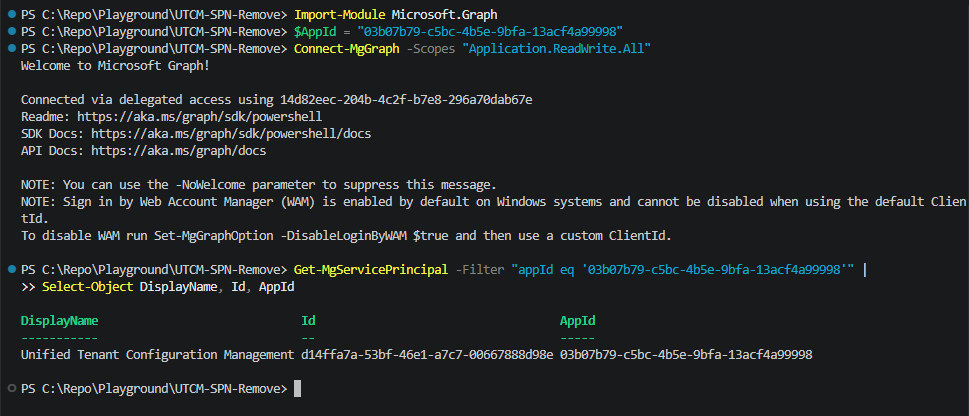
Here´s the full PowerShell script:
# Install once if needed:
# Install-Module Microsoft.Graph -Scope CurrentUser -Repository PSGallery -Force
Import-Module Microsoft.Graph

# UTCM AppId
$AppId = "03b07b79-c5bc-4b5e-9bfa-13acf4a99998"

# Sign in interactively
Connect-MgGraph -Scopes "Application.ReadWrite.All"

try {
    # Find the service principal by AppId
    $servicePrincipal = Get-MgServicePrincipal -Filter "appId eq '$AppId'"

    if ($servicePrincipal) {
        Write-Host "Found service principal '$($servicePrincipal.DisplayName)' ($($servicePrincipal.Id))."

        # Delete the service principal
        Remove-MgServicePrincipal -ServicePrincipalId $servicePrincipal.Id

        Write-Host "Service principal deleted."
    }
    else {
        Write-Host "Service principal not found."
    }
}
catch {
    Write-Error $_.Exception.Message
}
finally {
    Disconnect-MgGraph
}
Remove with code
If your want to remove the UTCM SPN with an application (e.g. in CSharp), here´s a sample code using Microsoft Graph .NET SDK (v5+):
var appId = "03b07b79-c5bc-4b5e-9bfa-13acf4a99998";

var result = await graphClient.ServicePrincipals.GetAsync(requestConfiguration =>
{
    requestConfiguration.QueryParameters.Filter =
        $"appId eq '{appId}'";
});

var sp = result?.Value?.FirstOrDefault();

if (sp != null)
{
    await graphClient.ServicePrincipals[sp.Id].DeleteAsync();
}
Summary
Administrators cannot remove the Microsoft-managed UTCM service principal through the UI. However, it can be removed using Microsoft Graph.
This allows administrators to revoke UTCM access and align with internal security and compliance requirements.