Office 365 Governance podcast with Martina Grom

In addition to all the great features in Office 365, governance plays an important role, especially for large organizations. Richard Campbell, runasradio.com, interviewed Martina Grom recently about governance and tools in Office 365. The interview is available as podcast here. In this podcast, Richard chats with Martina about the various aspects of Office 365 that affect the way users collaborate with each other and get work done. There are bunch of great tools inside and outside of Office 365 to enable Governance. Check out the latest Office 365 Governance podcast with Martina Grom at runasradio.com. ...

August 30, 2019 · 1 min · Toni Pohl

Project Kalenderausnahmen exportieren Export Calendar Exceptions

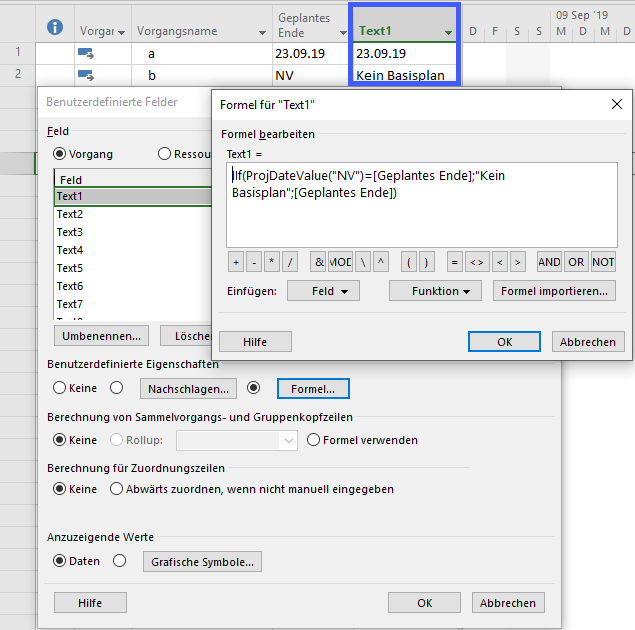
Deutsch Häufig wird in Foren die Frage gestellt, wie Ausnahmen (Abwesenheiten oder abweichende Arbeitszeiten) exportiert werden können. Hier ist ein Makro bereitgestellt, das alle Kalenderausnahemn in eine Datei exportiert. Dabei werden alle Ausnahmen aller Projektkalender und aller Ressourcenkalender während der Projektlaufzeit berücksichtigt. Mit dem Setzen einer Konstanten zu beginn, können Sie definieren, ob nur arbeitsfreie Tage oder alle Ausnahmen exportiert werden sollen. In Makros implementieren / Implement Macros wird beschrieben, wie ein Makro in Project übernommen werden kann. Mehr Beispielmakros sind unter VBA zu finden. ...

August 22, 2019 · 6 min · Barbara Henhapl
Speed up your website with PurgeCSS

Speed up your website with PurgeCSS

Modern websites and website templates use Cascading Style Sheets (CSS) intensively. To load websites faster, it makes sense to reduce these files to the essential content. You can do that with many tools. PurgeCSS is one of them. See the How To here. I wanted to optimize a small, static one-pager website. I used a HTML5 template with Bootstrap 4. Nothing very fancy, but simple and modern. All my tests ran against my localhost. ...

August 21, 2019 · 4 min · Toni Pohl
Instantly install your essential software with Chocolatey

Instantly install your essential software with Chocolatey

When installing a new computer, it takes some time to download and install the essential software. This is what Chocolatey is for. Chocolatey is a cost free package manager for Windows using NuGet infrastructure and PowerShell to quickly installing applications and tools that you need. I am using choco since a long time, now I wanted to show my current packaged software for my new computer. See the script here. About and Prerequisites Partly taken from About Chocolatey: Chocolatey CLI aka choco (or choco.exe) is a client that provides the core of Chocolatey and the installation store for locally installed packages. You need to have Windows 7+ or/ Windows Server 2003+ as Operating System and PowerShell v2+ (not PowerShell Core yet though) and the .NET Framework 4+ installed. Just to mention, the installation will attempt to install .NET 4.0 if you do not have it installed, see choco installation and Getting Started. Besides the client, there also exists a Chocolatey GUI and Chocolatey Agent (aka chocolatey-agent) for central administration. ...

August 2, 2019 · 3 min · Toni Pohl
Delegate365 changelog version 8.4-Teamify with policy support, Room Lists, Mailbox licenses management, Report download  and more

Delegate365 changelog version 8.4-Teamify with policy support, Room Lists, Mailbox licenses management, Report download and more

Delegate365 v8.4 brings a bunch of new features and improvements. Office 365 Groups management allows to teamify existing groups and to control all Teams settings including policy settings. The Sync Job can send warnings if many objects are deleted, Shared Mailboxes and Resource Mailboxes licenses can be removed, Reports can be directly downloaded, Room Lists are available, License Orders can be exported and much more. See a description of the new features here. ...

July 29, 2019 · 13 min · Toni Pohl
Working with Microsoft Group Forms and Flow

Working with Microsoft Group Forms and Flow

Microsoft Forms is very popular because it is a very easy way to create web forms quickly. You can create surveys, quizzes and simple forms, and easily see results as they come in. This quick tutorial shows how you can use Microsoft Forms, convert a from into a group form, how to access the result file and how to add additional tasks with Microsoft Flow or Azure Logic Apps. So, here we go. ...

July 13, 2019 · 5 min · Martina Grom
What is the difference in Azure AD between Enterprise applications and App registrations?

What is the difference in Azure AD between Enterprise applications and App registrations?

Azure Active Directory (Azure AD) acts as a central identity service and manages all apps in a tenant. When it comes to app management, Administrators often are confused why there are two (or currently three) application management modules existing in the Azure portal. Well, see the explanation here. An app can have many properties. The important part is, that Azure AD assigns an unique Application ID to an app and allows developers to add certain capabilities such as permissions, conditional access and more that is used by applications to access specific services. ...

July 10, 2019 · 4 min · Toni Pohl

Honored to be renewed as Microsoft MVPs

The Microsoft MVP Award Program honors IT Professionals and Developers who support the Microsoft community and share their knowledge. The program´s renewal cycle is every year on July 1st. So, today it was a busy day on Twitter and the #MVPBuzz hashtag. We at atwork are proud and pleased that our MVP’s have been renewed for their community contributions for 2019-2020! The MVP Award is Microsoft’s way of thanking outstanding community leaders based on their actions to share knowledge and technology in all possible ways, from speaking engagements to supporting others in communities. An MVP is awarded for contributions over the previous year for community work. See more abut the MVP program at mvp.microsoft.com and learn about the award categories here and view all current MVPs here. ...

July 1, 2019 · 2 min · Toni Pohl

Update a SPN in AAD with the Azure PowerShell Az module

Yesterday, I wrote how to Update your Azure CLI with Choco. Today, I needed to renew an existing Service Principal Name in an AAD. A SPN stands for Service Principal Name which is used for automation authentication. The PowerShell az module got some updates (v1.0.0). So, here´s the full step-by-step instruction for renewing a SPN with az ad sp credential. This updates the steps described at How to create or renew Service Principal Names in Azure Active Directory… ...

July 1, 2019 · 1 min · Toni Pohl
Update your Azure CLI with Choco

Update your Azure CLI with Choco

I use Azure CLI from time to time. So, it´s a good idea to update that module… For example, I use Azure CLI for renewing SPN´s a described at How to create or renew Service Principal Names in Azure Active Directory. When I checked the latest version with az --version , I saw my outdated version: “You have 52 updates available. Consider updating your CLI installation.” So, the best method is to use Chocolatey - The package manager for Windows in an elevated command prompt as described at Azure CLI. To make it short: Simply run ...

June 30, 2019 · 1 min · Toni Pohl