Get the Microsoft Graph g-raph stickers

Get the Microsoft Graph g-raph stickers

If you are a Microsoft 365 developer, you will be working with the Microsoft Graph to access data in the cloud. Of course, every product needs a mascot. So, the Microsoft Graph team created their own mascot: Welcome, Microsoft Graph g-raph (giraffe). Get the artwork for the Microsoft Graph g-raph here! For me, the g-raph is a very cute and perfect visualization of “connecting the dots” within the Microsoft 365 services with Microsoft Graph technology. ...

May 16, 2019 · 1 min · Toni Pohl

Project Zuordnungseinheiten neu berechnen - Recalculate Assignment Units

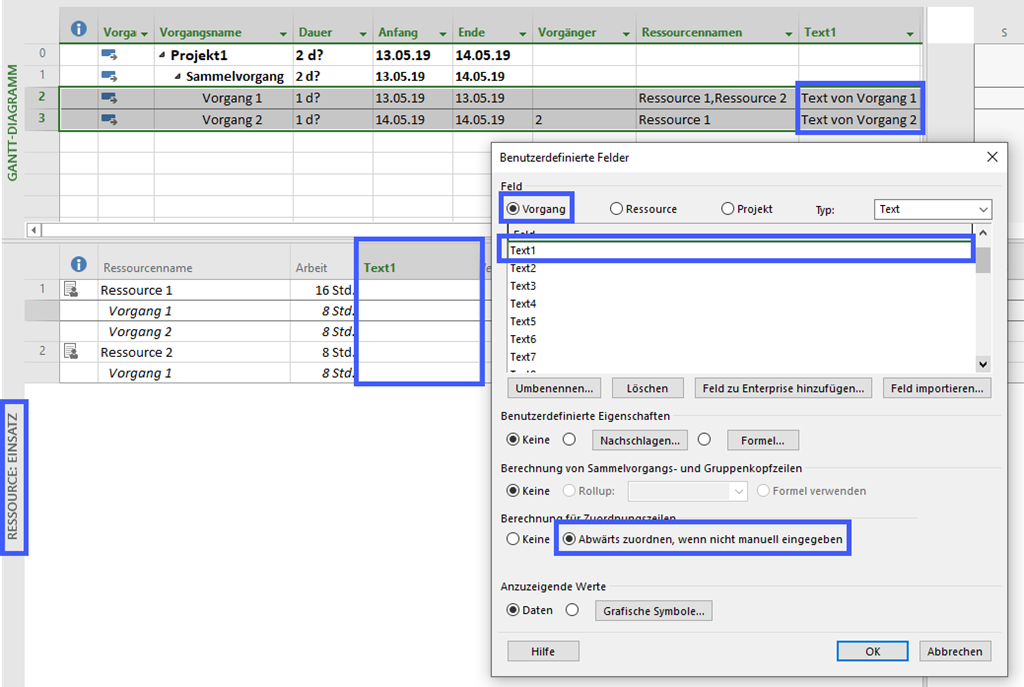
Deutsch Im Artikel Zuordnungseinheiten in Project ab Version 2010 ist beschrieben, weshalb die Anzeige der Zuordnungseinheiten bei der Änderung von Dauer oder Arbeit ab Project 2010 nicht aktualisiert wird. Rod Gill aus Australien hat dazu ein Makro zur Verfügung gestellt, mit dem die Neuberechnung der Zuordnungseinheiten erfolgen kann: Reset Assignment Units. In Europa verwenden wir jedoch andere Regionaleinstellungen, daher finden Sie hier eine modifizierte Version. In Makros implementieren / Implement Macros wird beschrieben, wie ein Makro in Project übernommen werden kann.Mehr Beispielmakros sind unter VBA zu finden. ...

May 15, 2019 · 4 min · Barbara Henhapl
Project Makros implementieren - Implement Macros

Project Makros implementieren - Implement Macros

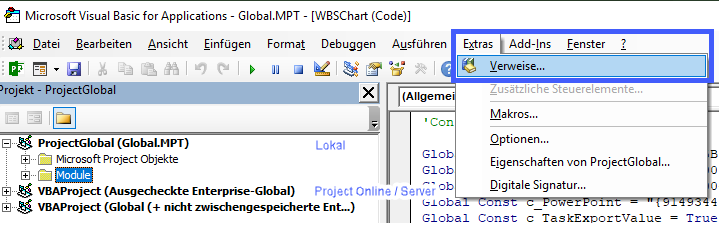
Deutsch In Foren wird häufig nach Automatisierungen gefragt, die mit Makros umgesetzt werden können. In diesem Artikel wird beschrieben, wie diese Makros in ein Projekt, auf den eigenen Rechner oder in Project Online / Project Server übernommen werden können. In künftigen Artikeln folgen dann Makros, die häufig im Einsatz sind. Verfügbare Makros sind unter VBA zu finden. Makro einfügen Um ein vorhandenes Makro in Project zu übernehmen, wird der Editor Microsoft Visual Basic for Applications benötigt. Starten Sie den Editor über Ansicht – Makros – Visual Basic oder drücken Sie die Taste F11. ...

May 12, 2019 · 5 min · Barbara Henhapl

MSBUILD 2019 News

This week, from May 6-8, Microsoft BUILD conference is happening near Microsoft´s home in Seattle, WA. With about 6000 people from around the world, BUILD is Microsoft´s largest yearly developer conference. This year, we learned tons of news, and the best part is, you get the content for free and you can find a complete guide of all news announced at Build here. Find the highlights and the news at news.microsoft.com/build2019: ...

May 7, 2019 · 1 min · Toni Pohl
Delegate365 changelog version 8.3-GroupSync,Bulk operations and more improvements

Delegate365 changelog version 8.3-GroupSync,Bulk operations and more improvements

The next version of Delegate365 v8.3 is here. This major version brings some new features as “Sync with security group”, bulk assignments, list export, improved OU management, and many further features and fixes. See the details here. Upgrading from Delegate365 version 8.2 does not require running a new setup. Upgrading from any other Delegate365 version, requires to (Re)run the setup. New Sync Rule “Sync with security group”: This new feature in Administration / Sync rules allows to remove users from an OU automatically based on their security group membership. See how this works in detail at Sync with Group. We hope this new sync feature helps improving your users organization based on security group memberships in Delegate365. ...

May 6, 2019 · 5 min · Toni Pohl

Project Online Project Server Project Detail Pages - Enhancements Part 8 Disable Project Owner Button on Project Detail Page

This is the eighth part of articles discussing Project Detail Page enhancements: Show/hide a field depending on the value of an internal field on the same page Show/hide a field depending on the value of an Enterprise Custom field on the same page Show/Hide a field based on the value of an internal field using REST Show/Hide a field based on the value of an Enterprise Custom Field without Lookup Table using REST Remove Time from Enterprise Custom Fields on Project Detail Pages Remove Prefix from Enterprise Custom Fields on Project Detail Pages Hide Impact Ratings on Project Detail Page “Strategic Impact” Disable “Project Owner” Button on Project Detail Page For a description for preparation of a Project Detail Page for JavaScript, see General Preparation ...

May 5, 2019 · 3 min · Barbara Henhapl

Groups Governance Toolkit-Working with group policies

At Microsoft Ignite conference last September, we demoed an approach for a self-built Office 365 Groups Governance Toolkit. Since Microsoft 365 is an evergreen service and continues to evolve, today we have more group settings available and we extend our provisioning function to work with group naming policies as well. See here how this can be accomplished by including new Graph requests. Foreword You can find the previous articles of our governance story at Provisioning an Office 365 group with an approval flow and Azure functions-part 1, part 2, part 3, part 4, part 5 and part 6 and the source code at martinagrom/Ignite2018GroupsGovernanceToolkit. ...

May 2, 2019 · 6 min · Martina Grom
Microsoft 365 Fragen und Antworten bei atworks kostenloser Security Sprechstunde

Microsoft 365 Fragen und Antworten bei atworks kostenloser Security Sprechstunde

Microsoft und atwork laden zur Remote Teilnahme an unserer Security Sprechstunde ein! Dies ist ein Event, welches mehrmals von Frühling bis Sommer 2019 von Microsoft Österreich und atwork kostenlos angeboten wird. Teilnehmer erfahren die neueste Informationen und Praxistipps rund um Microsoft 365 und können Fragen an die Experten stellen. Hier geht es zu den Terminen! Unter dem Motto “Don´t be afraid. Ask the expert!” informieren unsere Microsoft 365 Expertin Martina Grom (atwork CEO, Microsoft RD und MVP) und Klaus Harrer-Nemecek (Security Technical Specialist Microsoft) in je einer Stunde über unternehmensrelevante Themen. Hier findet ihr die Sprechstunden-Termine und den Anmeldungslink zur Teilnahme: ...

May 1, 2019 · 1 min · Toni Pohl
Delegate365 changelog version 8.3-Sync with Group

Delegate365 changelog version 8.3-Sync with Group

With Delegate365 v8.3 there comes a new feature in the Sync Rules: Sync with security group allows to automatically remove users from an OU. See how this works here. This is a feature request brought to us by Delegate365 customers: When a user is removed from a security group, he or she should also automatically be removed from the corresponding OU, if the User sync rules are set to “Security group”. So here´s a description of that feature with a sample (improved Delegate365 Admins can have a look at step1 and then continue with step 7)… ...

April 23, 2019 · 3 min · Toni Pohl
Switch your Office 365 pro plus from 32bit to 64bit

Switch your Office 365 pro plus from 32bit to 64bit

Microsoft started to recommend its 64bit edition of Office 365 pro plus to be installed as the default Office installation. While at first many people think this is a bad idea due to all add-ins I did the switch last weekend and it was a very smooth and friction free experience. Till April 2019 you had to manually uninstall the 32bit version of Office first and than install the 64bit version. If you are deploying Office 365 pro plus through the Office 365 Deployment toolkit you can now automate this experience and add a new switch to your config file. ...

April 21, 2019 · 2 min · Martina Grom