Important Update for Governance Toolkit 365 Users Configuration Changes Required for Power BI Integration

Important Update for Governance Toolkit 365 Users Configuration Changes Required for Power BI Integration

We are excited to announce an important update to our SaaS solution, Governance Toolkit 365 (GT365). To enhance security and streamline data access, we have replaced the Power BI data refresh authentication method with the Power BI built-in Admin API permissions. This change will take effect on February 21st. To ensure uninterrupted access to your Power BI data, it is crucial that you update your Microsoft 365 tenant configuration as described here. ...

February 10, 2025 · 3 min · Toni Pohl
Comparing Delegate365 Versions v9 vs. v10

Comparing Delegate365 Versions v9 vs. v10

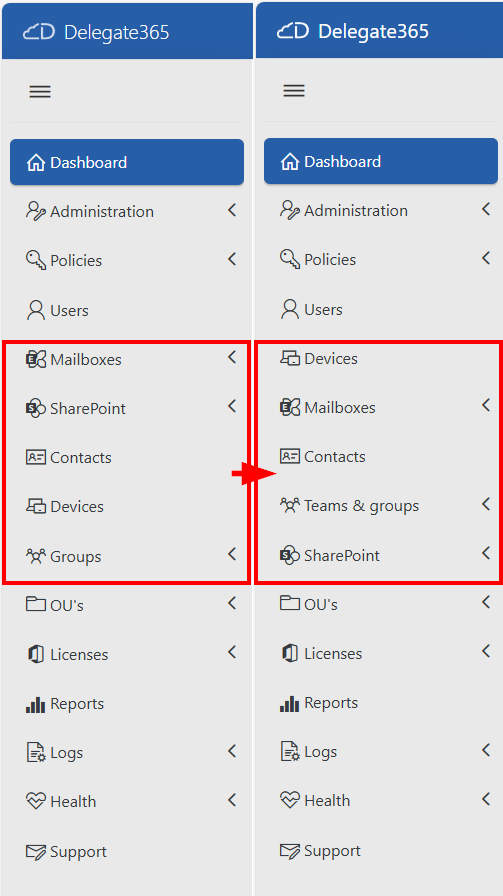
Delegate365 is a powerful web-based solution for managing Microsoft 365 tenants, offering a range of features designed to streamline user, group, license management, and more resource management. Both Delegate365 versions are identical in their core features, but v10 includes some improvements and will be continued. Upgrade soon! Key Features of Delegate365 Both versions of Delegate365 offer a robust set of features, including: User and License Management: Manage users, licenses, and groups within defined organizational units (OUs). Device Management: Assign and manage Devices based on their Tags Group Management: Manage all types of groups, including security, distribution, Microsoft 365, and dynamic groups. Delegation and Automation: Delegate administrative tasks and automate processes to improve efficiency. Auditing and Reporting: Comprehensive logging and reporting capabilities to ensure compliance and provide insights. Mailbox Management: Set mailbox delegations, convert to shared or resource mailboxes, and run message traces. SharePoint and Teams Management: Provision and manage SharePoint sites, Teams tabs, and channels. PowerShell Module: Available for entitled admins to perform operations via PowerShell, with all actions logged. ## Improvements in Delegate365 v10 Version 10 of Delegate365 introduces several enhancements that build on the existing features of v9: ...

February 1, 2025 · 3 min · Toni Pohl
Delegate365-January Updates Sync with AUs, Devices Management, Company defaults and more

Delegate365-January Updates Sync with AUs, Devices Management, Company defaults and more

The latest update to Delegate365 v10 includes numerous small but impactful changes designed to improve the user experience and functionality. With the addition of new fields and features, administrators can now manage their tasks more efficiently. These improvements reflect our commitment to continuous innovation and user satisfaction. See the changes here. New sync with Administrative Units (AU´s): The new AU synchronization enables the automatic assignment of users to a Delegate365 OU based on the membership of an AU. This works in the same way as synchronizing with security groups. Members of the AU are synchronized to the Delegate365 OU of the same name. If an assigned user is no longer a member of an AU, he or she will be removed from the OU. In module Administration / Sync rules / section User, the user sync can now be selected between Sync with Security Group, Sync with Administrative Units, or User Properties. ...

January 25, 2025 · 4 min · Toni Pohl
Using Microsoft 365 Security Audit Logs to Track Copilot Usage

Using Microsoft 365 Security Audit Logs to Track Copilot Usage

In our data-driven era, gaining insights into user interactions with tools like Microsoft 365 Copilot is essential for enhancing productivity. For administrators, it is vital to know which users are utilizing a Copilot license and the specific services they are engaging with. This information helps in managing licenses effectively, ensuring that resources are allocated efficiently. The Microsoft 365 Security Audit Logs offer a detailed view of user activities, including interactions with Copilot, even when the organization’s anonymization settings are enabled. Here’s how this works. ## Get Copilot Usage with Graph Reports ...

January 24, 2025 · 7 min · Martina Grom
Streamlining Automation Integrating Scripts with Logic Apps

Streamlining Automation Integrating Scripts with Logic Apps

Calling scripts from an Automation Account in a Logic App is particularly useful when the tasks to be performed are too complex to implement directly in a Logic App. It is also useful when scripts need to be reused multiple times without rewriting them in each Logic App. See how to enhance your Logic Apps with Automation Account Scripts. Such an integration allows for centralized management and updating of scripts to ensure consistency and maintainability. Finally, it is useful when advanced functions and modules available in PowerShell or Python are needed. ...

January 7, 2025 · 4 min · Martina Grom
Merry Christmas 2024 and Happy Holidays!

Merry Christmas 2024 and Happy Holidays!

Ho Ho Ho! Merry Christmas and Happy Holidays to all our fabulous friends, partners, and customers! As we wave goodbye to 2024, we want to shout out a massive Thank You for sticking with us through thick and thin. Your support and trust in our projects have been the wind beneath our wings. We’re thrilled to have you on this ride with us and can’t wait to see what projects we get up to together in the new year. ...

December 23, 2024 · 3 min · Toni Pohl
Exciting News GitHub Copilot Now Free for VS Code Users!

Exciting News GitHub Copilot Now Free for VS Code Users!

Great news for developers! GitHub Copilot, the AI-powered coding assistant, is now available for free in Visual Studio Code (VSCode). This new plan, announced on December 18, 2024, allows anyone with a GitHub account to access Copilot without any trial, subscription, or credit card requirements. ## What Does the GitHub Copilot Free Plan Include? With the free plan, users get: 2000 code completions per month: That’s about 80 completions per working day, which is quite substantial. 50 chat requests per month: This includes access to advanced models like GPT-4o and Claude 3.5 Sonnet. These features make it easier for developers to leverage AI in their coding workflows, enhancing productivity and efficiency. ## New Features and Capabilities ...

December 19, 2024 · 2 min · Toni Pohl
Delegate365-License Aggregation Report Update

Delegate365-License Aggregation Report Update

Delegate365 faced significant challenges in managing license data reports due to its daily storage practices. The root cause was the accumulation of an excessive amount of license data over the years, which exceeded the available resources. So we changed that and the License Aggregation Report in Delegate365 got an update. What Happened Recently, several users encountered a “Query Timeout - operations failed” error when generating a report in menu Licenses / License Aggregation. The system recorded license data for all Organizational Units (OUs) every day, resulting in the accumulation of hundreds to thousands of rows daily. Over time, this practice led to the creation of millions of rows in the database. Consequently, the Delegate365 client struggled to process this vast amount of data efficiently. ...

December 12, 2024 · 2 min · Toni Pohl
Impressions of Microsoft Ignite 2024

Impressions of Microsoft Ignite 2024

Microsoft Ignite 2024 has once again set the stage for innovations and new Microsoft Cloud features. This year’s event was packed with exciting announcements, particularly in the realms of Azure, AI, and Copilot. Here are some impressions from the event in Chicago. ## Book of News First things first: For a comprehensive look at all the exciting announcements and detailed insights from Microsoft Ignite, be sure to visit the Microsoft Ignite 2024 Book of News. This resource is packed with in-depth articles, videos, and updates on the latest innovations in Azure, AI, Copilot, and more. Explore the future of technology and how it can transform your business and daily life. ...

November 25, 2024 · 3 min · Toni Pohl
How to enable Copilot in Power BI

How to enable Copilot in Power BI

In today’s data-driven world, the ability to quickly analyze and visualize data is crucial for making informed decisions. Microsoft Power BI has long been a powerful tool for business intelligence, and with the introduction of Copilot, it has become even more versatile. See the following resources for activating Copilot for Power BI in your organization. Copilot leverages advanced AI capabilities to assist users in creating reports, analyzing data, and generating insights more efficiently. Enable Copilot in Power BI as described here, to ensure you can take full advantage of this innovative feature. ...

November 24, 2024 · 3 min · Toni Pohl