Microsoft Project Leistungssteuerung Ändern von Ressourcenzuordnungen
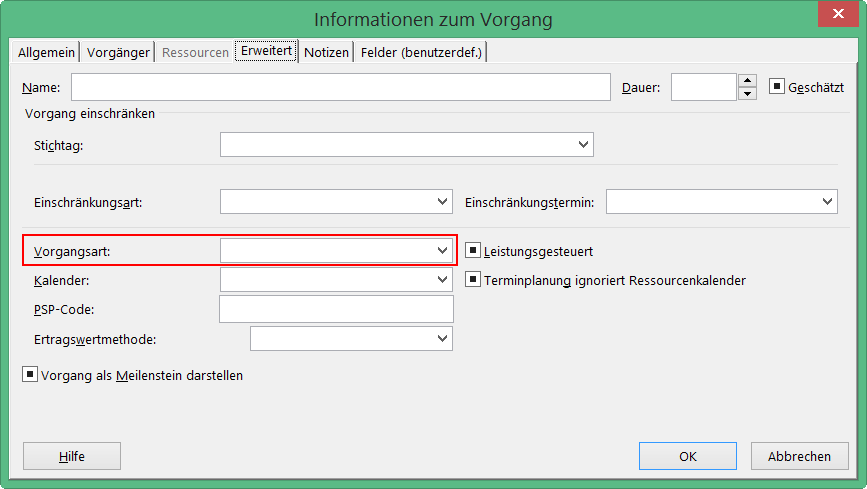
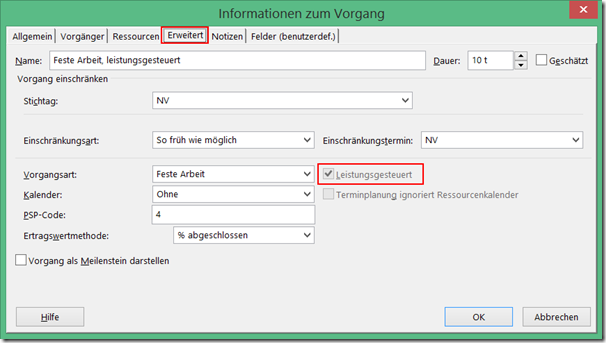
Neben den Vorgangsarten beeinflusst auch die Einstellung für Leistungsgesteuert das Verhalten von Project, wenn Sie die Anzahl der zugeordneten Ressourcen zu einem Vorgang ändern. Bei leistungsgesteuerten Vorgängen behält Project für die gesamte Arbeit für den Vorgang den aktuellen Wert bei, unabhängig davon, wie viele Ressourcen dem Vorgang zugeordnet sind. Leistungsgesteuert bedeutet, dass Project für den Vorgang den Wert für Arbeit nicht verändert. Der aktuelle Wert für Arbeit wird bei der der Änderung von zugeordneten Ressourcen zu einem Vorgang aufgeteilt. Wenn leistungsgesteuert deaktiviert ist, wird die vorhandene Arbeit nicht aufgeteilt, sondern die Arbeit gemäß der Zuordnungseinheiten der neu zugeordneten Ressource erhöht. In den aktuellen Versionen von Project ist diese Option im Standard deaktiviert. Sie finden die Einstellung zur Leistungssteuerung unter anderem im Dialogfenster Informationen zum Vorgang auf der Registerkarte Erweitert. Das Feld steht auch als Spalte zum Einfügen in Gantt-Ansichten zur Verfügung. ...