Delegate365 Pricing and Ordering

Delegate365 Pricing and Ordering

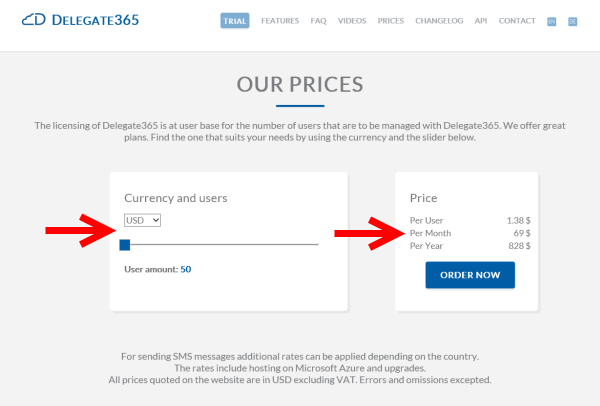
The licensing of Delegate365 is at user base for the number of users that are to be managed with Delegate365. So if f.e. there are 10,000 users in AAD and you want to manage 2,000 in D365, then a license for 2,000 users would be sufficient. Users are all active user in Office 365. This includes users, shared mailboxes and resources (rooms or equipment mailboxes). In order to make prices transparent also for larger packages up to 500,000 users we replaced the former static price information with an interactive price selector on the Delegate365 website. ...

July 6, 2015 · 2 min · Toni Pohl

Our Microsoft Virtual Academy courses are online

In May Martina, I and our MVP colleague Sigi Jagott have been to Redmond and recorded some courses about Office 365 for Microsoft Virtual Academy. The recordings took two days for Martina and two days for Sigi. I had the pleasure to join Martina for the first day and two recordings. It’s quite an experience to come into the Microsoft Studio in Redmond Town Center and get a briefing about how it works, what to do (and what not to do). The recording was done and cutted by Danny who did a great job introducing us into the world of doing the webcasts. Many thanks for your patience and your support! ...

July 3, 2015 · 3 min · Toni Pohl
Delegate365 changelog version 4.0.5-Synced infos and the latest Auto-Sync history

Delegate365 changelog version 4.0.5-Synced infos and the latest Auto-Sync history

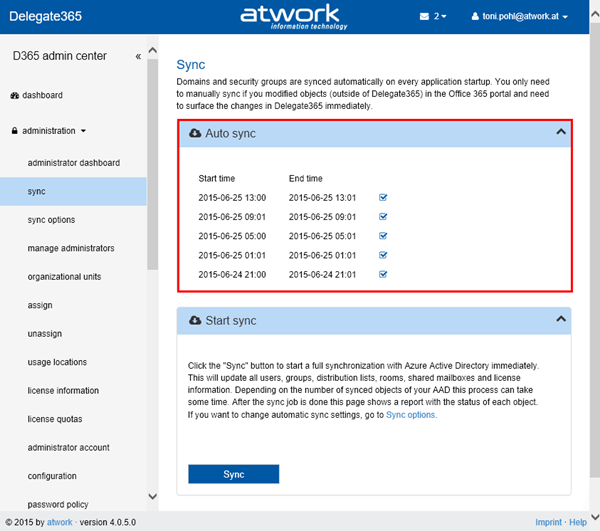
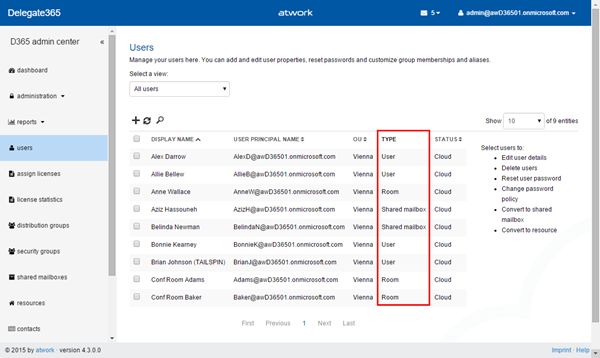
Delegate365 version 4.0.5 is out. The last automatic sync operations are now shown in the sync page and the lists show if objects are cloud or synced items. See the details here. Automatic Sync infos: For admins it’s essential to see when the last sync process was executed and if it the operations were successful. So we integrated a short history in the sync page showing the last 5 sync operations. Admins see when the automatic sync started and when it ended and if it finished successfully. As you can see the sync tries to use differential queries if possible to update only the changed objects quickly. As before Admins can run the manual Sync process anytime. ...

June 26, 2015 · 1 min · Toni Pohl
Delegate365 changelog version 4.0-New Member Picker and Fixes

Delegate365 changelog version 4.0-New Member Picker and Fixes

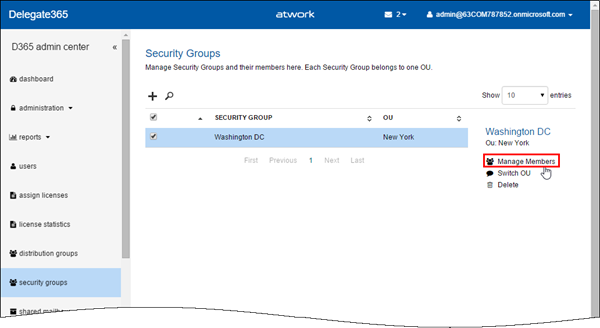
In Delegate365 version 4.0 we have made further improvements and some minor fixes. We introduced a new member picker with Auto-Suggest instead of the old dialog picker which now is accessible in the new Task Pane. The sync was updated to get the synced or cloud-information and some fixes for setting alias addresses and mailbox delegation. See the details here. New Member Picker: In all groups a new member picker came in. Members are managed by selecting the group and clicking “Manage Members” in the Task Pane like in this sample with a security group here. The usernames can be partly typed – one char is sufficient – and the Auto Suggest opens an shows all user names starting with that characters. The navigation can be done by mouse or with the cursor keys. Once the selection is made the admin still can remove items by clicking the “x” icon and the end of the users name or Apply the settings by clicking “Add”. The selected users are then added as members to that specific group. This concept was introduced in the administration / manage administrators page with version 3.9.5 (see here) and works now for all member pickers in D365: distribution groups, security groups, shared mailboxes and manage administrators (as before). ...

June 25, 2015 · 3 min · Toni Pohl
Delegate365 changelog version 3.9.5-Updates

Delegate365 changelog version 3.9.5-Updates

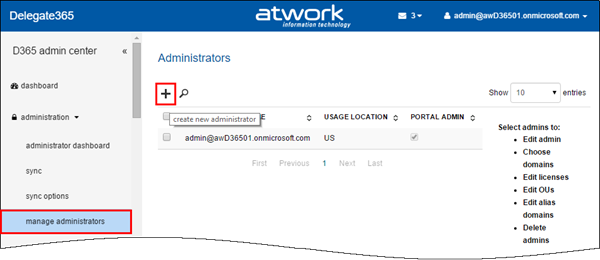
Delegate365 version 3.9.5 is out. We made some minor changes since the last version 3.9 (see here). See the changes here: Bulk create admins: When using D365 with many admins it can be some effort to create them. In former versions it was necessary to type (or copy) the UPNs of each admin in the create admin field. The creation of new admins works – as before – on the administration / manage administrators list. Now there follows a new form. Global Admins can type a username and an Auto-Complete function shows all corresponding starting with that name (starts with). Also there can be multiple admins picked and created in one step! To remove a selected admin, delete the user with Backspace key or by clicking the x-icon. The Auto-Complete works very quick even for many users (like in the screenshot above). Further improvements are that now all settings can be defined directly below in one step – for all selected admins like shown here. Below there are two more new sections: “Add admin to domain” and “Add admin to OU”. In here Global Admins can define which domains the admins can manage and in which D365 OU’s the admins will be members. This one-step-creation of admins simplifies the process of defining admins. The result can be checked anytime, like in this sample see the OU-assignment of user2. F.e. checking the OU… So best practise is to create multiple admins with common properties and assignments and then change specific permissions or assignments for special admins. ...

June 15, 2015 · 2 min · Toni Pohl
Delegate365 changelog version 3.9-Its all about sync, admin settings and branding

Delegate365 changelog version 3.9-Its all about sync, admin settings and branding

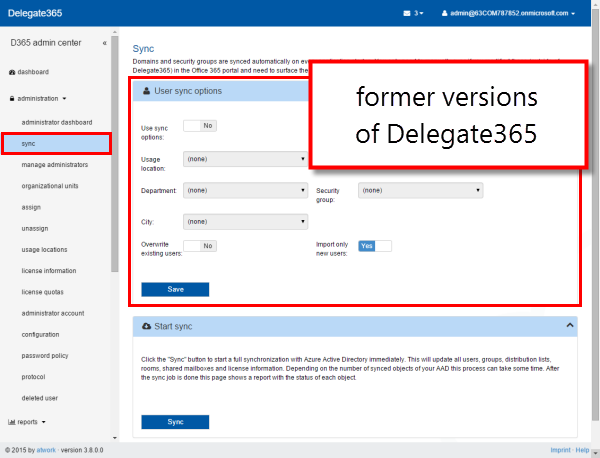
The next version of Delegate365 is here! In Delegate365 version 3.9 we have even more cool features and improvements. The sync processes now offers a bunch of innovations for automatic assignments to Delegate365 OU’s and was unified with the automatic sync function. Another switch was implemented to prohibit Admins access to the user’s mailbox settings as well as the new options for branding Delegate365 with your company logo and themes and some more features. See the details here: ...

June 11, 2015 · 6 min · Toni Pohl
Delegate365 product website improvements

Delegate365 product website improvements

We updated the product website Delegate365.com and implemented some improvements there to support interested parties to inform about Delegate365 and to open a trial. New Trial: We added added a new “Trial” button prominently to the menu to make it very easy to find the trial and to open a new evaluation version of Delegate365. The new form is also directly reachable with the URL https://delegate365.com/trial. In the trial form you just need to fill in your name, organization and company name. There’s also a field for optional additional comments – the same as before. After submitting the data with “Request Trial” we approve the request in the workflow and provision a new D365 tenant for you. This process may take up to one business day. ...

June 8, 2015 · 2 min · Toni Pohl
Recap of SPSParis

Recap of SPSParis

We had a great time at SharePoint Saturday Paris (www.spsevents.org/city/Paris/Paris2015)! Thanks a lot to the organizers Benoit, Gokan and Patrick! The event was well organized and we had a lot of fun being part of the french and the international SharePoint community at this event. #SPSParis took place in Tour Montparnasse, which was the tallest skyscraper in France until 2011. We had a fantastic view from the 40th level over Paris, wow! We enjoyed the great speaker dinner and the event itself and all activities around it. ...

May 31, 2015 · 2 min · Toni Pohl
Delegate365 changelog version 3.8-Password Policies and Reports

Delegate365 changelog version 3.8-Password Policies and Reports

We had a busy May! Delegate’s next version 3.8 brings some more new features. See the details here: User Password Policy: Now Administrators can set a the Password Policy for each user. If at least one user is selected, on the right side panel the new function “Password Policy” is shown, as in the screenshot below. The Task Pane loads the current settings of the selected user and enables the setting “Password never expires” for the Admin. When clicking “Save” the setting will update the password policy for this particular user. ...

May 27, 2015 · 3 min · Toni Pohl
Looking forward to SPSParis

Looking forward to SPSParis

Martina and I have been on Microsoft Ignite Conference in Chicago recently. There we met Patrick Guimonet, Microsoft MVP and Regional Director in France and spoke briefly about Build and Ignite Conference and about our session at SharePoint Saturday Paris (#SPSParis). SPSParis happens this Saturday, on 30th of May, at Montparnasse Tower and will host a lot of interesting sessions about the newest trends and technologies around SharePoint and Office 365. See the details here: https://www.spsevents.org/city/paris/paris2015 ...

May 26, 2015 · 1 min · Toni Pohl