Delegate365 changelog 9.2.3-Add users to groups

Delegate365 changelog 9.2.3-Add users to groups

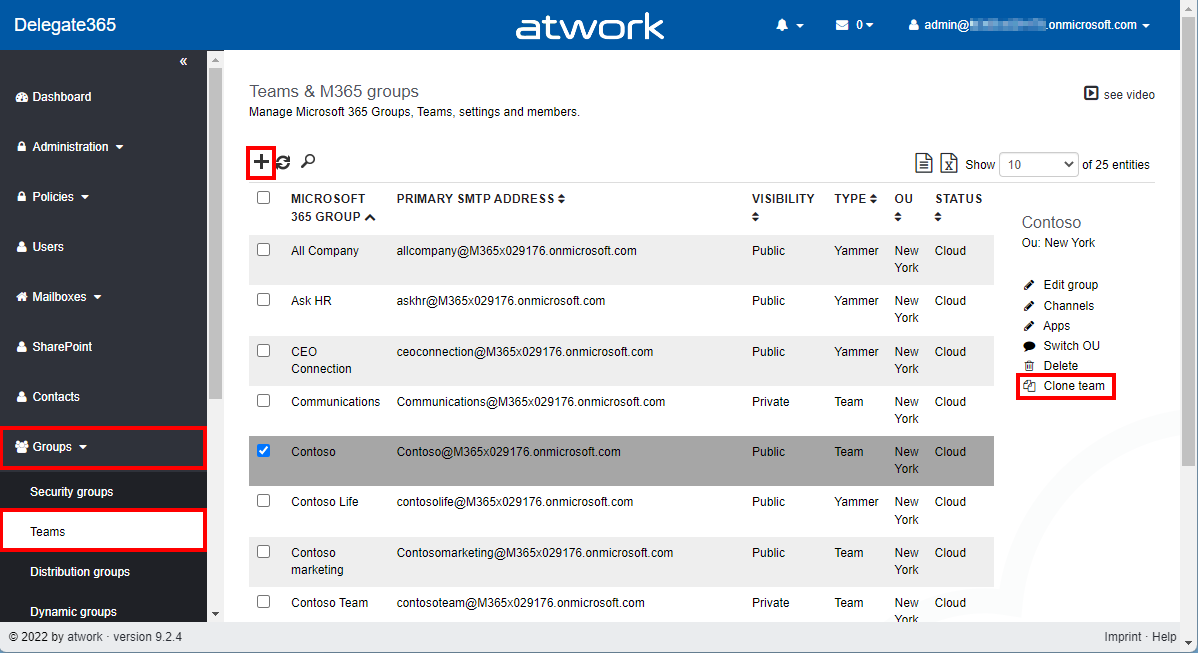
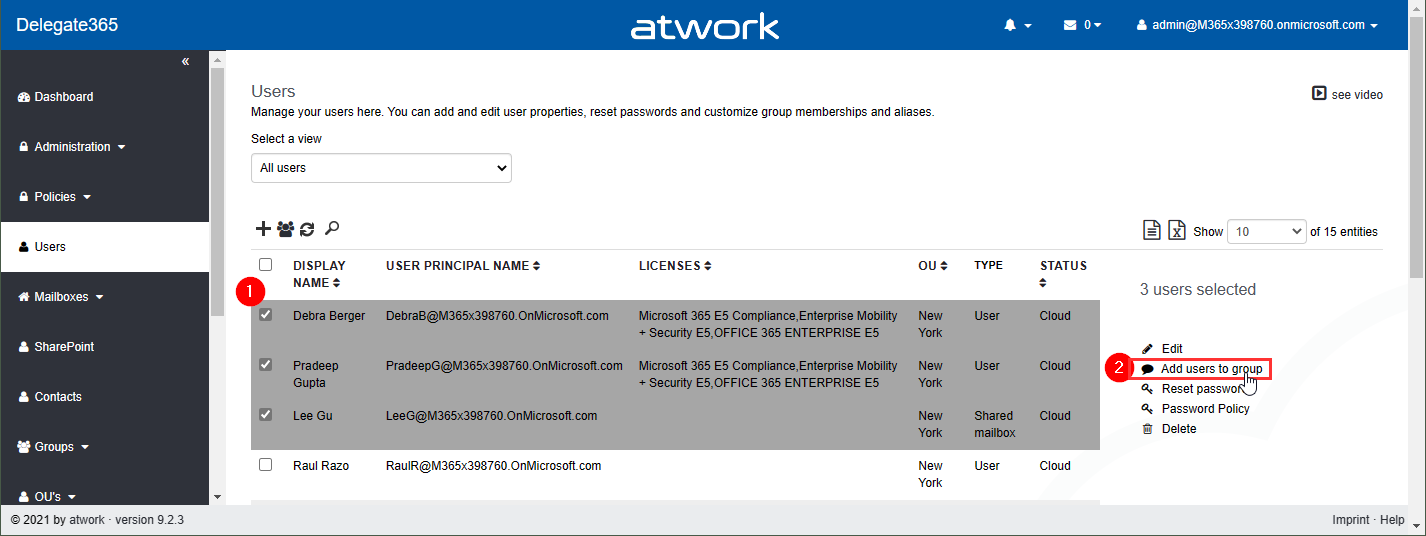
Delegate365 v9.2.3 brings a fix for the Message Trace function and offers a mechanism to add multiple users to one or more groups directly from the user list. See it here. Bulk add users to groups: In the users list, select more than one user. The menu on the right then shows the new option “Add users to group”. In this sample, 3 users are selected: Debra, Pradeep and Lee. The panel “Add users to group” opens and allows to select multiple groups of all types: Security groups, Distribution Groups, and Microsoft 365 Groups. The admin can search for the groups and add them to the Groups picker. By clicking on the Save button, a confirmation popup appears. When clicking Ok, the selected users will be added as members to these groups. A quick toast message shows the result in the bottom right corner. If the user already was a member of a group, this is ignored. ...

July 26, 2021 · 2 min · Toni Pohl
Message Trace in Delegate365

Message Trace in Delegate365

When you run a message trace operation to get status information about specific emails, the result can vary, depending on time zone settings. See a sample here. Show messages in the mail client In this sample, we work with an email sent from azure-noreply@microsoft.com. In Outlook we see the timestamp at Mon 7/5/2021 7:08 PM (2021-07-05 19:08). Message Trace in Delegate365 In Delegate365, admins can run a message trace to get information about the delivery status. When we run the message trace with the filter Startdate 2021-07-05 to Enddate 2021-07-05 - just this one day - and that user as recipient… ...

July 9, 2021 · 4 min · Toni Pohl
Delegate365 changelog 9.2.2-Manage group owners

Delegate365 changelog 9.2.2-Manage group owners

Delegate365 v9.2.2 allows to manage group owners. The permission policies have been extended and the current admin can add him- or herself or additional group owners for Security Groups and Microsoft 365 Groups. See a description of the latest features here. Enable (or disable) the manage owner feature: To enable the “manage owner” feature, you have to set the corresponding permission policies in the Groups - Security Groups - Manage owner from No to Yes, as here. Then, click on the Save button at the page end of the permission panel. By default, this new setting is disabled. So, don´t forget to switch it on, if your admins shall be able to set the group owner for security groups (in the same way as for Microsoft 365 Groups). Once the setting is set, it will be effective for all admins that have that permission policy assigned. To learn more about setting permission policies, see here. ...

June 16, 2021 · 4 min · Toni Pohl
Delegate365 changelog 9.2-PowerShell module update

Delegate365 changelog 9.2-PowerShell module update

The Delegate365 PowerShell module got a small update to expand a user´s assigned licenses, license plans and proxy addresses. See the following description. See the description at https://github.com/delegate365/PowerShell how to use the Delegate365 PowerShell module- Check the Delegate365 PowerShell module version First, ensure you have the latest version of the Delegate365 PowerShell module installed. Check with Get-Module as here. The version must be 1.0.0.10 (or in future a higher version). ...

June 11, 2021 · 2 min · Toni Pohl
We celebrate Pride Month and diversity in our remote workplace!

We celebrate Pride Month and diversity in our remote workplace!

A lot has changed in our (remote) workplaces and especially in the past year. But the importance of inclusion and diversity hasn’t gone anywhere. And neither has the joy and power of recognizing the total value of everyone on your team. At atwork, diversity and inclusion are in our daily life. Everyone should be treated equally and with respect. These are the foundations of our modern society. We want to show our sympathy by adapting our atwork logo on the website, on our blog and on our LinkedIn page to the rainbow colors. We support Pride and the LGBTIQ community with the motto “Join us. March with us. Together & Proud.” It’s important to celebrate Pride in the (remote) workplace because we need to acknowledge and recognize the accomplishments of the gay rights movement and our LGBTQ advocates. ...

June 10, 2021 · 1 min · Mercedes Orasch
Work with the Delegate365 PowerShell in the Azure Cloud Shell

Work with the Delegate365 PowerShell in the Azure Cloud Shell

Delegate365 provides a PowerShell module to access data in Delegate365 in scripts. You can import the Delegate365 module locally, or use it in the Azure Cloud Shell as well. See here, how to use the module in Azure Cloud Shell. Here, you can find a description of the Delegate365 PowerShell module. It is hosted in the PowerShell Gallery and can be easily installed. So, here´s a step-by-step guide how to use the Delegate365 PS module. ...

May 21, 2021 · 2 min · Martina Grom
Join us at globalazure.at 2021

Join us at globalazure.at 2021

We look forward to participating in the Global Azure Austria event again! The event is part of the event series Global Azure 2021. As in the past years, the Austrian edition of Global Azure 2021 is provided by the Coding Club Linz. Like last year, Global Azure 2021 will be a virtual event again and deliver over 30 sessions to your home on April 16th. Join us! Global Azure is organized by the Azure community for the community. The annual series of events offers meetings and exchanges over 3 days. The Azure communities around the world are organizing localized live streams for everyone around the world to join and learn about Azure from the best-in-class community leaders. ...

April 15, 2021 · 2 min · Toni Pohl
Delegate365 changelog 9.2-More improvements

Delegate365 changelog 9.2-More improvements

Delegate365 v9.2 will be extended with some new features this March. See the latest features here. See the latest features of Delegate365 v9.2 such as extended reports retention dates, new message tracing options, a new license order process, some fixes and more at Delegate365 changelog 9.2-improvements Schema Extensions: Another new feature is described at Introducing user schema extensions in Delegate365. This allows to add custom user data to Azure AD. The custom data can be used with PowerShell for own business processes. See more at how to use Azure AD schema extensions in Graph PowerShell. ...

March 8, 2021 · 2 min · Toni Pohl
Working with Azure AD schema extensions in Graph PowerShell

Working with Azure AD schema extensions in Graph PowerShell

Schema extensions enable to store extended custom data directly to objects in Azure AD. This article describes how to access data we defined and added in Introducing user schema extensions in Delegate365 with the Microsoft Graph PowerShell module. Prerequisites To work with Microsoft Graph and PowerShell, we need to install the Microsoft.Graph module as described at Install the Microsoft Graph PowerShell SDK. You can install the module in PowerShell Core or Windows PowerShell using the following command. ...

March 4, 2021 · 7 min · Toni Pohl
Introducing user schema extensions in Delegate365

Introducing user schema extensions in Delegate365

The current version of Delegate365 adds a new feature: Schema extensions for users. Schema extensions allow to add custom data to Azure AD objects. In Delegate365, administrators can use the Delegate365 schema extension feature to add custom properties to a user. Find out, how you can use the user schema extension in Delegate365 here. Possible areas of application are e.g. predefined job titles, cost center, employee type, other emails or managers, or other user specific data where there is no property in Azure AD existing. The Delegate365 user schema extension can be declared and used in Delegate365 and in the Azure AD. There can be multiple properties defined, as a text field, or with predefined values as a selection field. ...

February 25, 2021 · 5 min · Toni Pohl