Delegate365 changelog version 3.0 - Notification Center

Delegate365 changelog version 3.0 - Notification Center

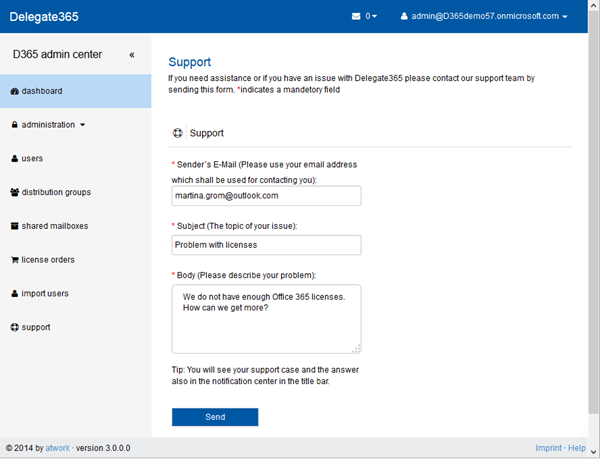
Delegate365 version 3.0 includes a new feature called “notification center”. The notification center is reachable in the upper right corner of the blue title bar. There´s an envelope icon and the number of unread messages next to the logged in user as marked red in the following screenshot. Reach the notification center anytime Since version 2.9 the header and footer bars are always visible, so the notification center is visible any time. If there are no messages present, the envelope icon is also visible but shows the number 0. You can see all (read) messages with the menu “Read All Messages” in the pull down menu. ...

December 14, 2014 · 3 min · Toni Pohl
Yammer mit Exchange Verteilerlisten vergleichen

Yammer mit Exchange Verteilerlisten vergleichen

Vor kurzem habe ich an einer Umfrage teilgenommen, an der eine Gruppe entschieden hat, ob die derzeit bestehende Verteilerliste gegen eine Yammer Gruppe getauscht wird. In den Umfrageergebnissen gab es viel für und wider. Viele der Teilnehmer haben in den Kommentaren genau ausgeführt, warum sie die Exchange Verteilerliste behalten wollen oder warum sie Yammer einsetzen wollen. Dabei gab es viele interessante Argumente und Ansichten, von denen ich die wichtigsten in diesem Blogartikel erwähne und wie man diese in Yammer umsetzen kann. ...

December 13, 2014 · 5 min · Martina Grom
Comparing Yammer to Exchange Distribution lists

Comparing Yammer to Exchange Distribution lists

Recently I was part in a poll about retiring an Exchange Distribution list (DL) and move content to a Yammer group. Not surprisingly there are a lot of pro’s and con’s for and against it. From the comments why to stay in an Exchange DL or move forward to Yammer there were some interesting arguments and viewpoints. Today I will go through some of them and explain how you can handle that in either technology. ...

December 7, 2014 · 5 min · Martina Grom
How to use external users in SharePoint Online with a cost-free Azure Active Directory

How to use external users in SharePoint Online with a cost-free Azure Active Directory

We are using SharePoint Online (SPO) in many scenarios: for our own Intranet and we often create SPO Sites in our Office 365 tenant to collaborate with partners and for projects. Many projects last only for some months and after the work is finished the SPO site will be deleted. Since we don´t want to create not-our-company-users in our own Active Directory (AD) or in our synced Azure Active Directory (AAD) and assign an Office 365 license from our tenant it´s convenient to use users from another AAD and share the SPO site with them. ...

December 6, 2014 · 8 min · Toni Pohl
Cloud Adventkalender 2014 mit Gewinnspiel

Cloud Adventkalender 2014 mit Gewinnspiel

Heute startet wieder der Cloud Adventkalender! Aus dem Engagement von Microsoft MVP´s entstand letztes Jahr diese Idee, interessante Artikel über Cloud Technologien in einen ansprechenden Adventkalender zu verpacken. Hinter 24 Fenstern versteckt sich täglich ein Blog Artikel der deutschen Cloud Computing-Community, sowie weiterführende Links zum entsprechenden Thema. Zusätzlich zu den interessanten Cloud-Artikeln gibt es jeweils eine Frage mit einem Gewinnspiel! Als Preise gibt es drei handsignierte Exemplare des Buches Cloud Architecture Patterns von Bill Wilder und verschiedene Softwarelizenzen. ...

December 1, 2014 · 1 min · Toni Pohl
Erste Schritte mit Docker-Teil 3

Erste Schritte mit Docker-Teil 3

Nach der Ankündigung von Microsoft Docker in der nächsten Version von Windows Server und (natürlich) in Microsoft Azure zu unterstützen macht es als Developer Sinn, sich mit dieser Art von Applikationsbereitstellung zu befassen. Was ist Docker – und wie funktionierts? In Teil 1 dieser Artikelserie haben wir uns angesehen, was Docker ist und wie das Konzept der Applikationsplattform funktioniert. Teil 2 informiert darüber, wie sich Docker anfühlt und wie man das System grundsätzlich per Commandline verwenden kann und zeigt die wichtigsten Commands wie docker pull, docker run usw. ...

December 1, 2014 · 4 min · Toni Pohl
Erste Schritte mit Docker-Teil 2

Erste Schritte mit Docker-Teil 2

Docker ist eine Applikationsplattform, die (bald) auch unter Windows verwendet werden kann. Wie in Teil 1 beschrieben besteht Docker aus mehreren Komponenten. Um die Anwendung von Docker zu erlernen und die Funktionen anzusehen, ist es am einfachsten, das Online-Tutorial durchzugehen. Wie Docker funktioniert seht ihr nun hier in Teil 2. Try it Auf https://docker.com/tryit/ kann die Basisfunktionalität von Docker gleich ausprobiert werden. Das Tutorial dauert etwa 10 Minuten und zeigt, wie man ein Image aus der Docker Hub Registry lädt (download) und startet. Danach wird ein zusätzliches Utility in den Container installiert, getestet und die Änderungen in ein neues Image in die Docker Hub Registry gespeichert, damit andere Benutzer dieses verwenden können. ...

November 30, 2014 · 4 min · Toni Pohl
Erste Schritte mit Docker-Teil 1

Erste Schritte mit Docker-Teil 1

Im Oktober (u.a. rund um TechEd Europe) wurde eine Partnerschaft zwischen Microsoft und Docker bekanntgegeben. Microsoft wird Unterstützung von Docker in Azure und Windows Server einbauen, so präsentierte es Mark Russinovich bei der TEE14 Keynote und Jason Zander im Azure-Blog in New Windows Server containers and Azure support for Docker. Was ist eigentlich Docker? Docker ist eine Open Plattform um Applikationen in eigenen Prozessen geschützt laufen zu lassen und zu verwalten. Eine Applikation läuft in einem “lightweight container” auf einer Virtualisierungs-Plattform, ähnlich wie in einer virtuellen Maschine (VM), nur ist alles viel “schlanker”. Und wesentlich schneller. ...

November 28, 2014 · 5 min · Toni Pohl
Delegate365 changelog version 2.9Setup Wizard

Delegate365 changelog version 2.9Setup Wizard

In Delegate365 version 2.9 the setup wizard for the primary configuration was slightly changed. The setup process must be run to configure D365 with any (existing) Office 365 tenant. The only things you need are the configuration password (provided by atwork) and the login and password of a global administrator of your Office 365 tenant, see also here. Do I need to run the setup? If you already received a Trial of Delegate365 with a new, preconfigured Office 365 tenant these steps are not necessary. This setup process is for organizations who want to use their own Office 365 (demo) tenant or for renewal of the D365 Service Account. If you got an email by atwork with the setup URL and a configuration password (code) you are able to complete the described steps here. ...

November 20, 2014 · 3 min · Toni Pohl
Delegate365 changelog version 2.9Shared Mailboxes support

Delegate365 changelog version 2.9Shared Mailboxes support

As described here we are pleased to announce the new Shared Mailboxes support in D365 version 2.9. Shared Mailboxes are an Exchange feature where many users can access a common mailbox, f.e. for departments or customer contact etc. Admins who are entitled to use this function now easily can manage Shared Mailboxes in D365. Besides, Shared Mailboxes do not need an Office 365 license since it´s a common mailbox for multiple (licensed) users. ...

November 19, 2014 · 4 min · Toni Pohl