I Am MECSession about Remote Control Office 365 with Microsoft Azure

I Am MECSession about Remote Control Office 365 with Microsoft Azure

This week, from March 31th to April 2nd, the Microsoft Exchange Conference 2014 takes place in Austin, Texas. Austin is a great city and it´s fun to be here an to be part of the conference! We from atwork are here with two sessions: How to (remote) control Office 365 with Azure with Martina Grom and Toni Pohl (Developer session) Experts Unplugged: Exchange Online Migrations with Ayla Kol, Jono Luk, Martina Grom, Ram Poornalingam, Ronil Dhruva and Lucas Costa (Discussion Session) ...

April 1, 2014 · 1 min · Toni Pohl
Office 365Neuerungen bei SharePoint Online

Office 365Neuerungen bei SharePoint Online

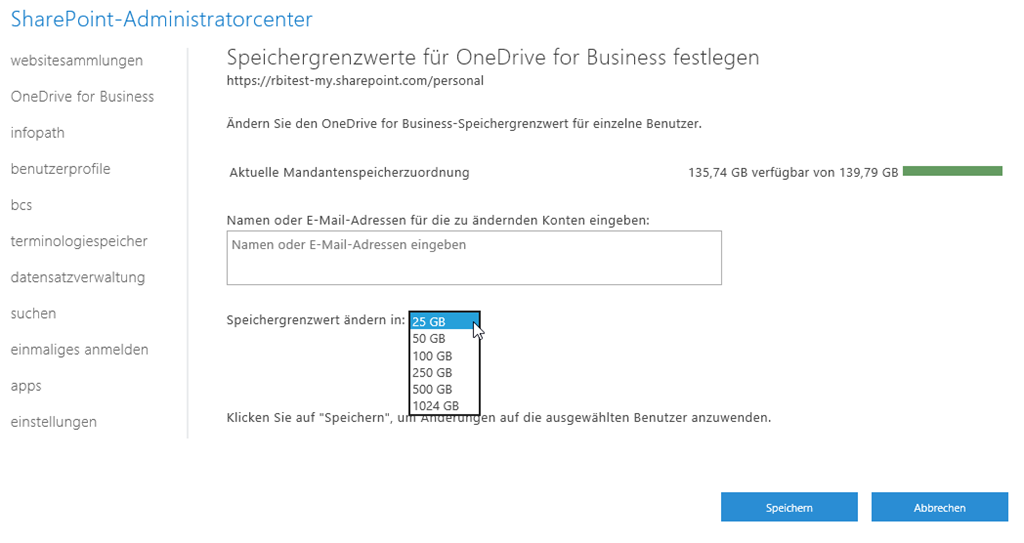
Office 365 wächst und wächst und wächst. Wir sehen täglich, wie die Services erweitert werden und Limitierungen erweitert und gelöst werden. Seit April 2013 sind sowohl die Zugriffe als auch die gespeicherten Daten um mehr als 480% gestiegen. Bereits jetzt erhalten Benutzer eines E3 Planes standardmäßig 25GB OneDrive for Business Storage, 50GB Mailboxstorage, ein unlimitiertes E-Mail Archiv, 5GB für SiteMailboxen, 10GB für jede Shared Mailbox. Eine Erweiterung wurde letzte Woche bekannt gegeben, die der Verwendung von SharePoint Online enorm hilft: das Sitecollection Limit wurde auf 1TB / Sitecollection erweitert. Bisher war es möglich, pro Sitecollection max. 100GB an Daten zu speichern, was bei großen Sitecollections schon mal für Unmut gesorgt hat, da man bereits bei der Architekturplanung des SharePoint Tenants darauf achten musste, wie die Lösung angelegt wird. Ein zweites Limit betraf die Tenantgröße: 25 TB waren bisher das Maximum, nun ist die Aussage: unlimitiert. Auch OneDirve for Business (ehemals SkyDrive pro) kann jetzt bis zu 1 TB groß werden. ...

March 18, 2014 · 2 min · Martina Grom
SPC14 Sessions sind verfügbar

SPC14 Sessions sind verfügbar

Kaum eine Woche ist es her, dass in Las Vegas die SharePoint Conference 2014 (#SPC14) stattgefunden hat. Die Teilnehmer der SPC14 konnten eine Woche lang KnowHow Transfer direkt von den Microsoft Produktteams und Las Vegas genießen. Für Alle, die nicht dabei sein konnten, hat Microsoft dieses Jahr einen tollen Schritt gesetzt: Alle Sessions der SPC14 gibt es – schon jetzt! - zum kostenfreien Ansehen und Download auf https://channel9.msdn.com/Events/SharePoint-Conference/2014! Zuvor gab es den Session Download nur für Teilnehmer der Konferenz. Die Sessions sind nicht nur online ansehbar, sondern auch in den Formaten MP3 (nur Audio), MP4, Mid Quality MP4 und High Quality MP4 downloadbar! ...

March 13, 2014 · 2 min · Martina Grom
Eine Woche SharePoint SPC14

Eine Woche SharePoint SPC14

Heute ist es soweit: Die SharePoint Conference 2014 beginnt am 3. März und dauert vier Tage bis 6. März und findet – wie bereits in den letzten Jahren – in Las Vegas statt. Die Keynote wird heute live auf channel9.msdn.com gestreamed, bei uns in Mitteleuropa ist das von 17:30 bis 19:30 Uhr. Teilnehmer finden auf https://myspc.sharepointconference.com mit Ihrem Login die Agenda – auch für mobile Geräte. Dieses Jahr ist die SharePoint Conference paperless – alle Details sind in einem vorbereiteten OneNote Dokument (und als PDF) zum Download erhältlich. ...

March 3, 2014 · 1 min · Toni Pohl
Global Windows Azure Bootcamp am 29. März

Global Windows Azure Bootcamp am 29. März

Wie auch letztes Jahr gibt es auch heuer wieder einen weltweiten Global Windows Azure Bootcamp Day, nämlich am Samstag, dem 29. März 2014, dieses Mal in Leonding. Gastgeber ist die HTBLA Leonding mit viel Platz, eigenen Computerräume und guter Internetanbindung, eine perfekte Location für das Cloud-Event. Hier gehts zur Website mit allen Informationen und Anmeldung. https://globalwindowsazurebootcamp.eventday.com Der Global Windows Azure Bootcamp Day wird von der Community für die Community veranstaltet und ist kostenlos. Es werden viele bekannte Sprecher aus der .NET-Developer-Szene, MVPs, von Microsoft und aus dem Microsoft-Umfeld vor Ort sein und es sind mehr als ein Dutzend Sessions zu den verschiedensten Themen mit Windows Azure geplant. ...

March 2, 2014 · 1 min · Toni Pohl
Die eigene Domain in Windows Intune zum Mobilen Device Management verwenden

Die eigene Domain in Windows Intune zum Mobilen Device Management verwenden

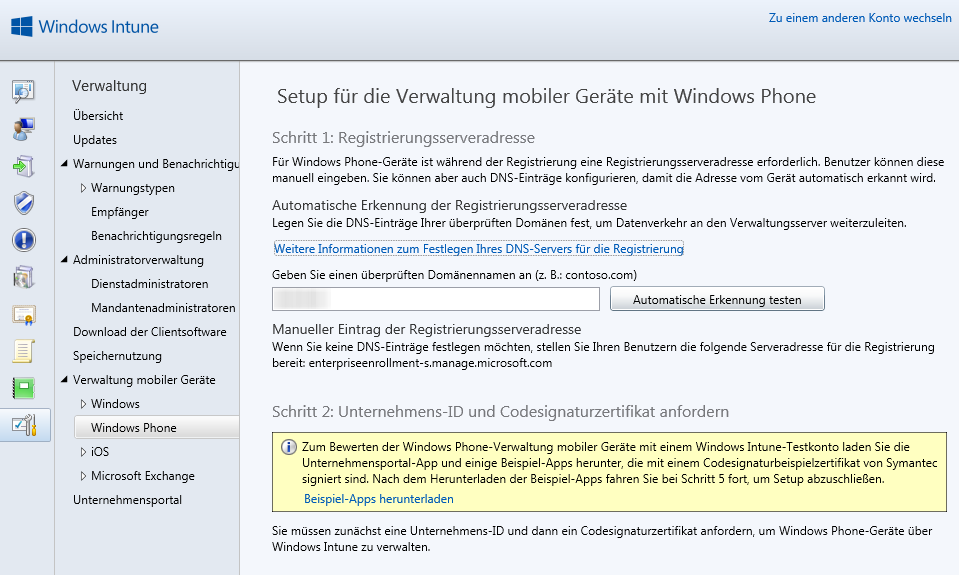
Window Intune hilft Unternehmen bei der Verwaltung Ihrer Client Computer, Windows RT Geräten, Windows Phone Geräten bis hin zu iOS Devices. Seine Stärken hat es vor allem im Bereich des mobilen Device Managements, in Kombination mit System Center wird das Management der Infrastruktur übersichtlich und vorsorgend. Wenn Windows Intune konfiguriert wird und Sie mobile Geräte hinzufügen möchten, können Sie hierbei auch Ihre eigene Domain verwenden. Diese Einstellung treffen Sie in der Verwaltungskonsole unter Verwaltung / Verwaltung mobiler Geräte und dort bei Windows Phone. ...

February 28, 2014 · 1 min · Martina Grom
DirSync  no such object on the server

DirSync no such object on the server

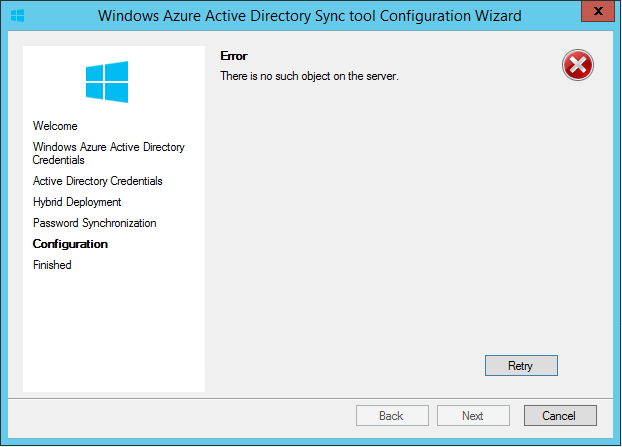
Ich habe in den vergangenen Tagen ein sehr interessantes Phänomen von Dirsync gesehen. Ich weiß nicht wie viele von Ihnen Dirsync schon einmal neu installieren mussten, aber manchmal kommt das vor. Wenn man zum Beispiel die Datenbank auf einen anderen Server verschieben will oder dgl. kann das schon mal notwendig werden (was so ned 100% stimmt, aber dazu ein anderes Mal mehr). Mir ist selbiges vor kurzem passiert. Also – eigentlich recht simpel. DirSync deinstallieren, auf neuem Server installieren und beim Configuration Wizard folgende Fehlermeldung erhalten: ...

February 26, 2014 · 2 min · Christoph Wilfing
Windows Intuneadd your custom enrollment address for your mobile device management

Windows Intuneadd your custom enrollment address for your mobile device management

In the last couple of weeks I did a lot Windows Intune POC’s with Demo Customer environments. Windows Intune is a great tool for mobile device management, you can add Windows Devices as well as your Windows Phones and iOS Devices. Mobile Device Management made easy, so you can manage your devices. To setup Mobile Device Management you have first decide what the authority of your Mobile Device Management is. Since I am a public cloud addicted, I use Intune the plain way. Of course you can also configure it together with your System Center infrastructure. After you have set that you can now start configuring your Mobile Device Management. ...

February 24, 2014 · 2 min · Martina Grom
Working with the Ghost blogging platform 2

Working with the Ghost blogging platform 2

In part 1 we created a Ghost blogging platform in Windows Azure by clicking next-next-finish. Now let´s use this blog system. When calling the blog URL you get a welcome post message with the first information you need: It´s the URL for the content mangement: <your blog URL>/ghost/ …at the first call you land at the signup form which looks like this: Fill in your Full Name as the name you want to appear as the author of blog posts and choose your email and a strong password. Then click “Sign Up”. Here we go! ...

February 23, 2014 · 3 min · Toni Pohl
Setting up the new Ghost blogging platform on Windows Azure 1

Setting up the new Ghost blogging platform on Windows Azure 1

What is Ghost? Well, Ghost is a brand new blogging platform (https://ghost.org/features/) which is built on Node.js. You can install Ghost locally on your computer or – which is much more easy and faster – use Windows Azure! Our MVP colleague Albert Weinert posted that he uses this new blog system on https://blog.der-albert.com and made us curious – so we needed to have a look and to try it out! Thx Albert for your tip! ...

February 22, 2014 · 2 min · Toni Pohl