Power Platform Environments and Governance Tips

Power Platform Environments and Governance Tips

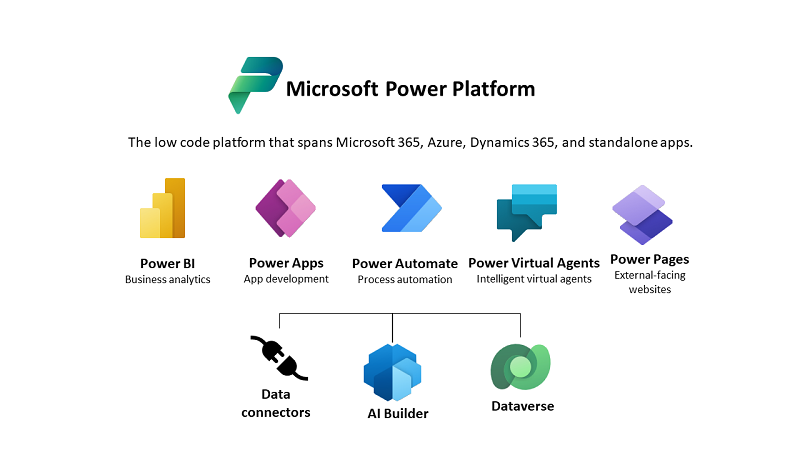
The Microsoft Power Platform enables individual solutions to be developed and business processes to be easily automated. When it comes to controlling the solutions, it is important to establish an IT governance in the organization. There are many areas and details about it. For this reason, I’ve put together a summary here with some news and helpful tips. The Microsoft Power Platform includes Power BI, Power Apps, Power Automate, and Power Virtual agents, leveraging the common infrastructure of the Microsoft Dataverse (the former Common Data Service) and Data Connectors. Dynamics 365 and the Power Platform are both deeply coupled with Dataverse and are held in containers called environments. A governance strategy usually starts with organizing the environments accordingly. Environments allow to separate Production, Test and Development. See more at Environments overview and at Microsoft Power Platform guidance documentation. ...
July 5, 2021 · 5 min · Toni Pohl
Optimize SQL queries using subqueries for lookups in Azure SQL Databases

Optimize SQL queries using subqueries for lookups in Azure SQL Databases

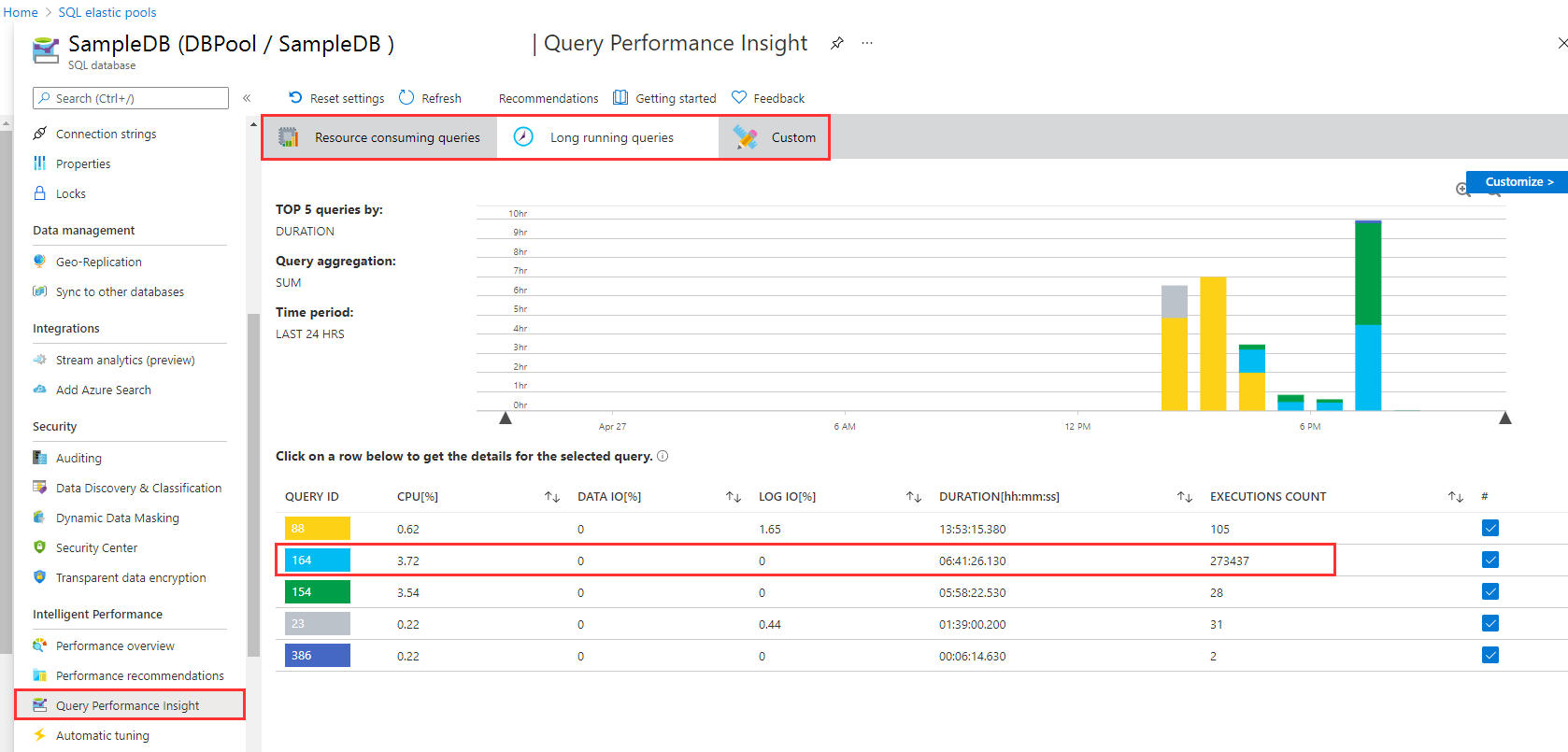
I like to work with Azure SQL Databases and use data from the cloud without any administrative effort. When working with apps, App Insights helps to detect anomalies, and to analyze bottle necks. Although SQL Azure can scale very well, we discovered performance issues in some legacy apps. Read here how we solved that by optimizing TSQL data queries. The scenario There is an older web application here that is connected to an SQL database that is running in an SQL elastic pool. App Insights showed the reason (the SQL queries) for the bad performance. Diving deeper, the elastic pool and the database / Query Performance showed performance issues in detail with certain queries which had very long runtimes. As we see in the following screenshot, there are two long running queries. Query 164 has been executed almost 274,000 times in the past 24 hours, consuming more than 6:40 hours. We started to investigate this issue. ...

April 27, 2021 · 5 min · Toni Pohl
Azure Logic Apps Toolbox 7-Resolve issues with the SharePoint Connector

Azure Logic Apps Toolbox 7-Resolve issues with the SharePoint Connector

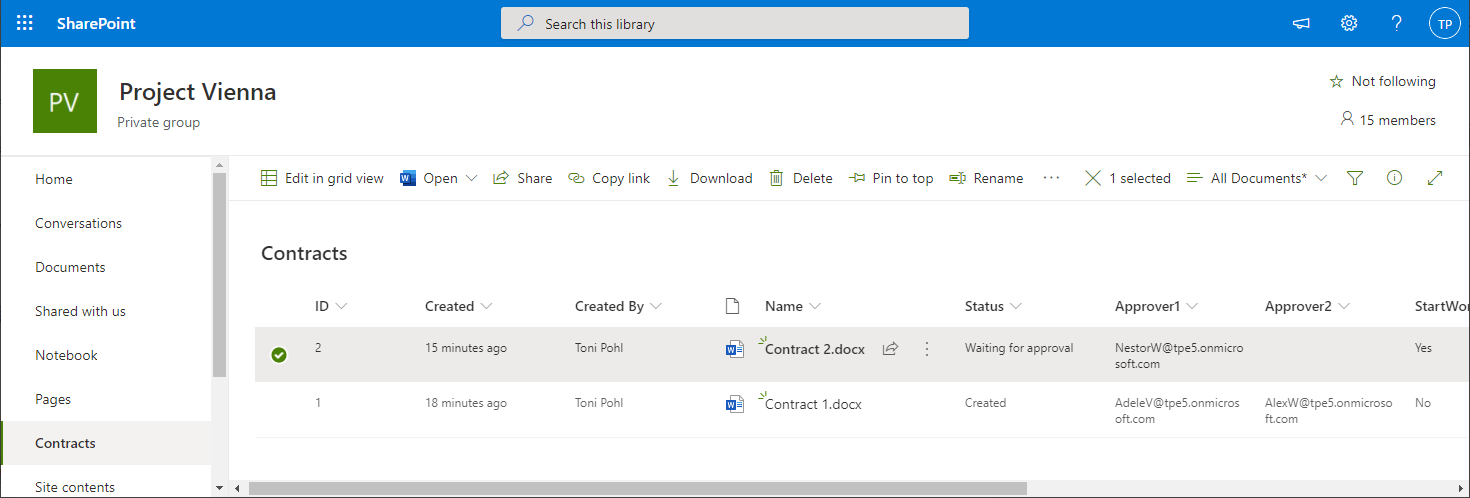
Using SharePoint Online (SPO) and Azure Logic Apps helps to automate processes. For a project, we have created some workflows with Azure Logic Apps that monitor changes to an SPO list or document library for approvals and other document workflows. We have found that the SPO connector does not always send all data in a reproducible manner: sometimes some fields were sent and sometimes not. We struggled with this behavior and found an unexpected workaround. ...

March 11, 2021 · 4 min · Toni Pohl
Azure Logic Apps Toolbox 6-Work with items in Apply to each

Azure Logic Apps Toolbox 6-Work with items in Apply to each

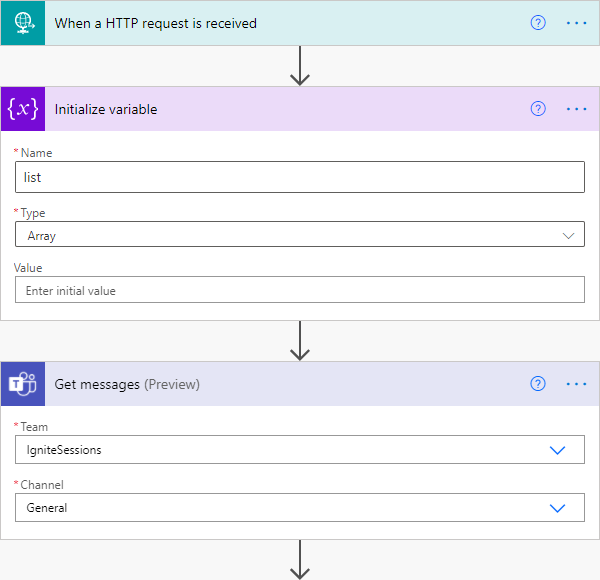
Automation of small tasks is helpful for many recurring processes. Unless you regularly use Power Automate (Flow) or Azure Logic Apps, it is often not that easy to remember the correct syntax for accessing items in a loop. Here is the quick help. This sample is using a flow in Power Automate to read messages from a Microsoft Teams team (I know, this sounds strange) and outputs any field to an email. The purpose is just to see how to access data in JSON format in a “Apply to each” loop. Here´s the screenshot of the complete flow with the description of the actions. ...

March 6, 2021 · 3 min · Toni Pohl
Azure Logic Apps Toolbox 5-Custom JSON payloads

Azure Logic Apps Toolbox 5-Custom JSON payloads

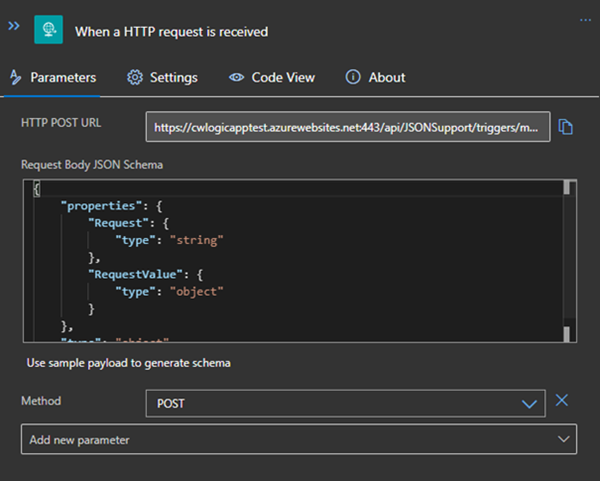
Did you ever have the problem of pushing different JSON payloads to a logic app and hitting errors due to JSON schema mismatches? The usual HTTP Request forces you to define the JSON Schema at the beginning. For every tiny difference in the later used properties you need to create your own Logic App even if the process is the same. I will show you an example of a single Logic App deciding at runtime which JSON schema to use for decoding the post body payload. Stay tuned! ...

January 14, 2021 · 3 min · Christoph Wilfing
Azure Logic Apps Toolbox 4-Working with SharePoint dropdown fields

Azure Logic Apps Toolbox 4-Working with SharePoint dropdown fields

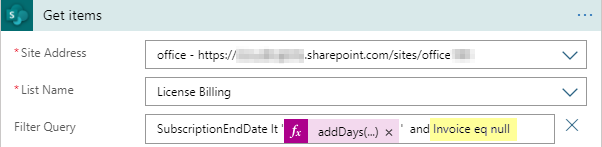
Yesterday I documented in “Get data from SharePoint as HTML table with Azure Logic Apps” how data is retrieved from SharePoint Online with an Azure Logic app. To dig a little deeper into working with SharePoint list data, here are a few more helpful tips. Query for empty fields (eq null) To find items in an SPO list that have NO value in an Azure Logic App SharePoint Get items action, we can use “<field> eq null” (and not eq ‘’ ). Simple as that, but good to remember. So in our sample, the ODATA filter query is as here: SubscriptionEndDate lt addDays(utcNow(),-30) and Invoice eq null ...

December 18, 2020 · 2 min · Toni Pohl
Azure Logic Apps Toolbox 3-Get data from SharePoint as HTML table

Azure Logic Apps Toolbox 3-Get data from SharePoint as HTML table

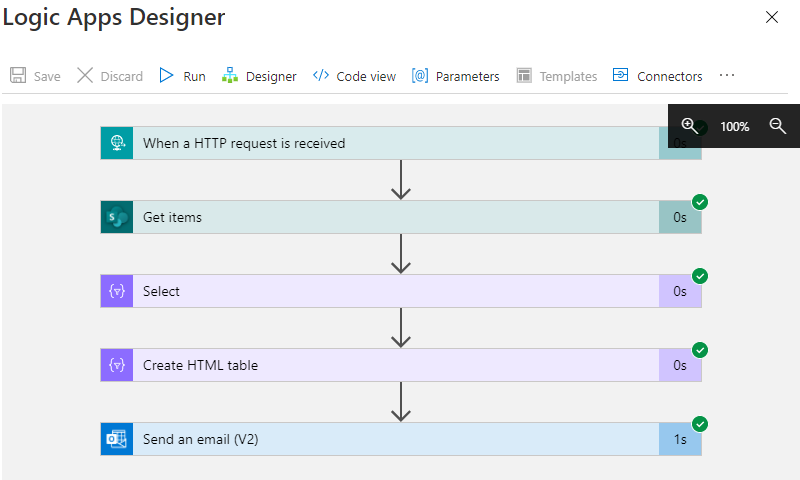
Sometimes it´s good to get data from a data source as a table and as quickly as possible in an automated way. While this can be done with multiple ways, here´s a quick solution if you want to get the items from a custom list in SharePoint Online sent as a HTML table in an email with Azure Logic Apps (or Power Automate). In this sample, we assume we have a custom list in a SharePoint Online site that includes some hundred lines of data with license requests and billing information. We want to get specific items that will expire in near future where there´s no invoice set. We will do this with a filtered query. The result shall be formatted as HTML table and sent to an email address. Azure Logic Apps and Power Automate (Flow) is perfect for such a quick task. ...

December 17, 2020 · 4 min · Toni Pohl
Free Microsoft eBook Roadmap to Digital Infinity

Free Microsoft eBook Roadmap to Digital Infinity

Today´s a quick tip: Check out the free Microsoft eBook “Roadmap to Digital Infinity” - How to become an Intelligence Driven Organization! Roadmap to Digital Infinity This is a short eBook with 19 pages that “will show you how to take the next steps on your digital journey.” It covers topics from Intelligence Driven Organization to the Digital Feedback Loop and the the core solution. It’s a beautifully designed eBook. I like the statements like “Change is the new normal” and a statement from Ralph Haupter, President, Microsoft EMEA: “One thing we can count on: combining human ingenuity with innovation will be essential, not optional”. In addition, the data analysis helps to put an organization in a test and learning culture. New ideas can be developed, started and improved with much more confidence. ...

November 17, 2020 · 1 min · Martina Grom
Project Online  Project Server Project Detail Pages - Enhancements Part 9- Show WebParts in Tabs on Project Detail Page

Project Online Project Server Project Detail Pages - Enhancements Part 9- Show WebParts in Tabs on Project Detail Page

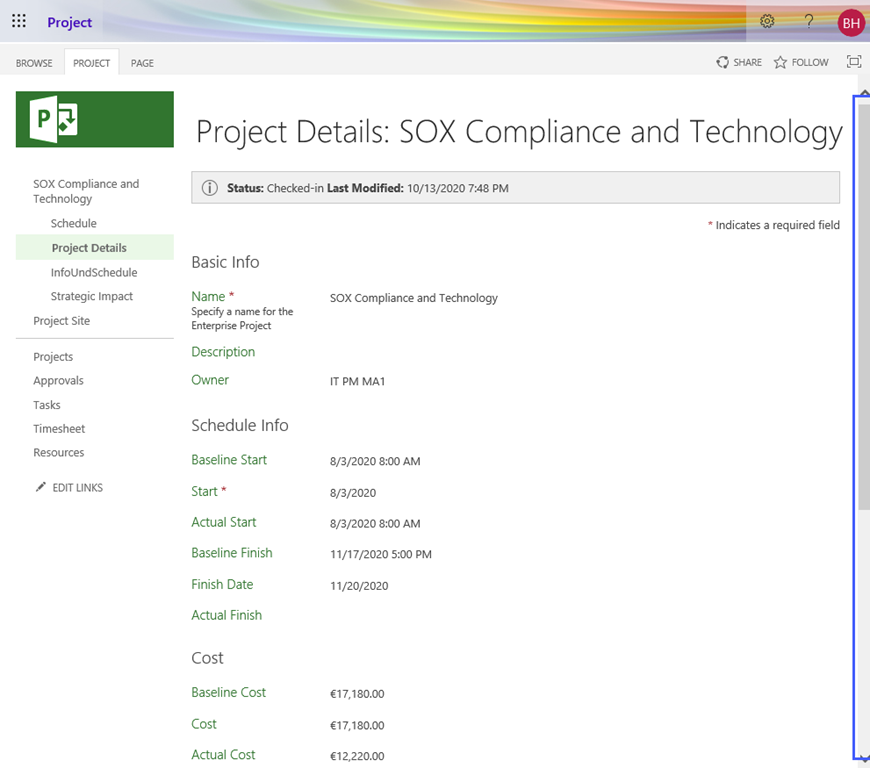
This is the ninth part of articles discussing Project Detail Page enhancements: Show/hide a field depending on the value of an internal field on the same page Show/hide a field depending on the value of an Enterprise Custom field on the same page Show/Hide a field based on the value of an internal field using REST Show/Hide a field based on the value of an Enterprise Custom Field without Lookup Table using REST Remove Time from Enterprise Custom Fields on Project Detail Pages Remove Prefix from Enterprise Custom Fields on Project Detail Pages Hide Impact Ratings on Project Detail Page “Strategic Impact” Disable “Project Owner” Button on Project Detail Page Show WebParts in Tabs on Project Detail Page For a description for preparation of a Project Detail Page for JavaScript, see General Preparation. ...

October 13, 2020 · 3 min · Barbara Henhapl
Project Massenänderung für Ressourcenkostensätze mit VBA  Bulk Update for Resource Rates with VBA

Project Massenänderung für Ressourcenkostensätze mit VBA Bulk Update for Resource Rates with VBA

Deutsche Version Alle Jahre wieder … Gegen Jahresende gibt es immer wieder die Anforderung, die Kostensätze für Ressourcen für das Folgejahr einzutragen. Hier stelle ich ein Makro bereit, der das Ganze mit VBA vereinfacht. Mit dem Code können Sie Kostensätze für jeweils eine Kostensatztabelle ändern. Für Änderungen in einem einfachen Projekt mit lokalen Ressourcen öffen Sie dieses Projekt für Enterprise Ressourcen aus Project Online oder Project Server öffnen Sie die Unternehmensressourcen im Client zur Bearbeitung von Ressourcen in einem gemeinsamen Ressourcenpool öffnen Sie den gemeinsamen Ressourcenpool Wenden Sie eine Ressourcenansicht, z.B. Ressource:Tabelle. Blenden Sie Kostenspalten ein, die noch nicht in Verwendung sind (Kosten1 – Kosten 10, ….). Ich verwende in diesem Code vorhandene Kostenfelder, um Probleme mit Einheitsbezeichnungen und Währungskennzeichen beim Import zu vermeiden. Wenn Sie nur den Standardsatz ergänzen möchten, ist ein Kostenfeld ausreichend. Für Überstundensatz oder Kosten pro Einsatz benötigen Sie bei Bedarf ebenfalls je ein Kostenfeld. Tragen Sie in diese Felder die neuen Kostensätze ein. ...

October 5, 2020 · 6 min · Barbara Henhapl