Delegate365August Updates Enhanced Features and Improvements

Delegate365August Updates Enhanced Features and Improvements

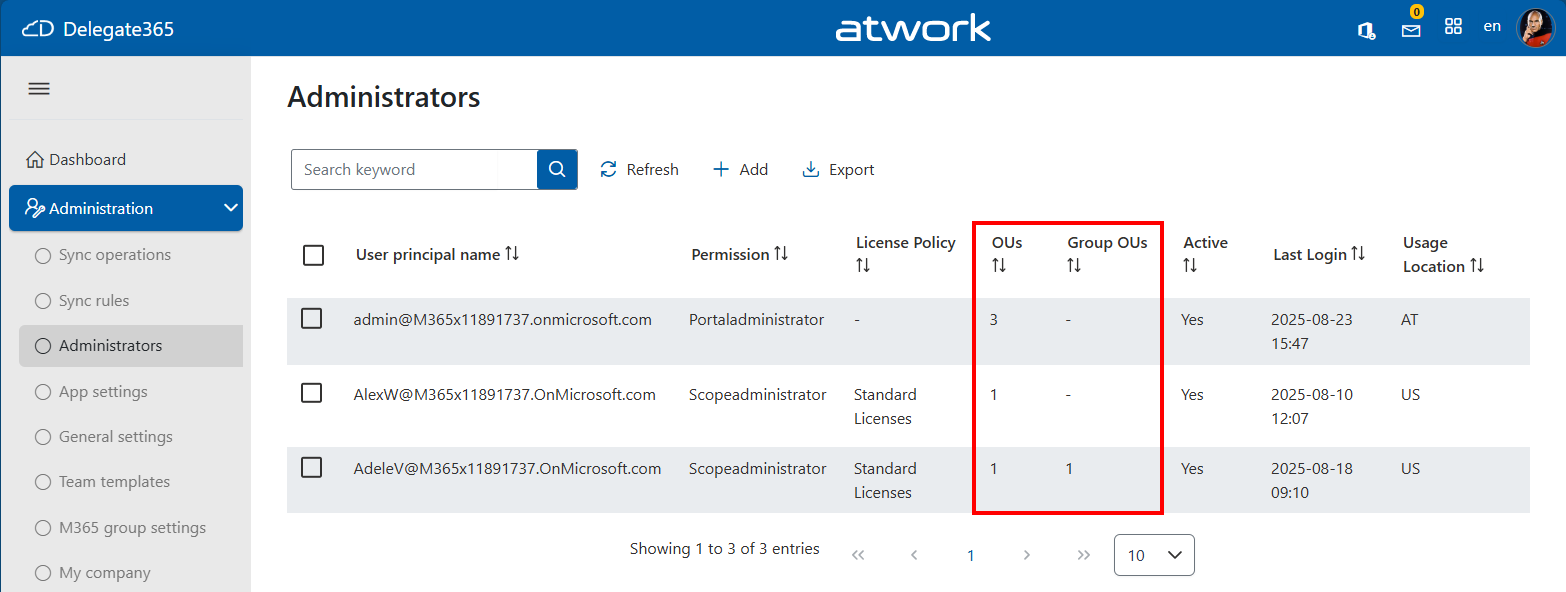
We are excited to announce the latest enhancements to Delegate365, designed to make your Microsoft 365 management even more intuitive and powerful. Building on the momentum of the recent releases, the August update introduces several user-driven improvements that provide additional productivity. Assigned OU overview for administrators: Admins can now see the number of assigned Organizational Units (OUs) at a glance thanks to the newly added OU columns *OUs *and Group OUs in the Administration / Administrators list. This helps to see the assigned policies and the number of assigned OU´s. ...

August 20, 2025 · 2 min · Toni Pohl
Troubleshoot Delegate365 Insufficient privileges to complete the operation

Troubleshoot Delegate365 Insufficient privileges to complete the operation

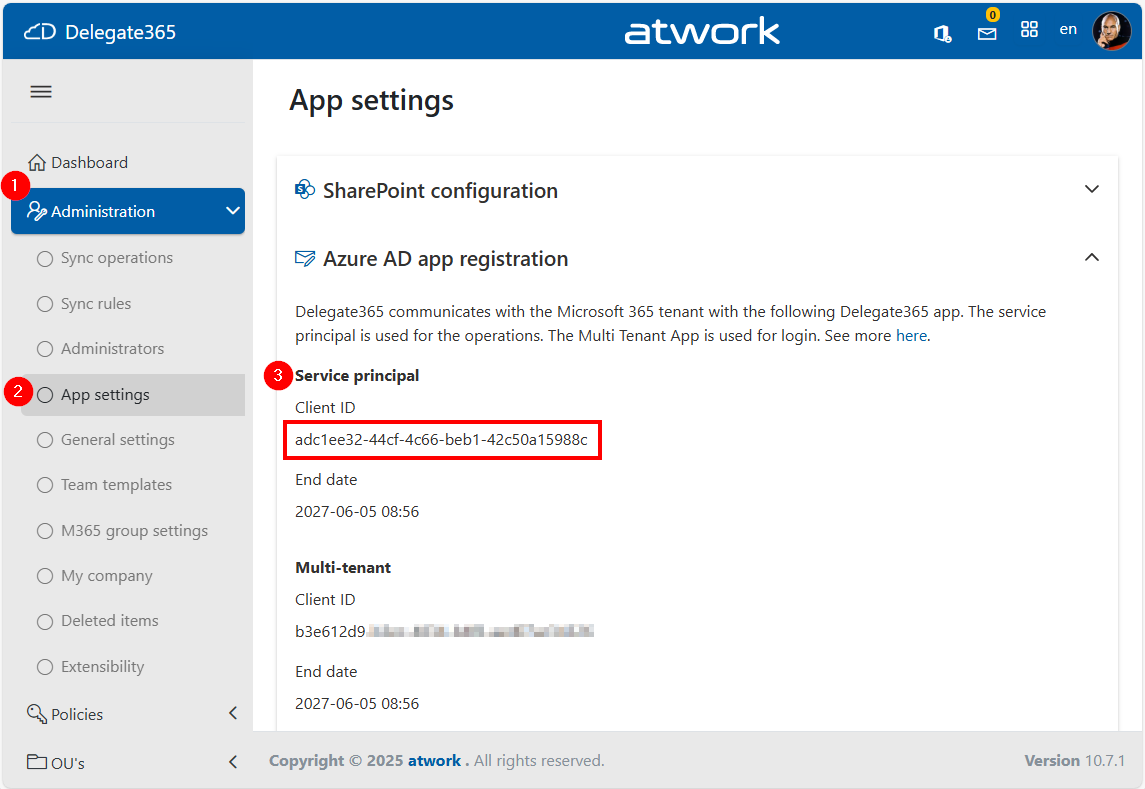
When managing devices through the Delegate365 application that integrates with Microsoft Intune, you might encounter the error “Insufficient privileges to complete the operation”, This issue may occur during specific operations if the Delegate365 setup has been used a longer time ago, or if the Global Administrator role has been removed from the Delegate 365 application by a Microsoft 365 administrator. In such cases, the administrator must reassign the necessary role to the application. The process for doing so is outlined below. ...

July 24, 2025 · 3 min · Toni Pohl
Delegate365-June Updates Enhanced Features and Improvements

Delegate365-June Updates Enhanced Features and Improvements

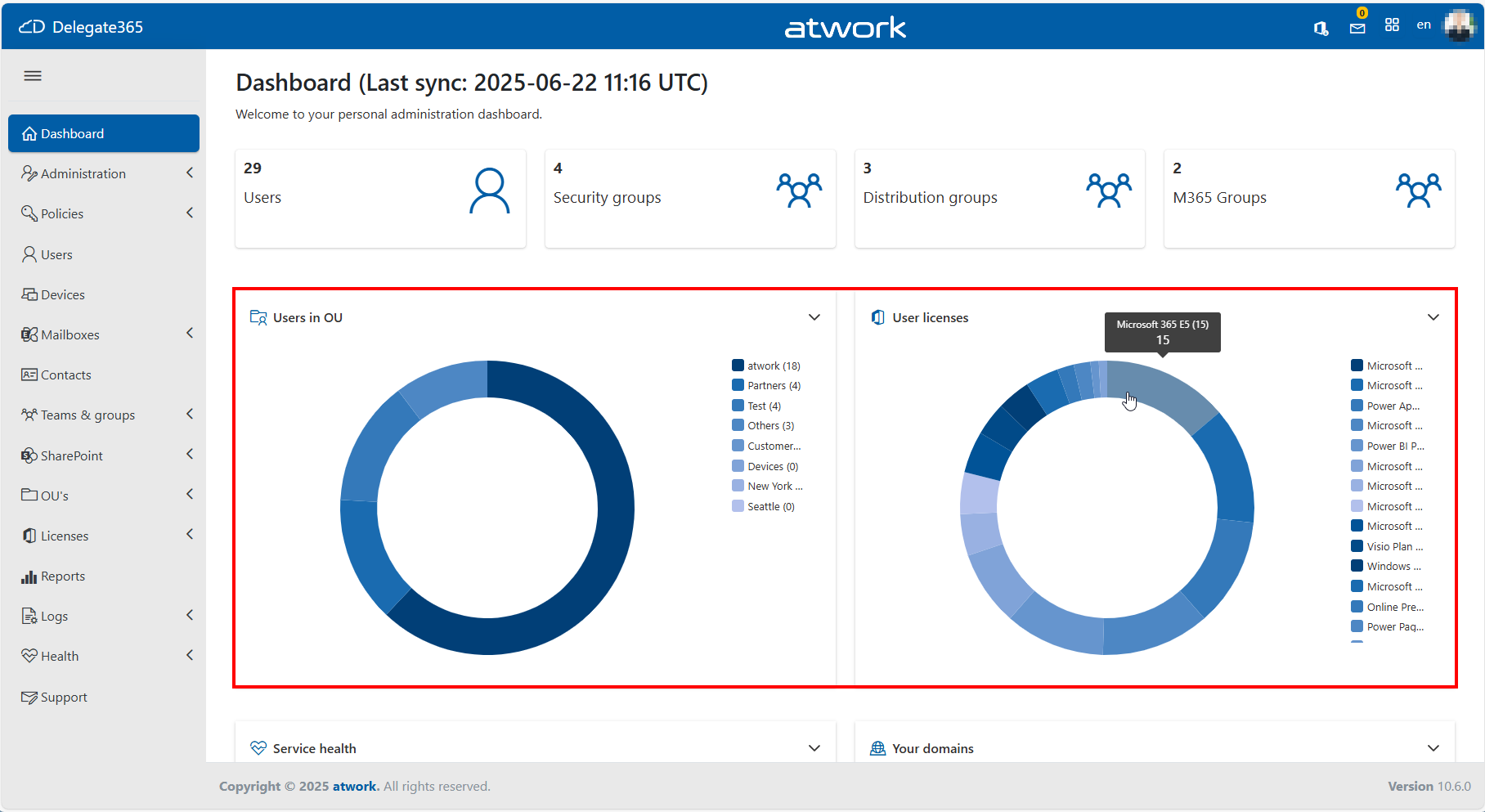
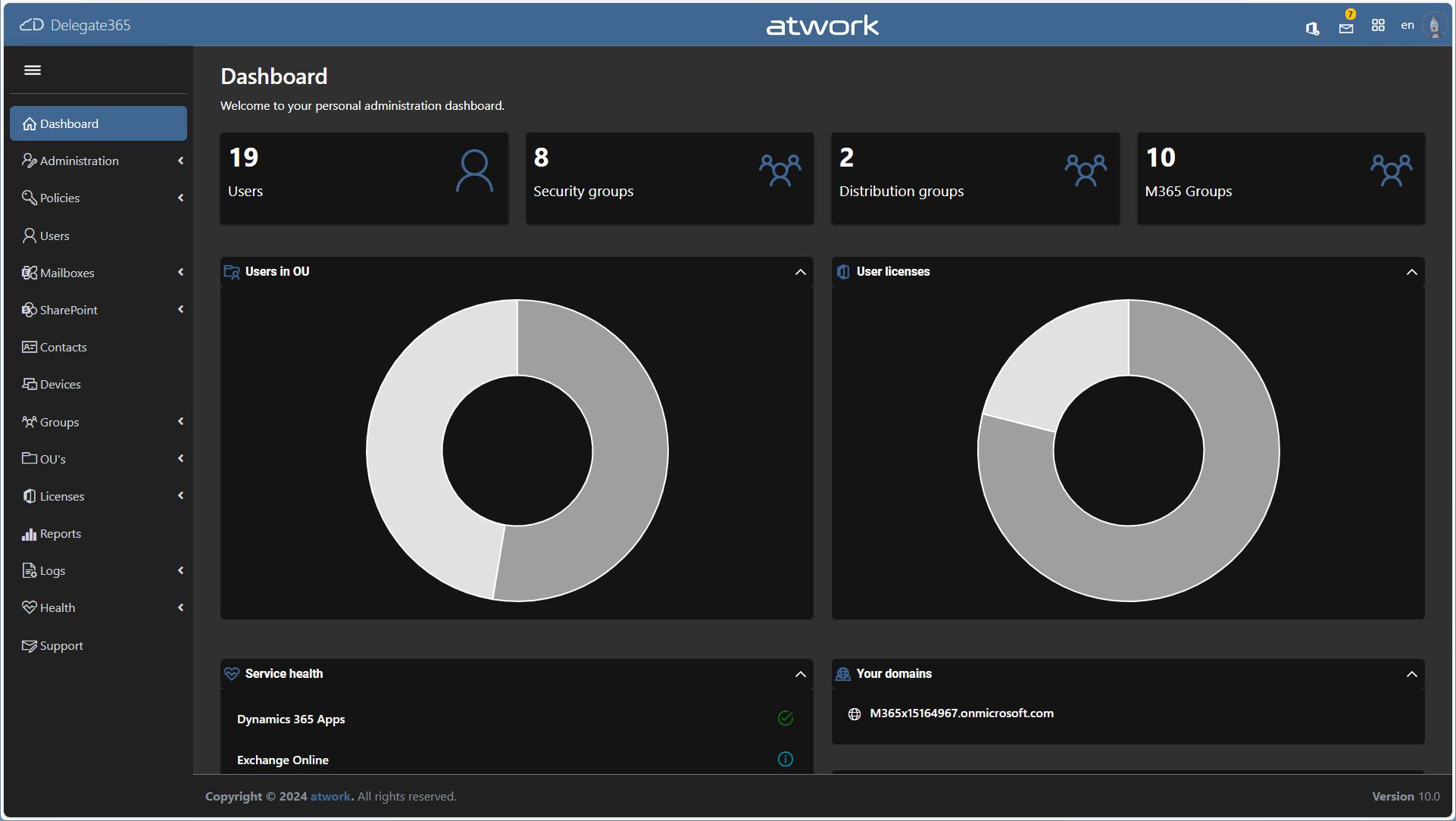
We are continuously working to enhance Delegate365, making it more powerful and user-friendly with every update. Following the major v10 April update, we’re excited to share the latest improvements and new features introduced in June 2025. Key Enhancements in May and June: Revamped Dashboard Graphics: The dashboard visuals have been refreshed with a modern look and now include a legend for better clarity and usability. When you hover over an item in the legend, the corresponding section of the chart is highlighted, making it easy to see the number of affected items at a glance. The license pie chart User licenses now displays a detailed breakdown of assigned licenses, rather than just showing the number of licensed and unlicensed users. Improved Reporting Performance: The List SignIns report now supports streaming for large datasets, ensuring faster and more reliable access to extensive sign-in data. Mailbox Fixes: We resolved an issue with the Update Mailbox and quota function in Exchange Online, particularly related to mailbox size handling. Sync Rules for Licenses, new feature RemoveAll Licenses: A new option to quickly remove all licenses from a selected security group has been added. If the *Remove All *sync rule is active, thisremoves all M365 licenses from the members of the group. A fix has also been applied to ensure the Apply to option works as intended. User Edit, Multi-Group Assignment: Using the Add user to group function could result in an error if different group types were assigned. This error has been resolved. The assignment now works reliably in all scenarios Small UI Enhancements: New controls have been added for a more intuitive experience and better performance (v10.0.6). Tab order *and support for the Home and End keys in the User Edit form have been corrected to improve accessibility and navigation. These updates are part of our ongoing commitment to improving Delegate365 based on your feedback. Stay tuned for more enhancements coming soon!

June 9, 2025 · 2 min · Toni Pohl
Delegate365-April Updates Group Picker, Devices Sync, Reports, Changes and Fixes

Delegate365-April Updates Group Picker, Devices Sync, Reports, Changes and Fixes

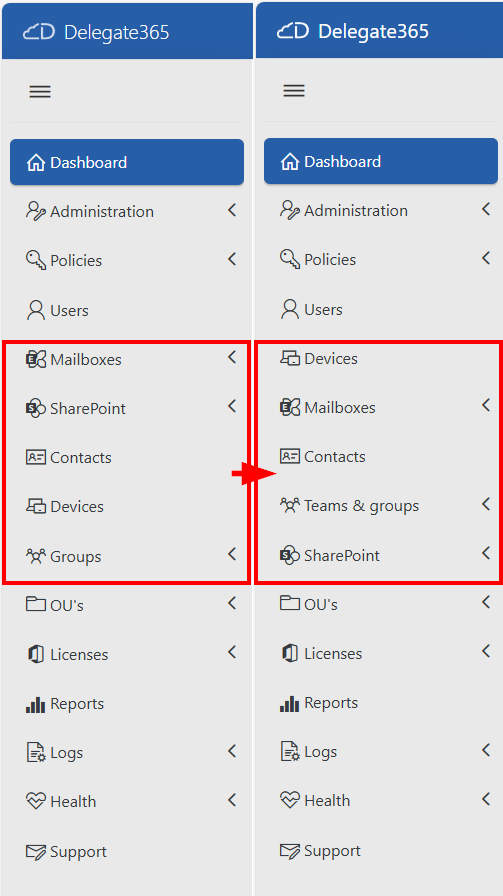
We have made numerous updates and improvements to Delegate365 over the past few months (see also Delegate365-January Updates). See an overview of the Delegate365 v10 April update here. Menu order slightly changed: The design of Delegate365 now more closely matches the M365 Admin Portal. This also affects the order of the menu on the left. The modules have been rearranged. These are the changes: Old menu order: Administration, Policies, Users, Mailboxes, SharePoint, Contacts, Devices, Groups, OU’s, Licenses, Reports, Logs, Health, Support New menu order: Administration, Policies, Users, Devices, Mailboxes, Contacts, Teams & groups, SharePoint, OU’s, Licenses, Reports, Logs, Health, Support This means that the menu order corresponds more to the way you work. ...

April 28, 2025 · 5 min · Martina Grom
Comparing Delegate365 Versions v9 vs. v10

Comparing Delegate365 Versions v9 vs. v10

Delegate365 is a powerful web-based solution for managing Microsoft 365 tenants, offering a range of features designed to streamline user, group, license management, and more resource management. Both Delegate365 versions are identical in their core features, but v10 includes some improvements and will be continued. Upgrade soon! Key Features of Delegate365 Both versions of Delegate365 offer a robust set of features, including: User and License Management: Manage users, licenses, and groups within defined organizational units (OUs). Device Management: Assign and manage Devices based on their Tags Group Management: Manage all types of groups, including security, distribution, Microsoft 365, and dynamic groups. Delegation and Automation: Delegate administrative tasks and automate processes to improve efficiency. Auditing and Reporting: Comprehensive logging and reporting capabilities to ensure compliance and provide insights. Mailbox Management: Set mailbox delegations, convert to shared or resource mailboxes, and run message traces. SharePoint and Teams Management: Provision and manage SharePoint sites, Teams tabs, and channels. PowerShell Module: Available for entitled admins to perform operations via PowerShell, with all actions logged. ## Improvements in Delegate365 v10 Version 10 of Delegate365 introduces several enhancements that build on the existing features of v9: ...

February 1, 2025 · 3 min · Toni Pohl
Delegate365-January Updates Sync with AUs, Devices Management, Company defaults and more

Delegate365-January Updates Sync with AUs, Devices Management, Company defaults and more

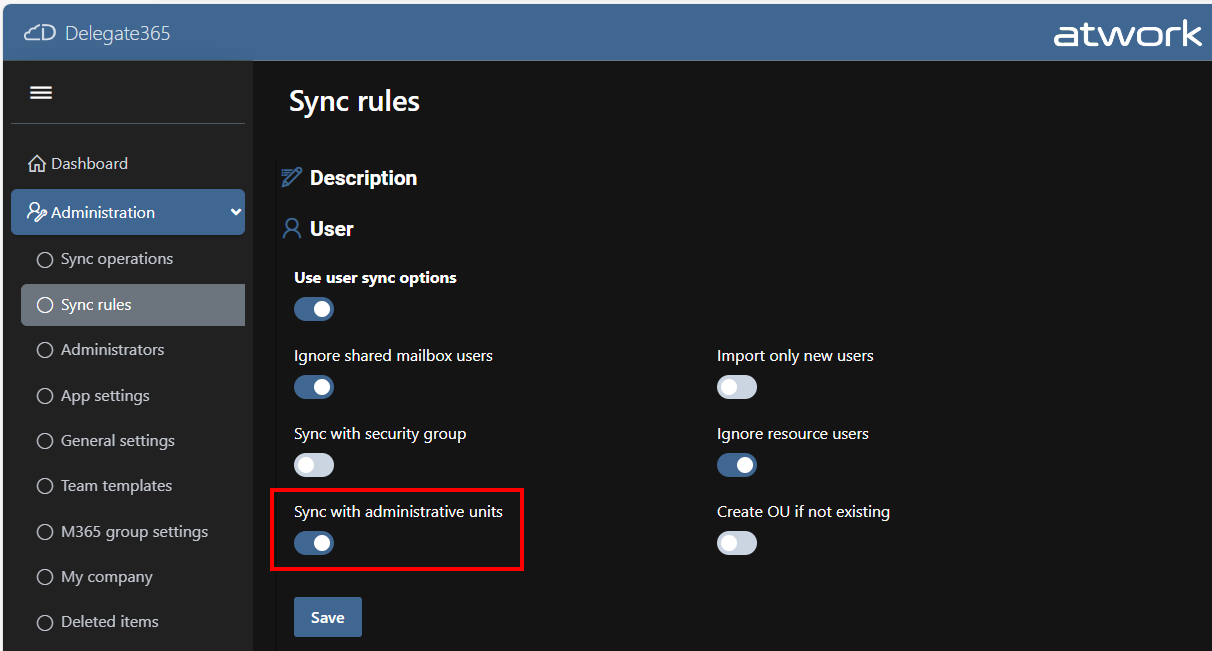
The latest update to Delegate365 v10 includes numerous small but impactful changes designed to improve the user experience and functionality. With the addition of new fields and features, administrators can now manage their tasks more efficiently. These improvements reflect our commitment to continuous innovation and user satisfaction. See the changes here. New sync with Administrative Units (AU´s): The new AU synchronization enables the automatic assignment of users to a Delegate365 OU based on the membership of an AU. This works in the same way as synchronizing with security groups. Members of the AU are synchronized to the Delegate365 OU of the same name. If an assigned user is no longer a member of an AU, he or she will be removed from the OU. In module Administration / Sync rules / section User, the user sync can now be selected between Sync with Security Group, Sync with Administrative Units, or User Properties. ...

January 25, 2025 · 4 min · Toni Pohl
Delegate365-License Aggregation Report Update

Delegate365-License Aggregation Report Update

Delegate365 faced significant challenges in managing license data reports due to its daily storage practices. The root cause was the accumulation of an excessive amount of license data over the years, which exceeded the available resources. So we changed that and the License Aggregation Report in Delegate365 got an update. What Happened Recently, several users encountered a “Query Timeout - operations failed” error when generating a report in menu Licenses / License Aggregation. The system recorded license data for all Organizational Units (OUs) every day, resulting in the accumulation of hundreds to thousands of rows daily. Over time, this practice led to the creation of millions of rows in the database. Consequently, the Delegate365 client struggled to process this vast amount of data efficiently. ...

December 12, 2024 · 2 min · Toni Pohl
Introducing the new and improved Delegate365 A modern SaaS solution for efficient, delegated management of an M365 tenant

Introducing the new and improved Delegate365 A modern SaaS solution for efficient, delegated management of an M365 tenant

We are thrilled to announce the launch of the latest version of our Software-as-a-Service solution, Delegate365 (delegate365.com). This brand-new iteration is designed to provide a faster, more modern, and highly efficient delegated management experience. Available now for testing, Delegate365 is here to transform how you manage and delegate your Microsoft 365 environment. For the past decade, we have consistently updated Delegate365 to ensure it remains at the forefront of IT management solutions. Our commitment to security has been unwavering, with regular updates to protect against emerging threats and vulnerabilities and to enhance the platform’s security and functionality. We have continually introduced new features to meet the evolving needs of our users. From integrating advanced functionalities to improving user experience, our updates have always aimed to make Delegate365 more powerful and user-friendly. This dedication to innovation and security has made Delegate365 a trusted solution for IT management over the years. ...

October 31, 2024 · 5 min · Toni Pohl
Use Delegate365 with Privileged Identity Management PIM

Use Delegate365 with Privileged Identity Management PIM

In today’s digital landscape, managing privileged access to applications is crucial for maintaining security and compliance. Microsoft Entra Privileged Identity Management (PIM) offers a robust solution to manage, control, and monitor access within your organization. In this guide, we’ll walk you through the process of configuring Microsoft Entra PIM for your application, Delegate365, ensuring that only authorized users can access it through a security group. Delegate365 is equipped with robust security features and offers seamless integration with Microsoft Entra Privileged Identity Management right out of the box. This integration ensures that administrators can only access Delegate365 using their standard work accounts when the PIM role is activated. Without activating the PIM role, access to Delegate365 is denied. ...

August 19, 2024 · 6 min · Toni Pohl
Delegate365-Disable MFA Legacy

Delegate365-Disable MFA Legacy

In Delegate365, there exist two methods to configure Multi Factor Authentication (MFA) for users: the functions “Authentication methods (MFA)”, and “MFA (Legacy)”. See the difference here, and how to disable the “MFA (Legacy)” feature. Authentication Methods (MFA): This is Microsoft’s modern MFA setting method. Delegate365 allows you to remove authentication methods for a user, so the user will have to reconfigure their MFA if they are removed. MFA (Legacy): This method is deprecated, which is why we called it “Legacy.” It requires a service account without MFA to work, and will stop working after March 2025, see Important update: Deprecation of Azure AD PowerShell and MSOnline PowerShell modules. Therefore, this feature is only present for historical reasons. If it is not needed, we recommend disabling it as below. ...

July 29, 2024 · 2 min · Toni Pohl