Project Online Project Server Lesen und Schreiben von Benutzerdefinierte Enterprise-Feldern Read and Write Enterprise Custom Fields

Deutsch Häufig sollen Werte für Benutzerdefinierte Enterprise-Felder (ECF) per Makro (VBA) gelesen oder gesetzt werden. Dazu ist jeweils im ersten Schritt die ID des ECF zu identifizieren, dafür steht die Funktion FieldNameToFieldConstant zur Verfügung. Als Parameter benötigt diese Funktion den Feldnamen und die Entität des Felds. Mit der erhaltenen Konstanten können dann die Werte mit der Funktion* GetField* gelesen oder mit der Funktion SetField gesetzt werden. Im Codebereich finden Sie Beispiele für alle Entitäten. Bitte beachten Sie Folgendes: ...

May 27, 2019 · 9 min · Barbara Henhapl
Project Benutzerdefinierte Felder in andere Entität kopieren  Copy Custom Fields to Other Entity

Project Benutzerdefinierte Felder in andere Entität kopieren Copy Custom Fields to Other Entity

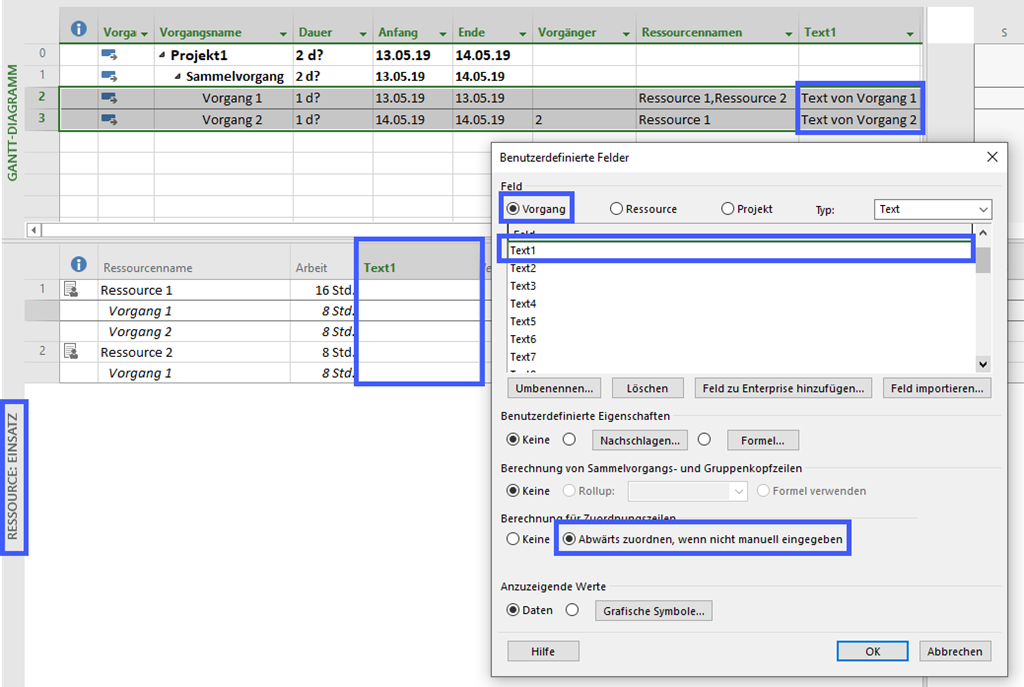
Deutsch Häufig wird in Foren die Frage gestellt, weshalb Werte benutzerdefinierter Felder in einer Ansicht nicht zur Verfügung stehen. Das liegt üblicherweise daran, dass das Feld für eine Entität erstellt wurde, die in der gewünschten Ansicht nicht zur Verfügung steht. So kann es sich um ein Vorgangsfeld handeln, das in der Ansicht Ressource: Einsatz nicht angezeigt werden kann oder um ein Ressourcenfeld, das in der Ansicht Vorgang: Einsatz nicht verfügbar ist. Das ist auch dann der Fall, wenn die Berechnung für Zuordnungszeilen auf Abwärts zuordnen, wenn nicht manuell eingegeben aktiviert ist: ...

May 22, 2019 · 6 min · Barbara Henhapl
Project Export PSP in Office  Export WBS to Office

Project Export PSP in Office Export WBS to Office

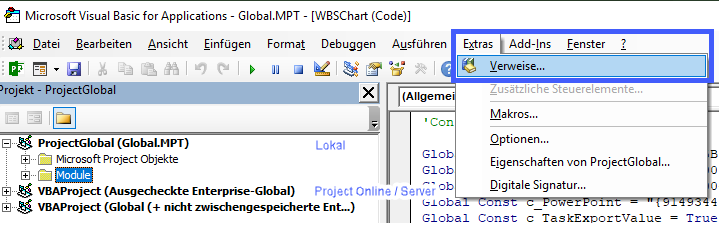
Deutsch Verweise manuell aktivieren Verweise per Makro aktivieren English Code: Referenzen beim Öffnen aktivieren / Enable References on Open Code: Referenzen aktivieren / Enable References Code: Export PSP / Export WBS Deutsch Leider bietet Project keine Möglichkeit, die Planung als PSP zu exportieren. Diese Anforderung wird aber oft in Foren und auch von Kunden gestellt. Ich stelle hier ein Makro bereit, dass eine SmartArt Grafik in Excel, Word und PowerPoint bereitstellt. Um aus Project eine dieser Officeanwendungen anzuprechen, müssen Verweise für die jeweilige Anwenung gesetzt sein. Die Verweise sind optimalerweise in der globalen Vorlage zu setzen. Beim Arbeiten ohne Verbindung zu Project Online / Project Server ist das die Datei Global.mpt. Diese Datei enthält alle Objekte, die auf dem Rechner für alle Projekte zur Verfügung stehen. Bei Verbindung mit Project Online / Project Server sind die Verweise in der Enterprise Global zu aktivieren. ...

May 19, 2019 · 10 min · Barbara Henhapl
Get the Microsoft Graph g-raph stickers

Get the Microsoft Graph g-raph stickers

If you are a Microsoft 365 developer, you will be working with the Microsoft Graph to access data in the cloud. Of course, every product needs a mascot. So, the Microsoft Graph team created their own mascot: Welcome, Microsoft Graph g-raph (giraffe). Get the artwork for the Microsoft Graph g-raph here! For me, the g-raph is a very cute and perfect visualization of “connecting the dots” within the Microsoft 365 services with Microsoft Graph technology. ...

May 16, 2019 · 1 min · Toni Pohl

Project Zuordnungseinheiten neu berechnen - Recalculate Assignment Units

Deutsch Im Artikel Zuordnungseinheiten in Project ab Version 2010 ist beschrieben, weshalb die Anzeige der Zuordnungseinheiten bei der Änderung von Dauer oder Arbeit ab Project 2010 nicht aktualisiert wird. Rod Gill aus Australien hat dazu ein Makro zur Verfügung gestellt, mit dem die Neuberechnung der Zuordnungseinheiten erfolgen kann: Reset Assignment Units. In Europa verwenden wir jedoch andere Regionaleinstellungen, daher finden Sie hier eine modifizierte Version. In Makros implementieren / Implement Macros wird beschrieben, wie ein Makro in Project übernommen werden kann.Mehr Beispielmakros sind unter VBA zu finden. ...

May 15, 2019 · 4 min · Barbara Henhapl
Project Makros implementieren - Implement Macros

Project Makros implementieren - Implement Macros

Deutsch In Foren wird häufig nach Automatisierungen gefragt, die mit Makros umgesetzt werden können. In diesem Artikel wird beschrieben, wie diese Makros in ein Projekt, auf den eigenen Rechner oder in Project Online / Project Server übernommen werden können. In künftigen Artikeln folgen dann Makros, die häufig im Einsatz sind. Verfügbare Makros sind unter VBA zu finden. Makro einfügen Um ein vorhandenes Makro in Project zu übernehmen, wird der Editor Microsoft Visual Basic for Applications benötigt. Starten Sie den Editor über Ansicht – Makros – Visual Basic oder drücken Sie die Taste F11. ...

May 12, 2019 · 5 min · Barbara Henhapl
MSBUILD 2019 News

MSBUILD 2019 News

This week, from May 6-8, Microsoft BUILD conference is happening near Microsoft´s home in Seattle, WA. With about 6000 people from around the world, BUILD is Microsoft´s largest yearly developer conference. This year, we learned tons of news, and the best part is, you get the content for free and you can find a complete guide of all news announced at Build here. Find the highlights and the news at news.microsoft.com/build2019: ...

May 7, 2019 · 1 min · Toni Pohl
Groups Governance Toolkit-Working with group policies

Groups Governance Toolkit-Working with group policies

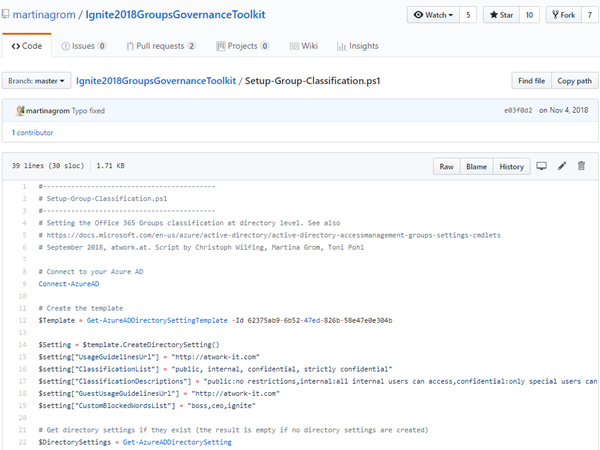
At Microsoft Ignite conference last September, we demoed an approach for a self-built Office 365 Groups Governance Toolkit. Since Microsoft 365 is an evergreen service and continues to evolve, today we have more group settings available and we extend our provisioning function to work with group naming policies as well. See here how this can be accomplished by including new Graph requests. Foreword You can find the previous articles of our governance story at Provisioning an Office 365 group with an approval flow and Azure functions-part 1, part 2, part 3, part 4, part 5 and part 6 and the source code at martinagrom/Ignite2018GroupsGovernanceToolkit. ...

May 2, 2019 · 6 min · Martina Grom
How to add custom user properties to Delve and SharePoint

How to add custom user properties to Delve and SharePoint

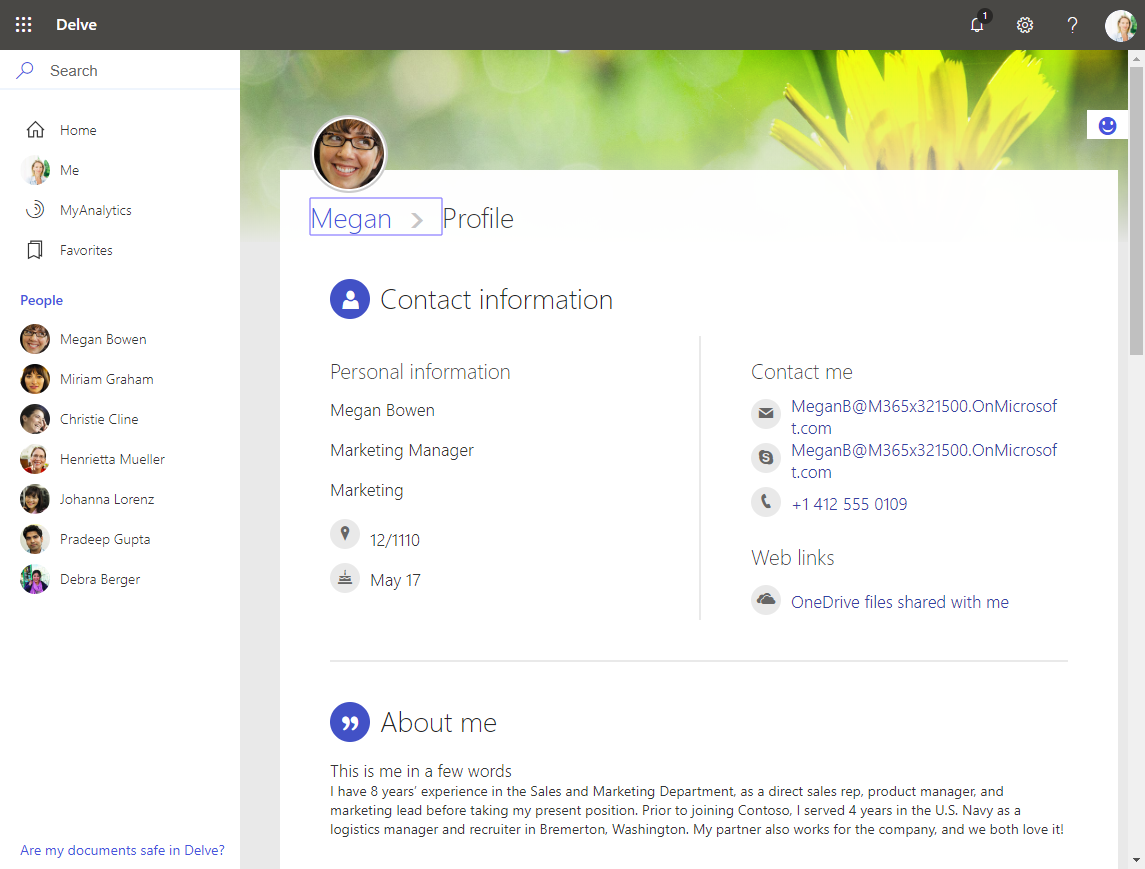
The Delve App allows to discover company and user data across Office 365. Unfortunately, while the app is very helpful, it can not be customized. Well, but we can easily add additional user information, such as personal data, a cost center, additional contact data or hyperlinks, etc. See how this works here. The default Delve experience When opening the Delve app and a user profile, this looks like in a demo tenant here: https://REGION.delve.office.com/?u=USERID&v=profiledetails ...

April 15, 2019 · 3 min · Martina Grom
Tips for PowerApps-6 tips for working with images

Tips for PowerApps-6 tips for working with images

Since I use PowerApps only from time to time, I wanted to document some common actions, such as working with images and the camera control. So, here are my little notes in 6 tips. Well it´s Saturday evening, and I am listening to fancy music and playing with PowerApps (and Flow, Cognitive Services and Adaptive Cards). To not forget the following basics, I thought, it´s a good idea to document a quick intro for working with the Camera control and pictures in PowerApps. ...

April 14, 2019 · 6 min · Toni Pohl