Handle failed actions in Azure Logic Apps

Handle failed actions in Azure Logic Apps

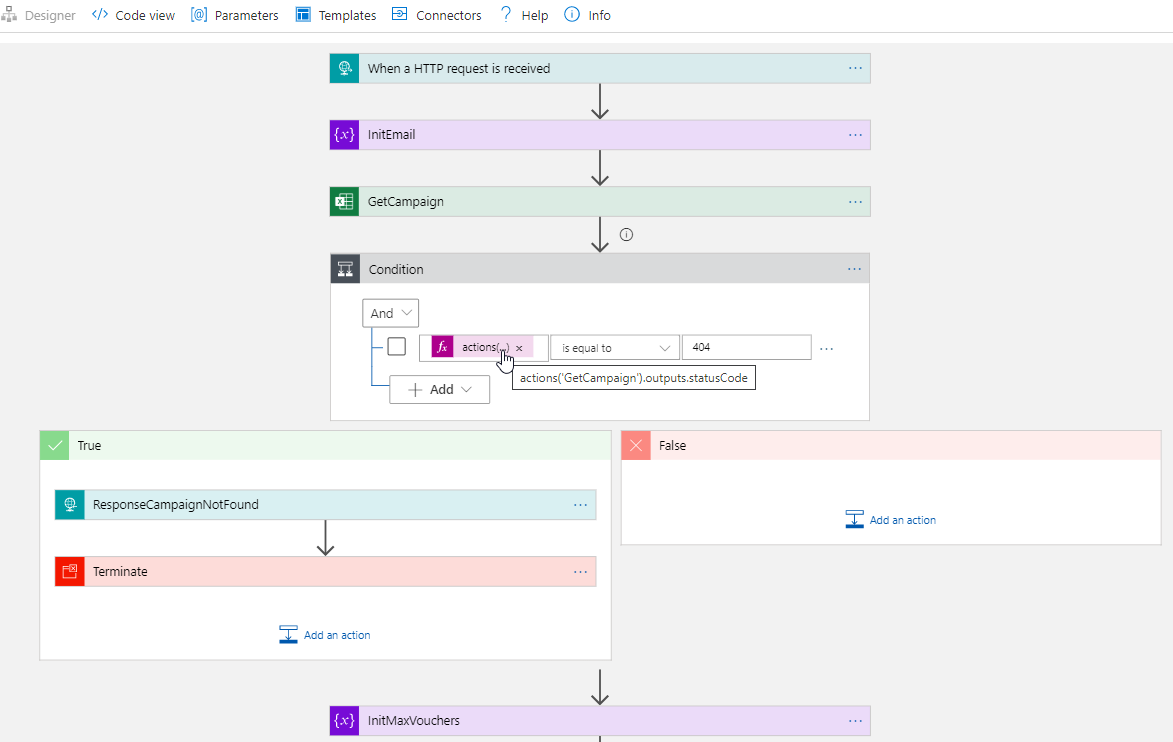
Today´s a quick tip for users working with Azure Logic Apps. This article shows how you can continue to work in a flow if an action has failed. This sample accesses an Excel file from a Microsoft teams SharePoint site and searches for a key. If the key was not found, the flow shall continue and deliver a useful error code with a message. See how this works here. The scenario The following Azure Logic App is triggered by an HTTP request and gets some data from another system. The purpose is to lookup a campaign and some data from an Excel file that is stored in a SharePoint site of a Microsoft 365 Group (a team site) and to continue to work with that data. Furthermore, the Logic App generate a voucher and sends emails. But that´s another story. Here we concentrate on the failure handling. ...

October 6, 2020 · 4 min · Toni Pohl
Project Massenänderung für Ressourcenkostensätze mit VBA  Bulk Update for Resource Rates with VBA

Project Massenänderung für Ressourcenkostensätze mit VBA Bulk Update for Resource Rates with VBA

Deutsche Version Alle Jahre wieder … Gegen Jahresende gibt es immer wieder die Anforderung, die Kostensätze für Ressourcen für das Folgejahr einzutragen. Hier stelle ich ein Makro bereit, der das Ganze mit VBA vereinfacht. Mit dem Code können Sie Kostensätze für jeweils eine Kostensatztabelle ändern. Für Änderungen in einem einfachen Projekt mit lokalen Ressourcen öffen Sie dieses Projekt für Enterprise Ressourcen aus Project Online oder Project Server öffnen Sie die Unternehmensressourcen im Client zur Bearbeitung von Ressourcen in einem gemeinsamen Ressourcenpool öffnen Sie den gemeinsamen Ressourcenpool Wenden Sie eine Ressourcenansicht, z.B. Ressource:Tabelle. Blenden Sie Kostenspalten ein, die noch nicht in Verwendung sind (Kosten1 – Kosten 10, ….). Ich verwende in diesem Code vorhandene Kostenfelder, um Probleme mit Einheitsbezeichnungen und Währungskennzeichen beim Import zu vermeiden. Wenn Sie nur den Standardsatz ergänzen möchten, ist ein Kostenfeld ausreichend. Für Überstundensatz oder Kosten pro Einsatz benötigen Sie bei Bedarf ebenfalls je ein Kostenfeld. Tragen Sie in diese Felder die neuen Kostensätze ein. ...

October 5, 2020 · 6 min · Barbara Henhapl
PowerShell package Az.Accounts failed to download

PowerShell package Az.Accounts failed to download

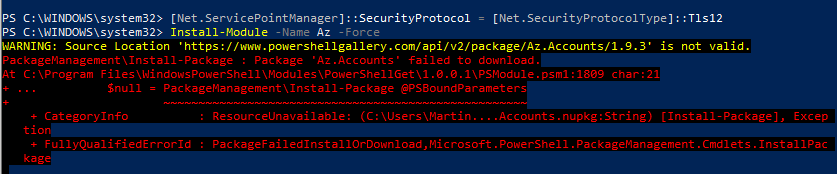
I recently ran into this problem: I had to install the Azure Az PowerShell module from the PowerShell Gallery on a new computer. Interestingly the installation with Install-Module -Name Az failed with the error message “WARNING: Source Location ‘https://www.powershellgallery.com/api/v2/package/Az.Accounts/1.9.3' is not valid.”. See my solution here. The Azure Az PowerShell module provides access to the world of Azure. See more at Introducing the new Azure PowerShell Az module. So, if you run into this issue when executing ...

September 20, 2020 · 2 min · Martina Grom
SPFx App webpart is blocked in various browsers

SPFx App webpart is blocked in various browsers

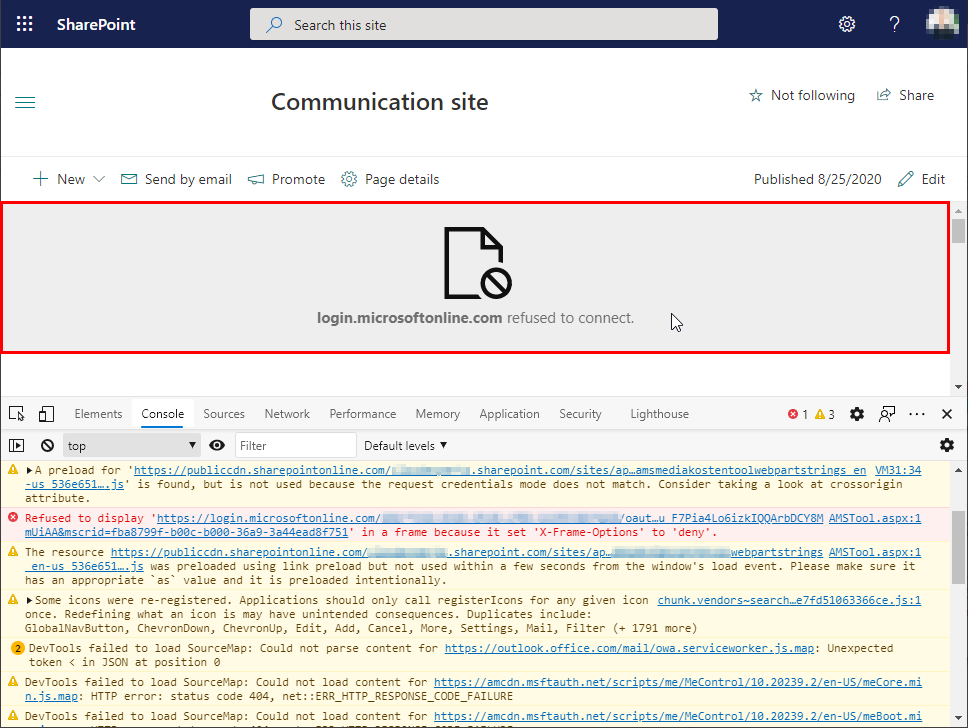
Recently, I stumbled across a strange behavior when running self-developed SPFx webparts in various browsers. When the SPO app was deployed, it worked well with Single-Sign-On, but in some browsers, the webpart was blocked. Instead, a grey box saying “login.microsoftonline.com refused to connect.” was displayed. I experienced that behavior in Chrome, and Edge, while FireFox, Safarai and Opera showed the webpart. Also, there was a different experience when working in the normal mode, or in the In-Private mode. If that happens to you, check out the solution here. ...

September 13, 2020 · 5 min · Toni Pohl

Join us at the Global Microsoft 365 Developer Bootcamp - Austria

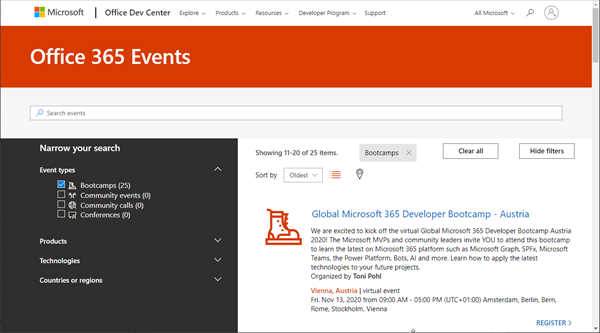
Global Microsoft 365 Developer Bootcamp is back! This year the event will take place virtually from more than 100 cities worldwide. Join us at our Microsoft 365 Developer Bootcamp - Austria on November, 13th, 2020! The Global Microsoft 365 Developer Bootcamp is here for the 4th year straight. Check out Microsoft 365 Events Bootcamps and join us at our bootcamp in Austria using Microsoft Teams. Register now! We are excited to kick off the virtual Global Microsoft 365 Developer Bootcamp Austria 2020! The Microsoft MVPs and community leaders invite YOU to attend this bootcamp to learn the latest on Microsoft 365 platform such as Microsoft Graph, SPFx, Microsoft Teams, the Power Platform, Bots, AI and more. Learn how to apply the latest technologies to your future projects. ...

August 18, 2020 · 1 min · Toni Pohl
Get Administrator roles and Privileged Identity Management roles of an Azure AD tenant

Get Administrator roles and Privileged Identity Management roles of an Azure AD tenant

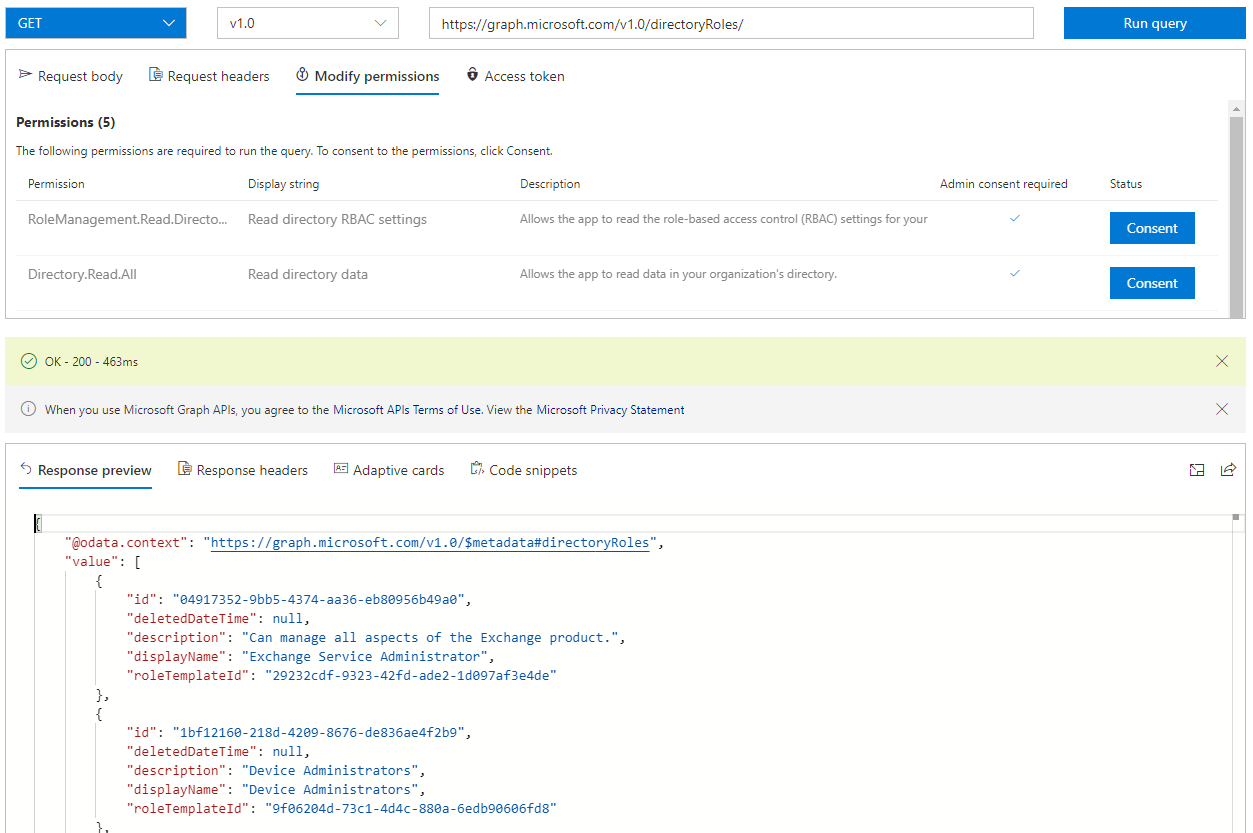
To ensure the security of your Microsoft 365 client, we recommend implementing an appropriate governance and security strategy. An effective measure is to determine the current administrators and their permissions. In this article, we want to identify administrators with permanent roles and administrators who can use roles with Privileged Identity Management (PIM). PIM provides just-in-time privileged access to Azure AD and Azure resources. See how to find all Administrators, including PIM, here. ...

July 16, 2020 · 6 min · Toni Pohl
Project VBA Module exportieren und importieren  Export and Import VBA Modules

Project VBA Module exportieren und importieren Export and Import VBA Modules

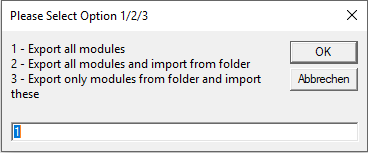
Deutsche Version Nachdem ich jahrelang Zeit verbraucht habe, mit rechten Mausklicks Module für BackUp-Zwecke zu exportieren und neue oder geänderte Module zu importieren, habe ich vor einiger Zeit Code geschrieben, womit ich das automatisiere. Ich habe den Code jetzt etwas abgewandelt, da UserForms nicht als Plaintext bereitgestellt werden können. Code bietet die Auswahlmöglichkeit. Alle Module eines ausgewählten Projekts in einen Ordner zu exportieren Alle Module eines ausgewählten Projekts in einen Unterordner zu exportieren und alle Module aus dem darüberliegenden Ordner zu importieren. Eventuell bereits vorhandene Module werden bei Bedarf zuvor entfernt ...

July 14, 2020 · 9 min · Barbara Henhapl

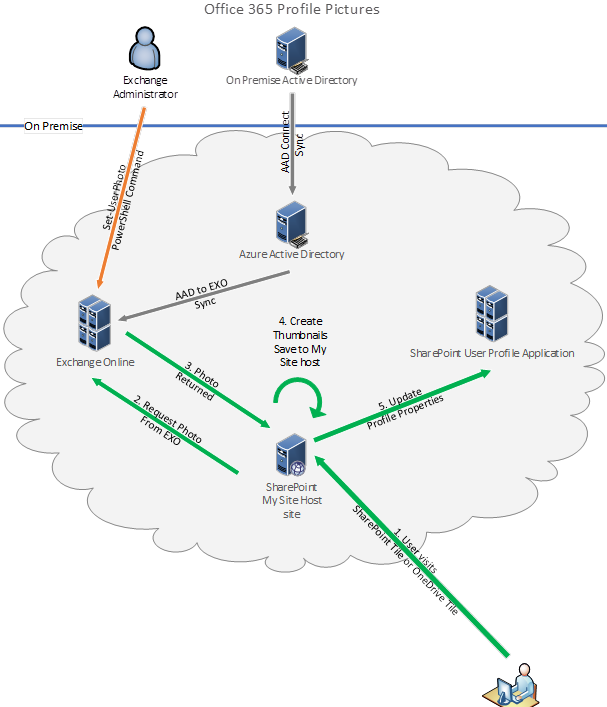
How user profile picture synchronization works in Microsoft 365

From an historical point of view, various single services such as Exchange and SharePoint Online have been integrated into Office 365, or as it´s named now, Microsoft 365. The platform shows user profile pictures, and syncs that between the services, depending on the service (licenses). Since this can be a little bit confusing, we now have a good article explaining the user profile sync. User profile picture sync is a important topic for every organization using Microsoft 365. In the end, you want to see users picture in people pickers, in Teams chats and calls, in Exchange, Delve, and so on. We have written some articles about that topic as well in the past, see SharePoint Online UserProfiles and the story about synchronizing with Azure Active Directory-Part 1, Part 2, How user profile synchronization works in Office 365 services and How the UserProfile in Azure Active Directory and how a Mailbox in Exchange Online looks like (using Microsoft Graph). We also have developed a solution for syncing user profile pictures from on premises systems to Microsoft 365. If you are interested in that, pls. contact us. ...

July 1, 2020 · 2 min · Toni Pohl
Run a PowerShell script as a different user

Run a PowerShell script as a different user

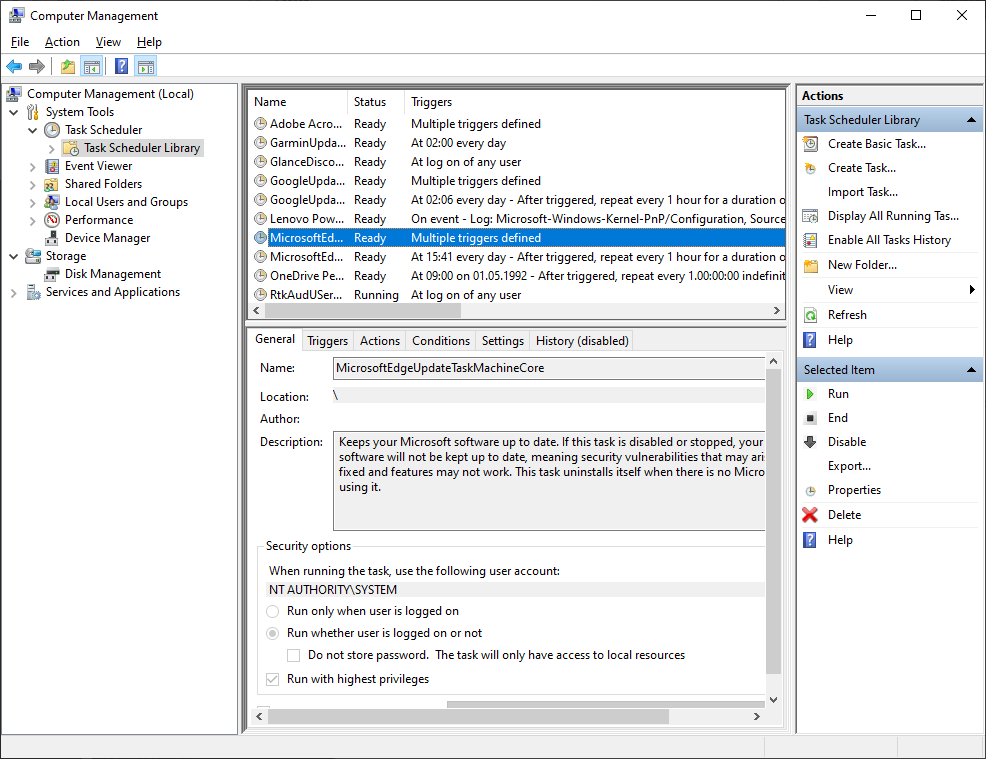
Sometimes it´s required to run a script as a service user on a Windows machine, e.g. for reading file shares as a different user with different permissions or similar tasks. You can easily do this using the following two methods. Method 1: Run a task as different user with Scheduled Tasks The first method is to create a new basic task in Computer Management / System Tools / Task Scheduler / Task Schedule Library. ...

June 25, 2020 · 3 min · Toni Pohl

Watch the sessions of GalacticSummit

Galactic Summit was THE Microsoft 365 online conference that happened on June 2nd and June 9th, 2020 on USS Defiant, USS Voyager, USS Enterprise, USS Discovery and La Sirena with over 8000 attendees. You can now watch the sessions online! Thanks to the organizers Adis, Margit, Spencer, Elena and Fitz, the sponsors and speakers of #GalacticSummit for this great and free online event! See all sessions at www.collabsummit.space. Find our sessions here: Best practices to use Microsoft 365 for crisis communication requirements, Martina Grom ...

June 19, 2020 · 1 min · Martina Grom