Azure Logic Apps Toolbox 8-Secure your secrets with Azure Key Vault and Managed Identity

Azure Logic Apps Toolbox 8-Secure your secrets with Azure Key Vault and Managed Identity

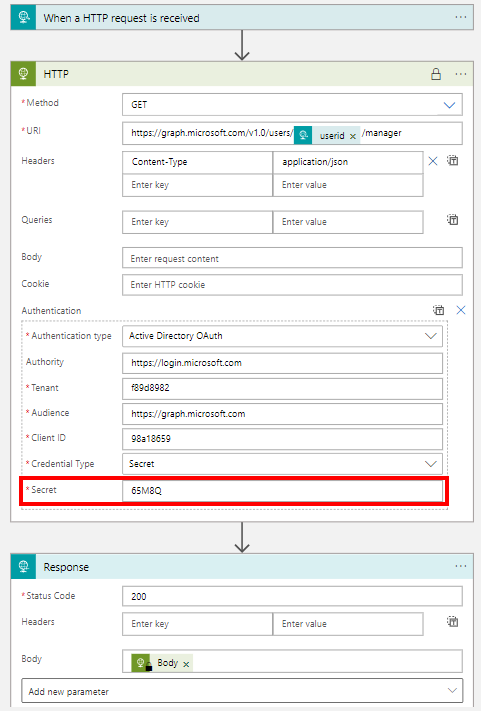
Credentials and secrets should be stored in a secure environment and not directly in an Azure Logic App or script. Azure provides the Key Vault service, which allows to store such secrets in a secure and controllable way. See how this works here. What is a secret? The Microsoft documentation of Azure Key Vault describes secrets follows: “A secret is anything that you want to tightly control access to, such as API keys, passwords, certificates, or cryptographic keys.” at Azure Key Vault basic concepts and at Azure Key Vault security. So you want to store ALL secrets in a safe location, in a Key Vault, and access them from other services. This can be done within Azure resources with a Managed Identity (see below). In this article we will focus on using an Azure Key Vault and storing such secrets and accessing them later in this step-by-step guide. ...

April 24, 2022 · 8 min · Toni Pohl

Free Book Inside Azure Management v3

Are you interested or already working with Microsoft Azure? Download the freshest and latest version of the free e-book “Inside Azure Management v3”. This preview release of “Inside Azure Management” is now available with more than 500 pages in 16 chapters covering topics like implementing solutions, containers, migrating workloads, hybrid, automation, backup, costs, governance, monitoring and alerting, analytics, and more. Check it out! The e-book already has about 30.000 downloads and is written by Microsoft MVP´s. “Inside Azure Management” can be downloaded at Free Book: Inside Azure Management v3. ...

March 30, 2019 · 1 min · Martina Grom
Groups Governance Toolkit Part 4-Ownerless Groups

Groups Governance Toolkit Part 4-Ownerless Groups

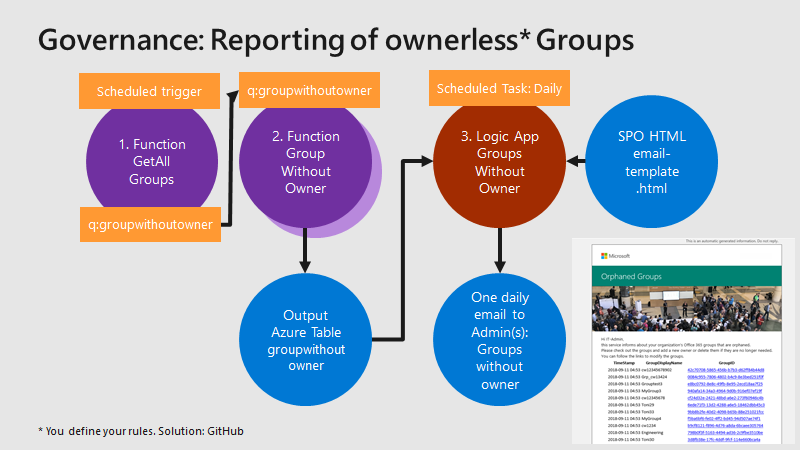
In this multi-part series we show you how to handle the Office 365 Groups and Microsoft Teams governance toolkit. The next article cover the governance part of our Groups Governance Toolkit.Imagine your company policy requires at least 2 owners per Office 365 Group or per Microsoft Team. In this part, we want to monitor all groups that are ownerless (orphaned), or do not comply with our organization’s policies. The IT department shall get the information of all groups and teams where there are no owners or not enough owners and the possibility to fix that. Read below how this can be accomplished. ...

February 13, 2019 · 5 min · Martina Grom