Get the most value from your Azure investment

Get the most value from your Azure investment

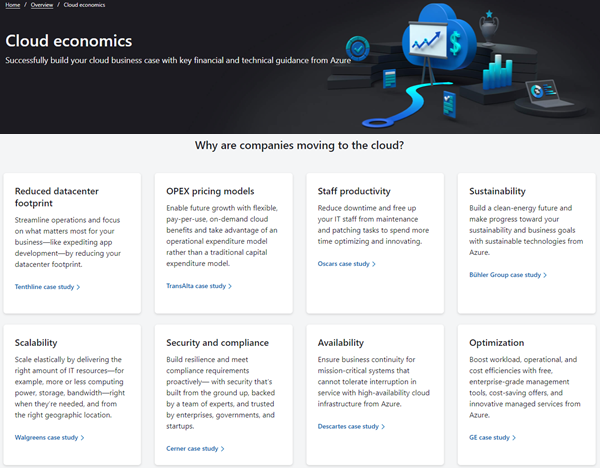
Are you still thinking of ways to move to the cloud with certain services? Well, the Cloud economics site could help. For working with the Azure cloud, Microsoft provides the Cloud economics public website with information how to get the most value from an Azure investment. Open it it at Cloud economics. On the website, potential customers can find a bunch of information about key guidelines for common technical and financial considerations, and reasons, why companies are moving to the cloud in case studies. Also, there is a PowerPoint document with recommendations available to download at Financial and economic considerations for cloud migration. ...


August 18, 2021 · 2 min · Martina Grom
Defining the skills citizens will need in the future world of work

Defining the skills citizens will need in the future world of work

Today´s just a short reading tip from McKinsey.com: Defining the skills citizens will need in the future world of work. The Covid crisis has undoubtedly changed the way we work today. At McKinsey Insights, Marco Dondi, Julia Klier, Frédéric Panier, and Jörg Schubert published an interesting article about the skills citizens will need in the future world of work. They find that the demand for technological, social and emotional, and higher cognitive skills will increase. Work in a digital environment, Digital literacy, and collaboration are just a few of them, as well as constant adaptation to new ways of working and new professions. Read the article at www.mckinsey.com. ...

August 15, 2021 · 1 min · Martina Grom
The Post Pandemic Hybrid Workspace with Martina Grom

The Post Pandemic Hybrid Workspace with Martina Grom

Richard Campbell, creator and host for Runas Radio, spoke with Martina Grom, CEO atwork, in an online conversation about hybrid workspaces, governance challenges of Microsoft 365 hybrid workers, and the migration into the Cloud during the pandemic. In this article, we summarized for you the critical insights from the marvelous 30 minutes conversation. The work-life balance equilibrium In addition to the threat to public health, economics, and social disruption, the world of work has been profoundly affected by the pandemic. Based on this, employees started to identify their work differently since there has been more flexibility within the pandemic. Therefore, many people figured out what works best for them – from starting early up to doing their work lately. Next to that, the work environment changed a lot since children, pets, and other family members became part of the daily routine when working from home. ...

August 11, 2021 · 3 min · Mercedes Orasch
Delegate365 changelog 9.2.3-Add users to groups

Delegate365 changelog 9.2.3-Add users to groups

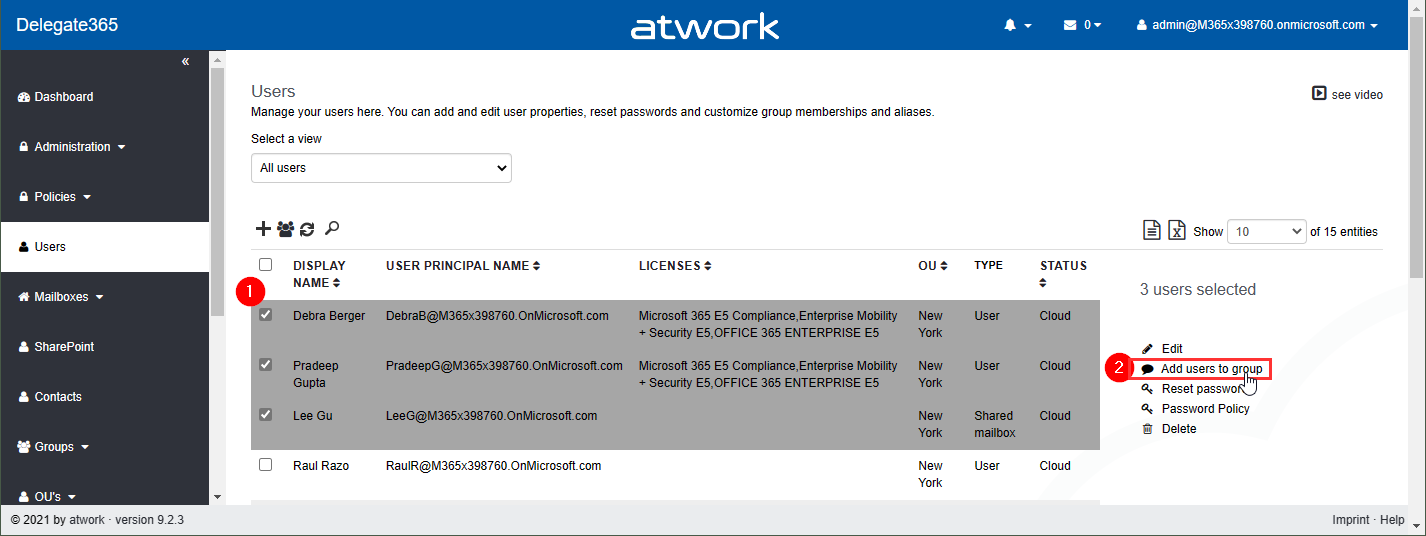
Delegate365 v9.2.3 brings a fix for the Message Trace function and offers a mechanism to add multiple users to one or more groups directly from the user list. See it here. Bulk add users to groups: In the users list, select more than one user. The menu on the right then shows the new option “Add users to group”. In this sample, 3 users are selected: Debra, Pradeep and Lee. The panel “Add users to group” opens and allows to select multiple groups of all types: Security groups, Distribution Groups, and Microsoft 365 Groups. The admin can search for the groups and add them to the Groups picker. By clicking on the Save button, a confirmation popup appears. When clicking Ok, the selected users will be added as members to these groups. A quick toast message shows the result in the bottom right corner. If the user already was a member of a group, this is ignored. ...

July 26, 2021 · 2 min · Toni Pohl
atwork launched Cloud Hub  the first Microsoft Teams App that lets you receive important news directly from your Microsoft Tenant

atwork launched Cloud Hub the first Microsoft Teams App that lets you receive important news directly from your Microsoft Tenant

The atwork-team is beyond excited that we recently launched our first Microsoft Teams App – Cloud Hub. With Microsoft 365 being an evergreen service, it is sometimes hard to keep up with everything which comes into your Tenant. Cloud Hub solves access regulations to the Message center and provides anytime access for Change Managers and Operations to be always informed about what is new. Cloud Hub supports your evergreening and target operating model with instant information for your Team. ...

July 19, 2021 · 2 min · Mercedes Orasch
Microsoft Teams Tip set a status message in guest tenants

Microsoft Teams Tip set a status message in guest tenants

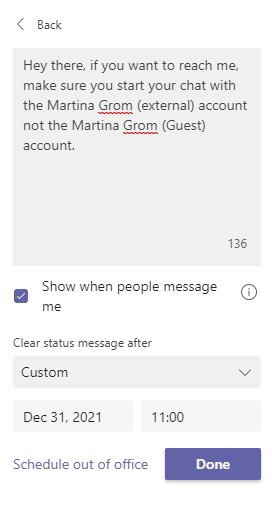
Some of us are part of many Microsoft Teams Tenants as guests. At least for me it happens very often that people try to reach me in their home tenants and they start a chat with my Martina Grom (Guest) account. Those messages likely get a reply from me only if I am currently signed-in into those tenants – most part of the day I am just signed into my home tenant. So the idea for using Microsoft Teams as an instant messaging service is failing here. ...

July 14, 2021 · 1 min · Martina Grom
Message Trace in Delegate365

Message Trace in Delegate365

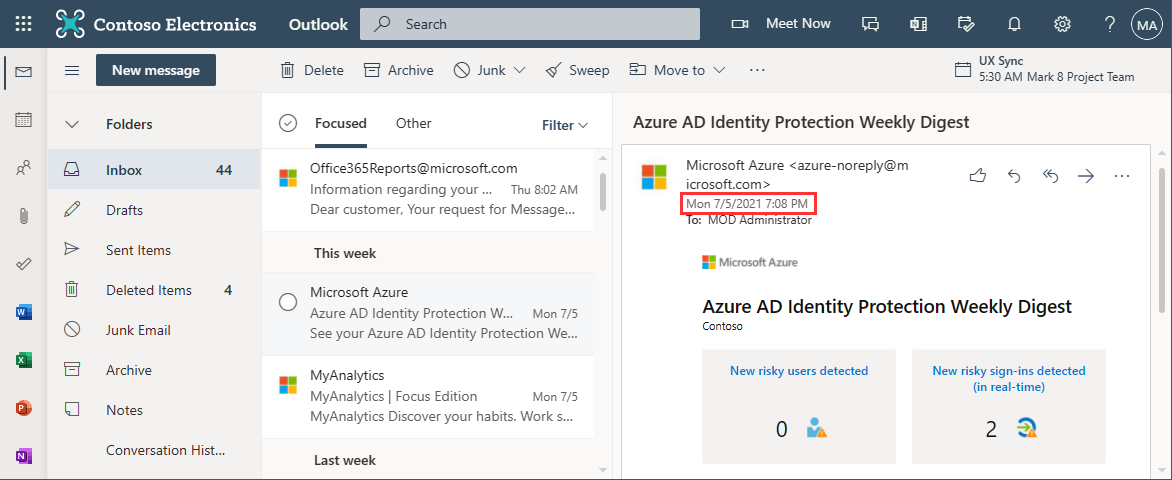
When you run a message trace operation to get status information about specific emails, the result can vary, depending on time zone settings. See a sample here. Show messages in the mail client In this sample, we work with an email sent from azure-noreply@microsoft.com. In Outlook we see the timestamp at Mon 7/5/2021 7:08 PM (2021-07-05 19:08). Message Trace in Delegate365 In Delegate365, admins can run a message trace to get information about the delivery status. When we run the message trace with the filter Startdate 2021-07-05 to Enddate 2021-07-05 - just this one day - and that user as recipient… ...

July 9, 2021 · 4 min · Toni Pohl
Power Platform Environments and Governance Tips

Power Platform Environments and Governance Tips

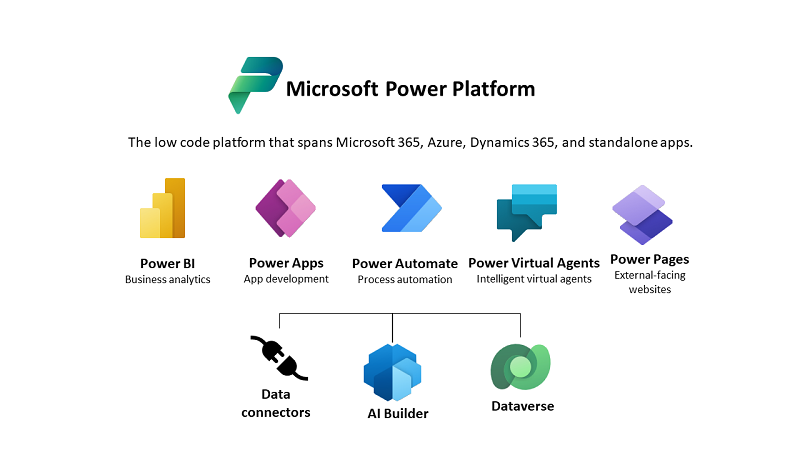
The Microsoft Power Platform enables individual solutions to be developed and business processes to be easily automated. When it comes to controlling the solutions, it is important to establish an IT governance in the organization. There are many areas and details about it. For this reason, I’ve put together a summary here with some news and helpful tips. The Microsoft Power Platform includes Power BI, Power Apps, Power Automate, and Power Virtual agents, leveraging the common infrastructure of the Microsoft Dataverse (the former Common Data Service) and Data Connectors. Dynamics 365 and the Power Platform are both deeply coupled with Dataverse and are held in containers called environments. A governance strategy usually starts with organizing the environments accordingly. Environments allow to separate Production, Test and Development. See more at Environments overview and at Microsoft Power Platform guidance documentation. ...

July 5, 2021 · 5 min · Toni Pohl
Delegate365 changelog 9.2.2-Manage group owners

Delegate365 changelog 9.2.2-Manage group owners

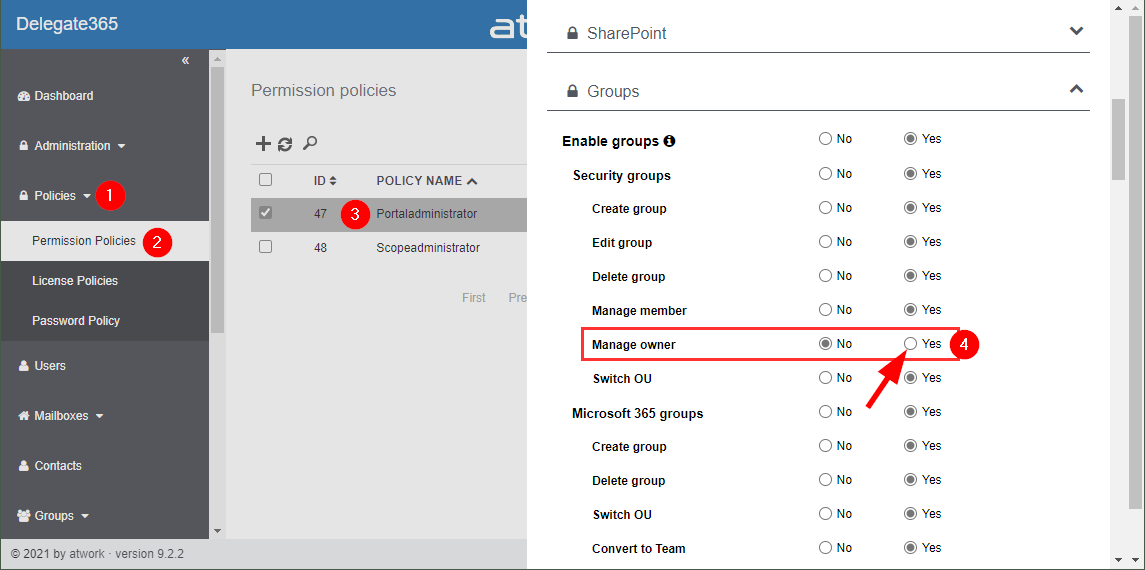
Delegate365 v9.2.2 allows to manage group owners. The permission policies have been extended and the current admin can add him- or herself or additional group owners for Security Groups and Microsoft 365 Groups. See a description of the latest features here. Enable (or disable) the manage owner feature: To enable the “manage owner” feature, you have to set the corresponding permission policies in the Groups - Security Groups - Manage owner from No to Yes, as here. Then, click on the Save button at the page end of the permission panel. By default, this new setting is disabled. So, don´t forget to switch it on, if your admins shall be able to set the group owner for security groups (in the same way as for Microsoft 365 Groups). Once the setting is set, it will be effective for all admins that have that permission policy assigned. To learn more about setting permission policies, see here. ...

June 16, 2021 · 4 min · Toni Pohl
Delegate365 changelog 9.2-PowerShell module update

Delegate365 changelog 9.2-PowerShell module update

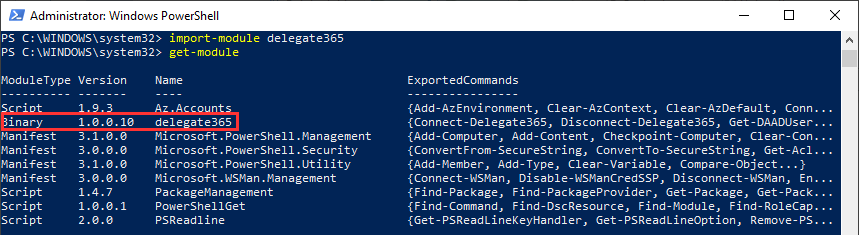
The Delegate365 PowerShell module got a small update to expand a user´s assigned licenses, license plans and proxy addresses. See the following description. See the description at https://github.com/delegate365/PowerShell how to use the Delegate365 PowerShell module- Check the Delegate365 PowerShell module version First, ensure you have the latest version of the Delegate365 PowerShell module installed. Check with Get-Module as here. The version must be 1.0.0.10 (or in future a higher version). ...

June 11, 2021 · 2 min · Toni Pohl