Delegate365 changelog version 7.3-new reports

Delegate365 changelog version 7.3-new reports

The newest version 7.3 of Delegate365 provides a complete new reports module that replaces the old reports section. See the benefits and the details of the new Delegate365 reporting engine and how to use it for all your Delegate365 admins with just their entitled data. Learn about the details here. New reports menu: The old reports menu was replaced by the new module. Now, there are four boxes with a description, the available reports, scheduled reports and finished reports. All Delegate365 Admins can now select from new reports (1 and 2), activate a notification when finished (3) and start a report job with the Submit button (4). This creates a task in the schedules reports list (5). A job picks that task and executes it after a couple of minutes. When the report has been created, a notification can be sent to the report owner and the report shows up in the finished reports list (6). Refresh updates the reports boxes (5 and 6) with the current status if needed. ...

February 12, 2018 · 6 min · Toni Pohl
Project Online Workflow error when reading flag field

Project Online Workflow error when reading flag field

In November 2017, a support article was published how to Troubleshoot Project Online workflows. One described error is “Custom field CUSTOM_FIELD_GUID does not have a value set for project PROJECT_GUID”. There is a special case when reading an Enterprise Custom Field of type Flag, as mentioned in a Note. Flag fields have one special behavior: You can’t set a default value for this type of fields. The value is blank, until you changed it manually at least one time – even if it is displayed as No on Project Detail Page or in Project client. Therefore, you can’t access this value from within a SharePoint Designer workflow until the first change. ...

February 11, 2018 · 6 min · Barbara Henhapl

Joining the Microsoft Graph Community Calls

Microsoft Graph is the unified endpoint to programmatically access resources and services in Office 365 and Azure Active Directory. To inform the developer community with the latest news, the Microsoft Graph team organizes a monthly Microsoft Graph API community call. We, Toni and I, were happy to contribute a use case at the last call showing a scenario of an Office 365 Group orchestration workflow with PowerApps, SharePoint Lists, Azure Functions and Microsoft Graph. ...

February 10, 2018 · 2 min · Martina Grom

Download the free Azure Serverless Computing Cookbook

Serverless Computing is popular. With Microsoft Azure, IT people can concentrate on their tasks and apps without taking care of managing any server infrastructure. One of the key Platform-as-a-Service (PaaS) components from Microsoft is the new, extensive Azure Functions service. Learn how to use Azure Functions with the cost-free Azure Serverless Computing Cookbook! The “Azure Serverless Computing Cookbook” book was written by Praveen Kumar Sreeram and reviewed by our colleague Florian Klaffenbach, published by Packt Publishing Ltd. last fall. You can download the free ebook in the Azure Resource Center at Azure Serverless Computing Cookbook. ...

February 3, 2018 · 1 min · Martina Grom
Working with Exchange Mailboxes and Groups as members

Working with Exchange Mailboxes and Groups as members

When working with Office 365 and Exchange services, it can be helpful to work with groups instead of users, for example, for allowing a group to have full access to a shared mailbox. In this case, there are some things to consider. See the working result in this documentation. The scenario First of all, I need to clarify, I’m not an Exchange guy. So, perhaps I’m describing a scenario that’s fully clear for Exchange Admins but I think, this could be helpful for other Office 365 Admins. This sample is my summary to show the solution for that specific request: How to set full access permissions to a shared mailbox, a resource or a distribution list for a group (and therefore to all members of that group). ...

February 2, 2018 · 3 min · Toni Pohl
Delegate365 changelog version 7.2-additional sync rules and more

Delegate365 changelog version 7.2-additional sync rules and more

With Delegate version 7.2 there come some new and useful features especially in the sync rules. See the details described here. Sync Rules: Groups OU-assignment by new name rules: All group rules now offer additional options in the Property dropdown allowing to assign a group to an OU by its name. To get the OU name out of the group name, the OU name must be the prefix of a name and a predefined separator must be used. The options include the following separators: [space] , [underscore] , [hyphen] –, [point] ., and [slash] /. To clarify the mechanism, the options show a sample. So, if a group Display Name is set to “New York_Group”, the sync rule strips down by the separator “” and uses “New York” as OU name and “Group” as group name. So, group “Group” is automatically assigned to OU “New York”. Take care when using a normal space character as separator: Then, the OU name can only be one word, for example: “New York Group” would result in an OU “New” and the group name is “York Group”. As workaround, the OU-name could be named with a hyphen “New-York” or similar. That’s the purpose, to use a Display Name for automatic OU-assignment instead of object properties. Now, admins can use this feature additionally if needed for the following objects: Distribution Groups, Office 365 Groups, Contacts, Resources, Shared Mailboxes and Security Groups as marked red in the following screenshot. ...

January 31, 2018 · 6 min · Toni Pohl
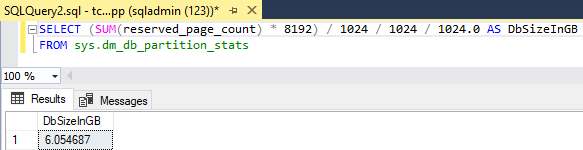
How to restrict access and to connect to a single SQL Azure database only

How to restrict access and to connect to a single SQL Azure database only

As of today, many organizations use various Microsoft Azure services. SQL Azure databases are popular among them. Often, IT Administrators want to allow departments or vendors full access to just one specific SQL Azure database and to restrict their access to other resources. See here how this works. Use SQL Management Studio or SQL Operations Studio When working with SQL databases, installing the SQL Management Studio (SSMS) is very helpful. You can get the latest version from Download SQL Server Management Studio (SSMS) for free. Alternatively, you can use the new lightweight and cost free SQL Operations Studio. ...

January 27, 2018 · 4 min · Toni Pohl
Snapshots of SharePoint Saturday Bremen 2018

Snapshots of SharePoint Saturday Bremen 2018

This weekend, on the January 20th, the first SPS North Germany/Bremen took place with great sessions in a very cool location. See some snapshots here. For #SPSBRE, we had a very cool location in the Bremen Harbor at Schuppen Eins (“shed one”). When entering the former harbor storehouse building that was built in 1959, the automobile Oldtimer Boulevard hits you with more than 60 unique cars, embedded in a modernized glass structure with a cafe, shops and a garage specialized in repairing old-timers. So, we had a lot to watch – and to learn. ...

January 21, 2018 · 1 min · Toni Pohl

CU at SharePoint Saturday Bremen 2018

We are looking forward to see you at the SharePoint, Office 365 and Azure community event next week on January 20, at the first SharePoint Saturday North Germany 2018, in the city of Bremen. There will be a lot of interesting sessions and a great speaker’s lineup. CU there! SharePoint Saturday North Germany / Bremen 2018 Saturday, January 20, 2018 Schuppen Eins, Konsul-Smidt-Str. 22, 28215 Bremen SPS Bremen will deliver a bunch of hot topics, see speakers and sessions! We from atwork have three sessions and will inform about these topics: ...

January 14, 2018 · 1 min · Toni Pohl
1st MVP Award for Dominik Hoefling

1st MVP Award for Dominik Hoefling

We are very happy to announce that Dominik Hoefling was awarded for the 1st Microsoft MVP Award for Office Servers and Services! Dominik has expertise in Microsoft Office 365 and is a recognized expert, MSL (Microsoft Learning) author, blogger, and conference speaker. See Dominik’s MVP profile. Dominik (@DominikHoefling) is a Senior Consultant for atwork deutschland GmbH. He currently works in Microsoft technologies, especially in Microsoft Exchange, Exchange Online and Office 365. He holds several Microsoft certifications including MCSA for Office 365, MCSE Messaging and MCITP Enterprise Administrator for Windows Server. Dominik also write technical blog posts for international companies and various topics about Exchange Hybrid deployments and Office 365. ...

January 2, 2018 · 1 min · Dominik Höfling