Self-service password reset for users in Azure Active Directory Editions

Self-service password reset for users in Azure Active Directory Editions

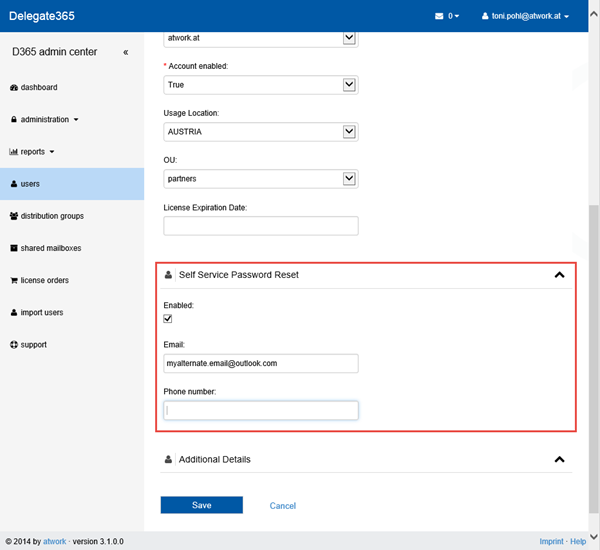
Since Microsoft´s Azure Active Directory (AAD) is constantly evolving it´s interesting to see the current status of features. Right now we want to point out the functionality of Azure Active Directory Editions in MSDN by December 10, 2014. AAD comes in three flavors: Free, Basic and Premium (see also here). Companies are often interested in relieving their IT with features like “Self-service password reset for users” (SSPR). In that MSDN article we see the support for the SSPR-feature for users in the three Azure Active Directory Editions: ...

December 31, 2014 · 2 min · Toni Pohl
Delegate 365 White Paper Update

Delegate 365 White Paper Update

As announced in April we created a Whitepaper for our product Delegate 365. Delegate 365 adds functionality on top of Microsoft Office 365 and works as an Add-On which delivers delegation features for entitled admins (and much more) in medium to large organizations using Office 365. Since we made a lot of enhancements and updates in Delegate 365 this year we now released an updated version of the Delegate 365 WhitePaper. ...

December 29, 2014 · 1 min · Toni Pohl
My experiences with the Microsoft Band

My experiences with the Microsoft Band

There are already many reviews about and around the Microsoft Band. I’ve mine now for about 6 weeks and I want to share my personal experiences and also some things I discovered so far. How it started Everything started with TechEd Europe in Barcelona. We shared an AirBnB apartment with some of my favorite Microsoft geeks and had a lot of fun during the week. Every morning, before the conference starts we had breakfast together and informed each other about the latest news in technology. It looked like that: ...

December 28, 2014 · 12 min · Martina Grom
Delegate365 changelog version 3.0Support Cases

Delegate365 changelog version 3.0Support Cases

With the new Delegate365 version 3.0 “notification center” feature there comes a new built-in support feature. In case of questions or issues in working with D365 it´s very easy to contact atwork for help. How to open a support case At the end of the left menu there´s a “support” link which opens the form. The support link is available for all admins, so for portal admins and standard admins. ...

December 15, 2014 · 2 min · Toni Pohl
Delegate365 changelog version 3.0 - Notification Center

Delegate365 changelog version 3.0 - Notification Center

Delegate365 version 3.0 includes a new feature called “notification center”. The notification center is reachable in the upper right corner of the blue title bar. There´s an envelope icon and the number of unread messages next to the logged in user as marked red in the following screenshot. Reach the notification center anytime Since version 2.9 the header and footer bars are always visible, so the notification center is visible any time. If there are no messages present, the envelope icon is also visible but shows the number 0. You can see all (read) messages with the menu “Read All Messages” in the pull down menu. ...

December 14, 2014 · 3 min · Toni Pohl
Comparing Yammer to Exchange Distribution lists

Comparing Yammer to Exchange Distribution lists

Recently I was part in a poll about retiring an Exchange Distribution list (DL) and move content to a Yammer group. Not surprisingly there are a lot of pro’s and con’s for and against it. From the comments why to stay in an Exchange DL or move forward to Yammer there were some interesting arguments and viewpoints. Today I will go through some of them and explain how you can handle that in either technology. ...

December 7, 2014 · 5 min · Martina Grom
How to use external users in SharePoint Online with a cost-free Azure Active Directory

How to use external users in SharePoint Online with a cost-free Azure Active Directory

We are using SharePoint Online (SPO) in many scenarios: for our own Intranet and we often create SPO Sites in our Office 365 tenant to collaborate with partners and for projects. Many projects last only for some months and after the work is finished the SPO site will be deleted. Since we don´t want to create not-our-company-users in our own Active Directory (AD) or in our synced Azure Active Directory (AAD) and assign an Office 365 license from our tenant it´s convenient to use users from another AAD and share the SPO site with them. ...

December 6, 2014 · 8 min · Toni Pohl
Free Windows 8.1 ISO Download for customers

Free Windows 8.1 ISO Download for customers

Customers who buy a new computer with Windows 8 or 8.1 preinstalled can run into problems when it´s necessary to insert the original Windows 8 medium (DVD or Image) f.e. for reinstallation – and they don´t have any medium because it was not part of the shipment. Till now it was hard to organize a Windows 8 medium. Now Microsoft offers a free download of Windows 8.1 for all versions for customers. They only need to have their own Windows activation key - and a boot medium (USB stick or DVD). ...

December 4, 2014 · 2 min · Toni Pohl
Delegate365 changelog version 2.9Setup Wizard

Delegate365 changelog version 2.9Setup Wizard

In Delegate365 version 2.9 the setup wizard for the primary configuration was slightly changed. The setup process must be run to configure D365 with any (existing) Office 365 tenant. The only things you need are the configuration password (provided by atwork) and the login and password of a global administrator of your Office 365 tenant, see also here. Do I need to run the setup? If you already received a Trial of Delegate365 with a new, preconfigured Office 365 tenant these steps are not necessary. This setup process is for organizations who want to use their own Office 365 (demo) tenant or for renewal of the D365 Service Account. If you got an email by atwork with the setup URL and a configuration password (code) you are able to complete the described steps here. ...

November 20, 2014 · 3 min · Toni Pohl
Delegate365 changelog version 2.9Shared Mailboxes support

Delegate365 changelog version 2.9Shared Mailboxes support

As described here we are pleased to announce the new Shared Mailboxes support in D365 version 2.9. Shared Mailboxes are an Exchange feature where many users can access a common mailbox, f.e. for departments or customer contact etc. Admins who are entitled to use this function now easily can manage Shared Mailboxes in D365. Besides, Shared Mailboxes do not need an Office 365 license since it´s a common mailbox for multiple (licensed) users. ...

November 19, 2014 · 4 min · Toni Pohl