Troubleshooting Active Directory Federation Services

Troubleshooting Active Directory Federation Services

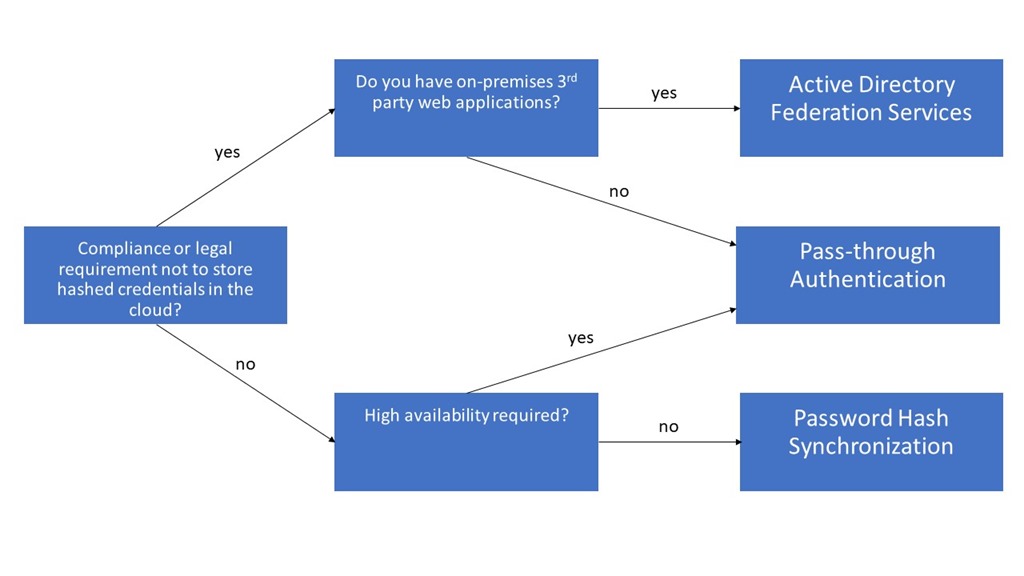
Enabling single sign-on for your users must not be a big deal. There are multiple hybrid identity authentication scenarios available to obtain single sign-on capabilities to your users: Active Directory Federation Services (AD FS): single sign-on, based on one identity in your on-premises Active Directory and publishes on-premises and cloud web applications. This is the most complex scenario and often used by organizations with 250+ seats. They are not only using Office 365 applications for single sign-on, but also for other Intranet and Internet applications to achieve SSO user experience. Password Hash Sync (PHS): same sign-on, which means you must authenticate again with your on-premises credentials accessing Office 365 services. Pass-through authentication (PTA): single sign-on, allows your users to sign in to Azure Active Directory directly validating the users’ passwords against your on-premises Active Directory. Seamless single sign-on: single sign-on, automatically signs your users in when they are on their corporate devices connected to your corporate network. Can be combined with either PHS or PTA. When should I use AD FS instead of other hybrid authentication methods? ...

January 4, 2018 · 4 min · Dominik Höfling
Delegate365 changelog version 7.1-Fixes, User Interface improvements, Sync Lock, MFA and more

Delegate365 changelog version 7.1-Fixes, User Interface improvements, Sync Lock, MFA and more

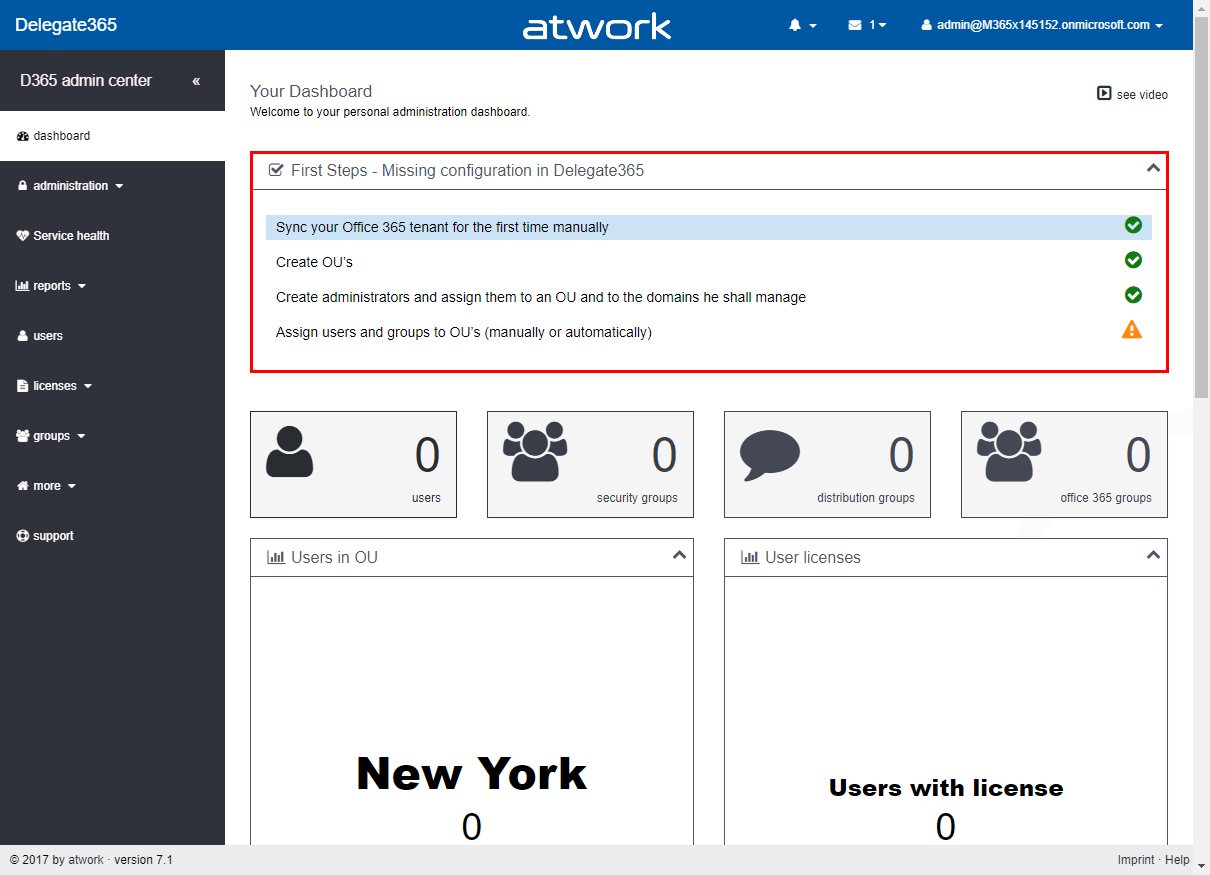
Right after Delegate365 version 7, we are releasing version 7.1 with some relevant updates. This version brings some fixes, an improved SyncOp, Sync Locking, First Start-support, a new Multi Factor Authentication automation feature, a streamlines sync rules experience, more videos and some updates. See the benefits and the details here. Dashboard-First Steps: To inform Admins if the basic Delegate365 configuration is missing, the dashboard now shows a First Steps box if necessary. This essentially helps new Delegate365 admins to show the required steps to configure Delegate365. Tasks that are already accomplished are marked with a green OK icon, open tasks are shown with an orange warning icon. So, this feature basically checks if they SyncOp has been executed to update the Delegate365 cache at least once, if at least one OU is existing, if at least one administrator has been assigned to one OU and one domain and if there are users assigned to any OU (so that there are users visible in Delegate365). The admin can click on the task to open the corresponding page to configure the desired properties. The following screenshot shows an example with three accomplished tasks and one open task. Once all requirements are satisfied, the First Steps box will no longer be visible (or show up again, if any requirement is missing). There is no manual method for switching the First Steps box on or off, it appears automatically to support the admin. Independently, Delegate365 checks if the connections to Azure Active Directory and Office 365 are valid as well. We think, this new feature makes sense in existing Delegate365 tenants and particularly in new ones. ...

December 4, 2017 · 7 min · Toni Pohl
Delegate365Cleanup unused apps

Delegate365Cleanup unused apps

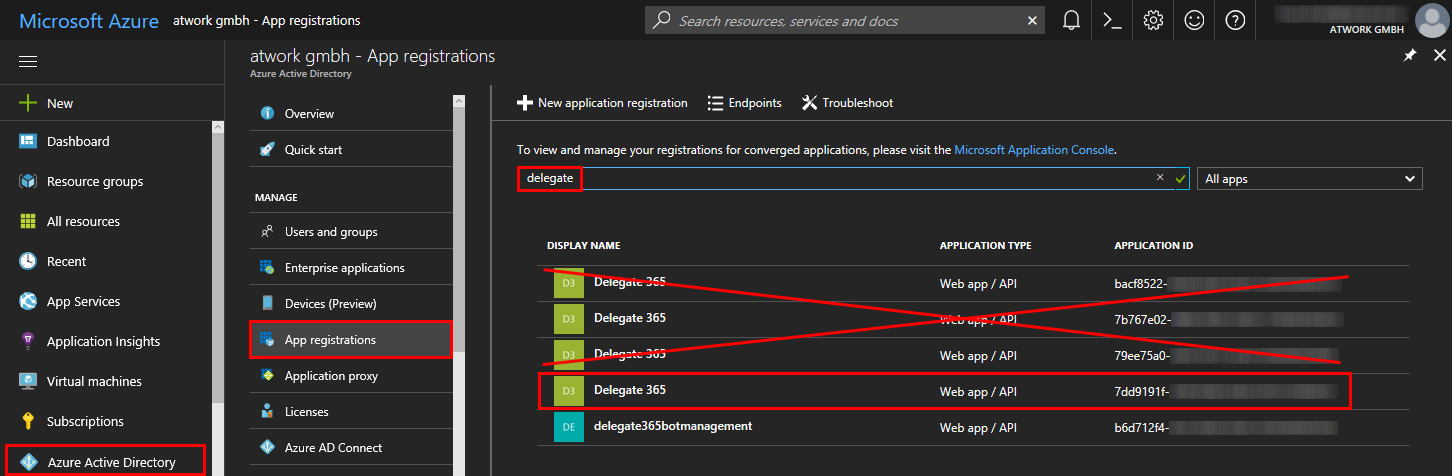
Delegate365 is registered as an app in the customer’s Azure Active Directory. When a Delegate365 setup is executed, it may be necessary that a new app is registered and is used from then on. So, what happens with old apps? See how to cleanup unused Delegate365 apps here. Technically, the app needs permissions to sign-in the user and to read data from the tenant. If new app permissions are necessary through an update (as this was the case with version 6.5 and the new service health feature), the Delegate365 setup must be re-run. When a new app is created, the Administrator then has to confirm the app consent for his users as described here. ...

November 1, 2017 · 2 min · Toni Pohl
Delegate365 changelog version 7.0-Office 365 Groups, Alias addresses, Logging and more

Delegate365 changelog version 7.0-Office 365 Groups, Alias addresses, Logging and more

We have been busy during summer time and we have been developing and testing our new Delegate365 version 7. We added new features like the support for Office 365 Groups and further useful extensions and made a technical refresh behind the scenes. So, the latest version of Delegate365 is available now and ready for updates. See the details described here. Delegate v7 is the successor of version 6.6. Besides new features, this is a major update since this version takes advantage of using new Microsoft APIs. So, here’s the news: ...

October 11, 2017 · 6 min · Toni Pohl
Delegate365 changelog version 6.6-Mailbox features and logging

Delegate365 changelog version 6.6-Mailbox features and logging

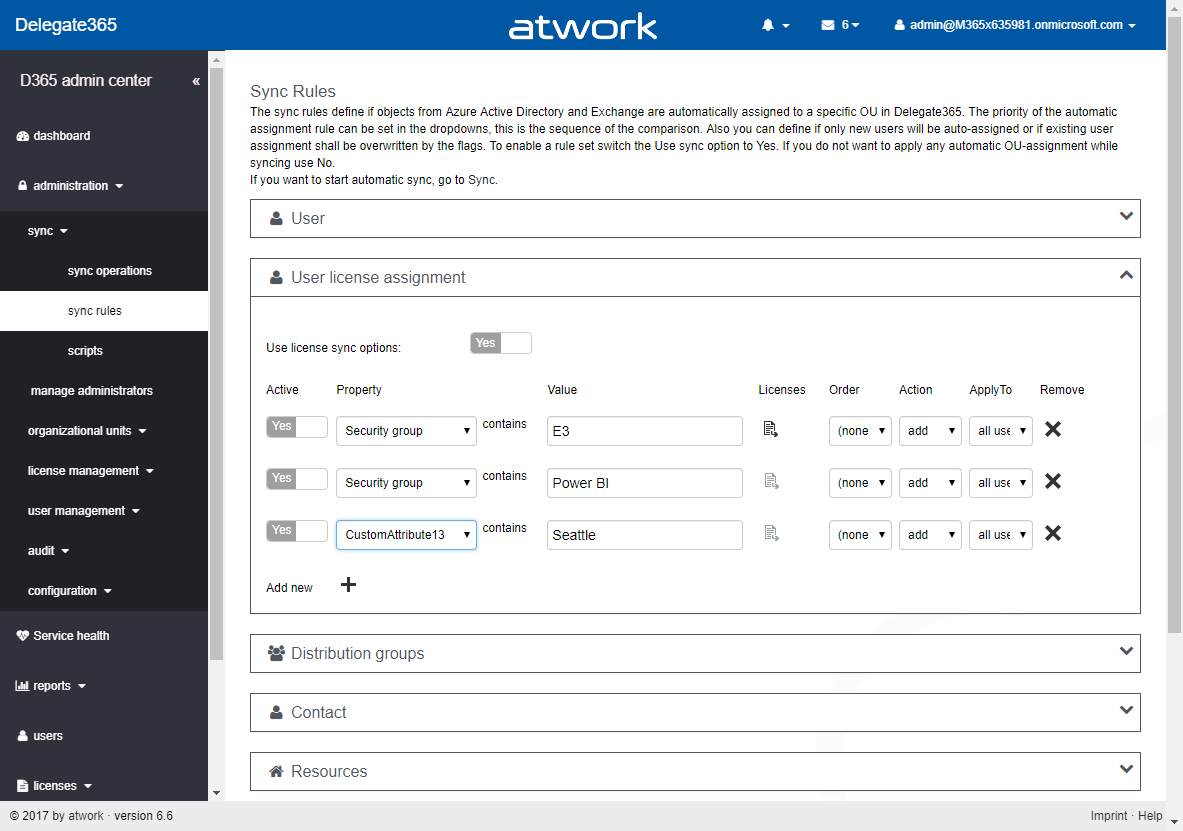
During summer time the next Delegate365 version was born that brings more mailbox and distribution group features, more sync rule options and some minor changes in logging and some fixes. See the details here. Delegate365 version 6.6 brings some improvements on the basis of version 6.5. New sync rules: The menu administration / sync / “sync options” has been renamed to “sync rules” in Version 6.5. Now, the “user license assignments” have been extended with additional options as in the screenshot below. A sync rule can now be switched on or off with the “Active” switch to simplify testing (“On” is the default setting for existing rules). The new “order” allows to reorder the rules. “Action” now allows not only to add Office 365 licenses, but also to remove the selected licenses, which was a often requested feature. “Apply to” allows to execute the rule against “all users”, “sign-in allowed” or “sign-in blocked” users. The new options deliver a much more granular control of license settings. The active sync rules are considered at each sync operation in Delegate365. Don’t forget to save any changes at the page bottom “Save” button! Remember, the more rules are enabled, the longer the sync operation will run, in large Office 365 tenants this might take hours, since every object must be checked and the operations will be executed. ...

September 12, 2017 · 4 min · Toni Pohl
Delegate365 and the Exchange issue update

Delegate365 and the Exchange issue update

In the last days, some customers of Delegate365 experienced a warning in the Delegate365 portal that informed about the failing communication to Exchange Online. This issue was caused by the Microsoft Exchange Online PowerShell endpoint. We are glad to announce that this issue should be fixed soon. Delegate365 informed users about the reduced functionality with a message “Access denied – please check the credentials of your Office 365 account…” when opening the yellow warning icon in the portal. ...

August 30, 2017 · 3 min · Toni Pohl
Delegate365-Working with License Assignments

Delegate365-Working with License Assignments

Delegate365 provides various automation tasks. One of these is the new License Assignment rule to automatically assign Office 365 licenses to users based on their user properties or on their group membership. See how this works in real world with a demo scenario here. The License Assignment is available since version 6.4. For details, pls. see the description here. This new feature allows to assign Office 365 licenses in a very custom way to users and runs at each Delegate365 synchronization operation, So, whenever a SyncOp runs, Delegate365 checks the sync rules and assigns licenses as specified. So let’s see how this works step-by-step as follows. ...

June 29, 2017 · 7 min · Toni Pohl
Delegate365 changelog version 6.5-Service health, logging and more

Delegate365 changelog version 6.5-Service health, logging and more

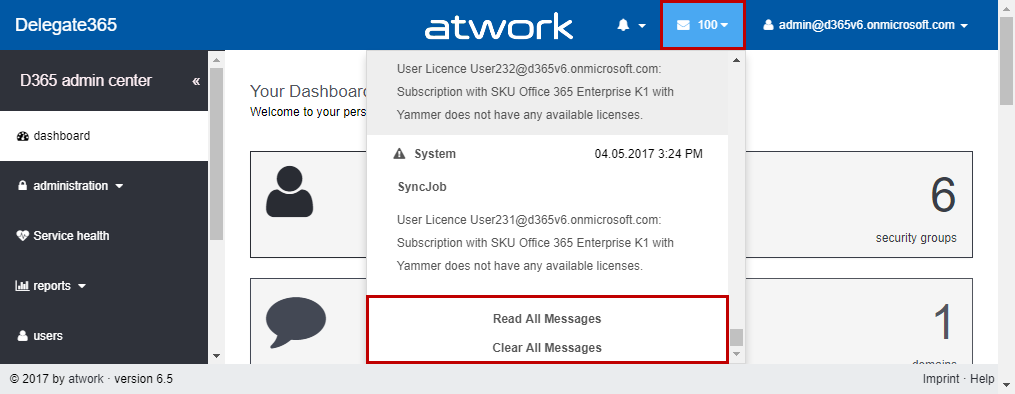
Delegate365 version 6.5 is here soon. With that update, there comes new functionality and some further improvements. Read the details here. Notification center: Now, the notification center shows just the last 100 messages (instead of all unread messages) to reduce the loading time for all unread messages that can be produced in a large number by the synchronization process. Anyway, you can access all messages as before by clicking the “Read all messages” link. “Clear all messages” sets all messages to “read”, so that they no longer show up in the notification center. This step improves the dashboard’s loading time. ...

June 28, 2017 · 6 min · Toni Pohl
Delegate365-Rerun the setup

Delegate365-Rerun the setup

Delegate365 runs as an app in Microsoft Azure on top of Office 365. You can connect to any Office 365 tenant with your Delegate365 portal. You just need a configuration password and a Global Admin user of your Office 365 tenant. The Setup must be executed once, as initial setup or during operation to renew the permissions of the Delegate365 app. See how the new and simplified setup process works here. ...

June 27, 2017 · 4 min · Toni Pohl
Delegate365-Working with Audit Logs

Delegate365-Working with Audit Logs

Delegate365 protocols all modifications of users, licenses and groups within the solution. This is essential to comprehend actions accomplished by Delegate365 administrators or by automated tasks. See how to work with that audited data here. So, all actions are logged to the Delegate365 Audit Log. In the current versions, the audit logs are saved to an Azure Storage Account. There are three ways of working with the audit data: See audit data within Delegate365 Access the data directly with Microsoft Storage Explorer Connect to the data with tools as Microsoft Excel or Power BI All methods are available for Portal Admins in the *administration / audit *menu and are described here. ...

June 26, 2017 · 7 min · Toni Pohl