Delegate365 changelog version 3.0 - Notification Center

Delegate365 changelog version 3.0 - Notification Center

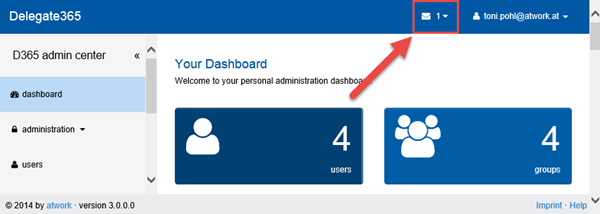
Delegate365 version 3.0 includes a new feature called “notification center”. The notification center is reachable in the upper right corner of the blue title bar. There´s an envelope icon and the number of unread messages next to the logged in user as marked red in the following screenshot. Reach the notification center anytime Since version 2.9 the header and footer bars are always visible, so the notification center is visible any time. If there are no messages present, the envelope icon is also visible but shows the number 0. You can see all (read) messages with the menu “Read All Messages” in the pull down menu. ...

December 14, 2014 · 3 min · Toni Pohl
How to use external users in SharePoint Online with a cost-free Azure Active Directory

How to use external users in SharePoint Online with a cost-free Azure Active Directory

We are using SharePoint Online (SPO) in many scenarios: for our own Intranet and we often create SPO Sites in our Office 365 tenant to collaborate with partners and for projects. Many projects last only for some months and after the work is finished the SPO site will be deleted. Since we don´t want to create not-our-company-users in our own Active Directory (AD) or in our synced Azure Active Directory (AAD) and assign an Office 365 license from our tenant it´s convenient to use users from another AAD and share the SPO site with them. ...

December 6, 2014 · 8 min · Toni Pohl
Delegate365 changelog version 2.9Setup Wizard

Delegate365 changelog version 2.9Setup Wizard

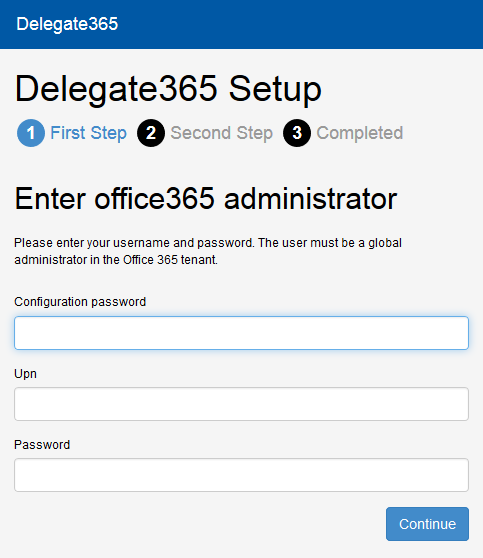
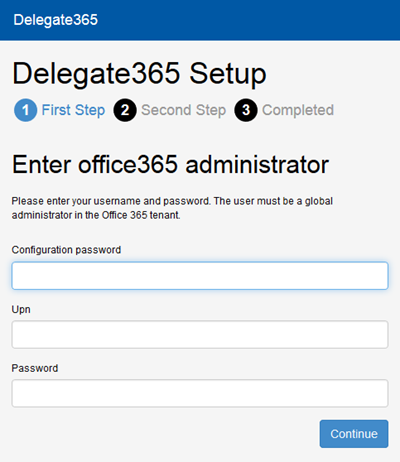
In Delegate365 version 2.9 the setup wizard for the primary configuration was slightly changed. The setup process must be run to configure D365 with any (existing) Office 365 tenant. The only things you need are the configuration password (provided by atwork) and the login and password of a global administrator of your Office 365 tenant, see also here. Do I need to run the setup? If you already received a Trial of Delegate365 with a new, preconfigured Office 365 tenant these steps are not necessary. This setup process is for organizations who want to use their own Office 365 (demo) tenant or for renewal of the D365 Service Account. If you got an email by atwork with the setup URL and a configuration password (code) you are able to complete the described steps here. ...

November 20, 2014 · 3 min · Toni Pohl
Delegate365 changelog version 2.9Shared Mailboxes support

Delegate365 changelog version 2.9Shared Mailboxes support

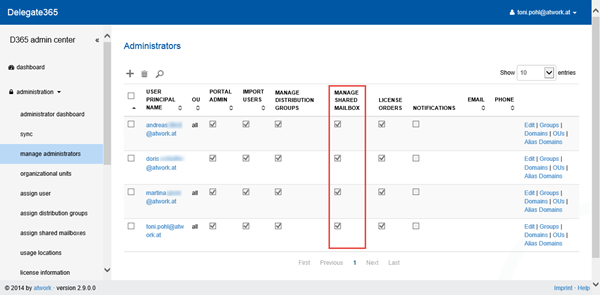
As described here we are pleased to announce the new Shared Mailboxes support in D365 version 2.9. Shared Mailboxes are an Exchange feature where many users can access a common mailbox, f.e. for departments or customer contact etc. Admins who are entitled to use this function now easily can manage Shared Mailboxes in D365. Besides, Shared Mailboxes do not need an Office 365 license since it´s a common mailbox for multiple (licensed) users. ...

November 19, 2014 · 4 min · Toni Pohl
Delegate365 changelog version 2.9 - New Design

Delegate365 changelog version 2.9 - New Design

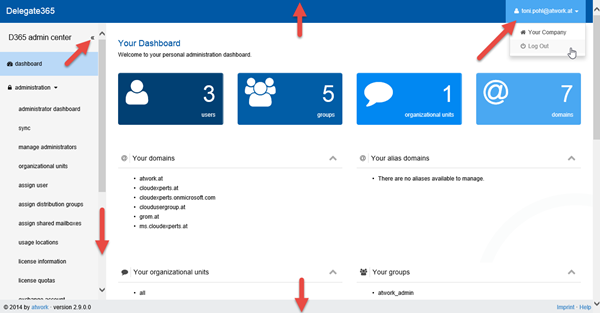
As described here we are pleased to announce the new design of our D365 portal in D365 version 2.9. We completely rebuilt the design and optimized the website performance to reduce load time. We now make use of the latest Bootstrap framework and optimized all Client-side Styles and Code to reduce load time as well as using the Javascript framework AngularJS and SignalR for receiving a great website performance. The whole website now uses these technics for a good user experience with immediate response times – the user sees what´s going on, f.e. when opening a distribution list manipulating members of a distribution list or when syncing data. ...

November 18, 2014 · 4 min · Toni Pohl
Delegate365 changelog version 2.9 announcementNew Design, New Sync and Shared Mailboxes support

Delegate365 changelog version 2.9 announcementNew Design, New Sync and Shared Mailboxes support

Delegate365 version 2.9 is a new milestone in the evolution process of our Office 365 Delegation Add-On product. Have a look at the great new features: New Design We completely rebuilt the design and optimized the website performance. We now make use of the latest Bootstrap framework and optimized all Client-side Styles and Code to reduce load time as well as using the Javascript framework AngularJS and SignalR for receiving a great website performance. The whole website now uses these technics for a good user experience with immediate response times – the user sees what´s going on, f.e. when opening a distribution list manipulating members of a distribution list or when syncing data. The page setup is renewed and the menu has been cleaned up somewhat. See the details here. ...

November 18, 2014 · 2 min · Toni Pohl
Delegate365 changelog version 2.9New Sync

Delegate365 changelog version 2.9New Sync

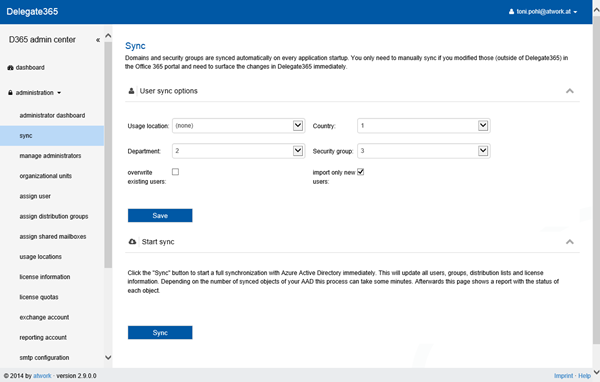
As described here we are pleased to announce the new synchronization function in D365 version 2.9. We completely rebuilt the sync process and added rules for automatic user assignment to specific OU´s. Why Sync? Since D365 needs to deal with (ten)thousands of users in an AAD D365 uses an cache layer to deliver a good user experience and performance. So changes which are made outside of D365 - like in the Office 365 portal, via PowerShell or another App – may not be visible immediately in D365. ...

November 18, 2014 · 8 min · Toni Pohl

Announcing Delegate365 version 2.9

In the coming week there will be the next update of Delegate rolled out. This will be Delegate version 2.9 which includes these updates: New Synchronization: We improved the sync processes (for domains, security groups, distribution lists and user and licenses) which now are combined in one simple step. The user import now can be configured with rules for putting users in specific OU´s depending on special properties (country, security groups, AAD properties…) ...

October 26, 2014 · 1 min · Toni Pohl
Delegate365 changelog version 2.8Setup Wizard

Delegate365 changelog version 2.8Setup Wizard

In Delegate365 version 2.8 there´s a new setup wizard included (as announced here). With this function companies no longer need to create a (temporary) administrator user for doing the setup process of Delegate365 but instead can setup their Azure Active Directory on their own for working with Delegate365. Prerequisites To configure your real company AAD with Delegate365 you get two access information by atwork: The Setup-URL (which usually goes like https://[yourcompany].azurewebsites.net/setup) and a configuration password (which is in fact a code) to give you the access for the setup process. This code is important and valid for this specific Delegate365 appliance. With that code you can setup the service accounts till the code is changed. More about that later. ...

October 25, 2014 · 5 min · Toni Pohl

Announcing Delegate365 version 2.8

Next week there will Delegate version 2.8 rolled out to all appliances. There will be new features included: Setup-Wizard: There´s a new setup wizard included, so that each customer can do the configuration (and renewal of the service account) of his D365 version on his own. New Synchronization: moved to version 2.9 (updated) More to come in the next version(s)… BTW: We added the update date information and bullets in the style sheet (which was missing) in the changelog on https://delegate365.com/changelog. ...

October 17, 2014 · 1 min · Toni Pohl