A year in review. 2023 is a wrap!

A year in review. 2023 is a wrap!

2023 was the year when we finally overcame the pandemic that affected many aspects of our lives. We resumed our normal activities while also applying the lessons we learned from a challenging situation, where we had to limit our travel, social interactions, and work remotely. From a business perspective, the year was very rewarding for us. Our company, atwork, received the Innovation award 2023 from Microsoft Austria for our AI4Good project, which uses AI to assist with sign language communication in various scenarios. ...

December 31, 2023 · 2 min · Martina Grom
Delegate365 changelog 9.7-Improvements

Delegate365 changelog 9.7-Improvements

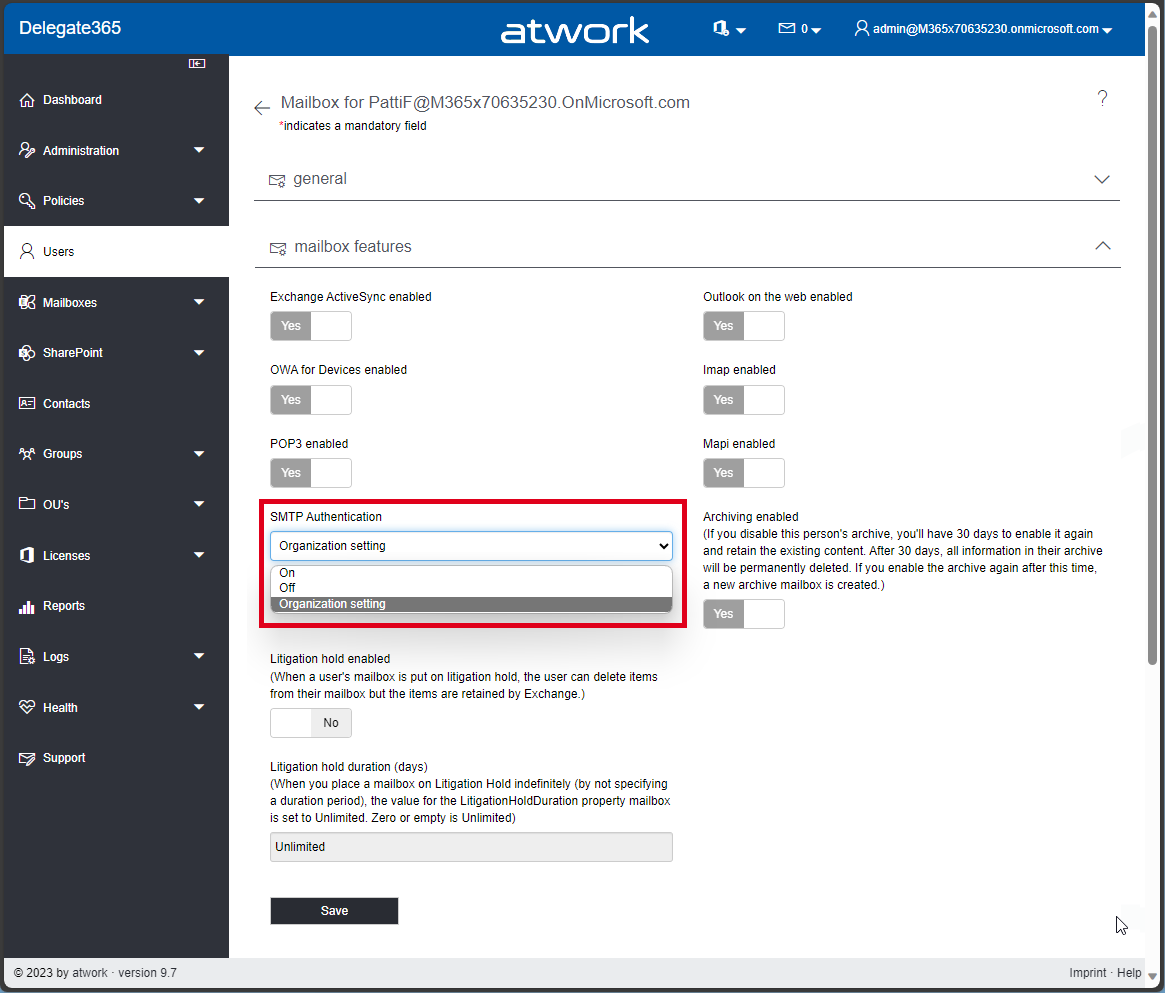
The current version of Delegate365 v9.7 comes with some improvements. See the details here. SMTP Authentication in Users / Mailbox settings: A new switch SMTP Authentication has been added to the Mailbox settings of a User. This allows, see Enable or disable authenticated client SMTP submission (SMTP AUTH) in Exchange Online. Usually, Microsoft recommends to disable SMTP AUTH in your Exchange Online organization and to enable it only for the accounts (mailboxes) that still require it. If security defaults is enabled in your organization, SMTP AUTH is already disabled in Exchange Online. However, admins can modify this setting in the Mailbox features section. The SMTP Authentication dropdown allows to set the setting to* On, Off, *and Organization settings. which means that the settings for the user are inherited from the organization´s transportation rules settings. This setting corresponds to the setting in the Microsoft 365 Admin Center, under Users / Active Users / Select a user / Manage Email Apps / Authenticated SMTP switch or with PowerShell. In PowerShell, this setting is set with Set-TransportConfig and Set-CASMailbox with an attribute named SmtpClientAuthenticationDisabled, where the organization settings are equal to $null, On means $false, and Off means $true. This is simplified in Delegate365 to be more understandable. ...
December 11, 2023 · 3 min · Toni Pohl
Dear Microsoft Entra Administrator, allow Guest users to leavelifecycle and governance for external user accounts

Dear Microsoft Entra Administrator, allow Guest users to leavelifecycle and governance for external user accounts

Sometimes being a guest in Microsoft Entra tenants feel like Hotel California: “You can check-out any time you like, but you can never leave!” It is this time of the year, where people get new phones and this comes also with some necessary cleanup task if you move from one phone to another. While the technology is really awesome today – connect old phone with new phone and transfers happen magically, there are some things that need to be done manually. Things like your Bank account access, cryptocurrency wallets, wallets, digital ID’s and last but not least – your multifactor settings. ...

October 21, 2023 · 5 min · Martina Grom
Azure Logic Apps Toolbox 9-More useful Tips

Azure Logic Apps Toolbox 9-More useful Tips

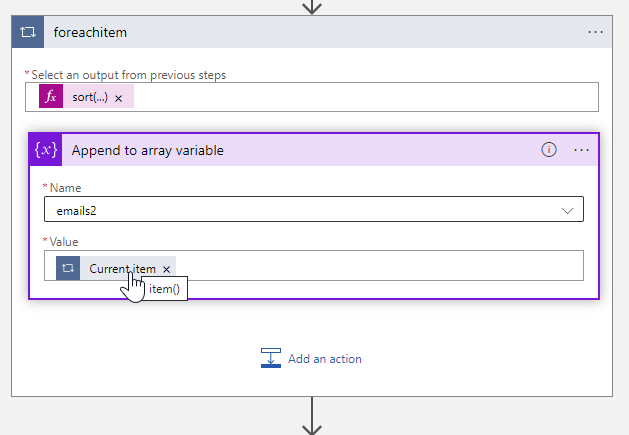
By working with Azure Logic Apps, data can be processed very quickly and conveniently. Sometimes small details are a challenge, like function names or correct syntax. This is especially true if you don’t work with logic apps all the time. In addition to our existing tips here in the blog, we have some other useful functions from various scenarios that will make your work with Logic Apps easier. If you are interested, we have already collected a number of tips in our blog in category Logic Apps. So, here are some more general tips for your flows. ...

October 5, 2023 · 4 min · Toni Pohl
Delegate365 changelog 9.6-Premium Reports

Delegate365 changelog 9.6-Premium Reports

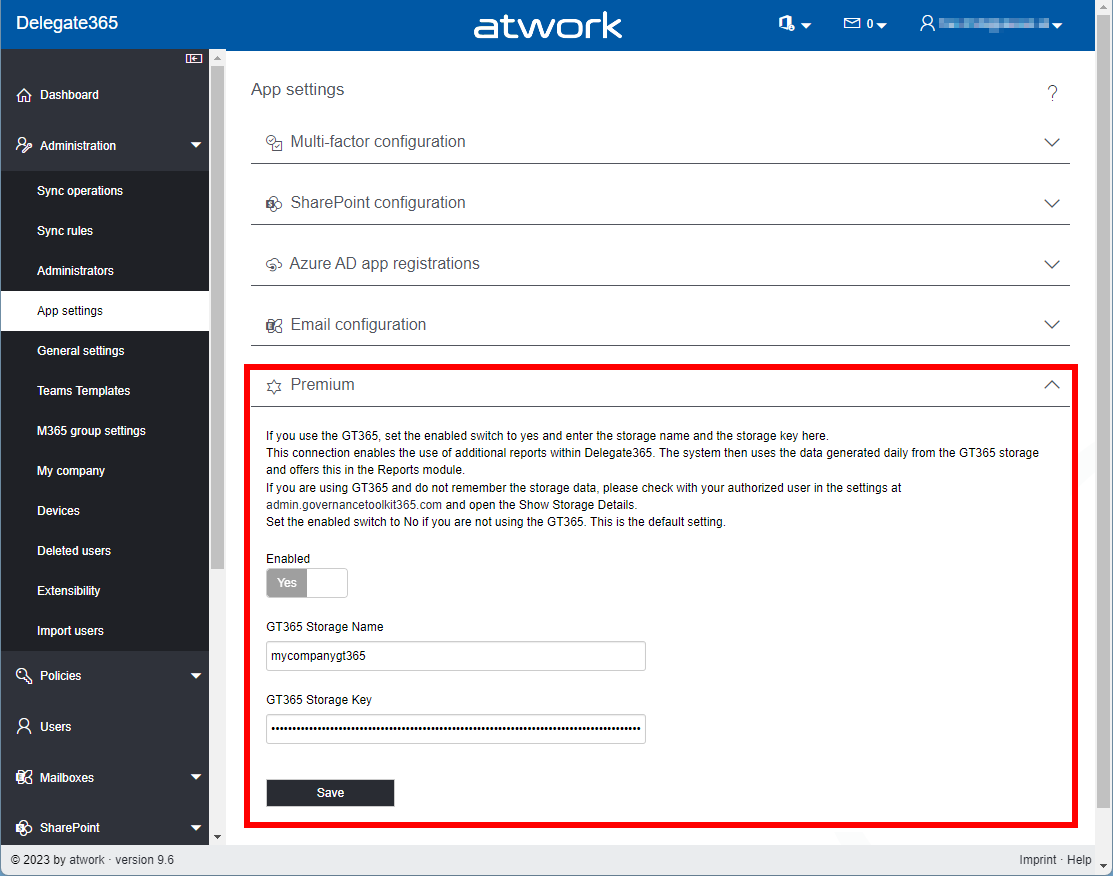
The latest version of Delegate365 v9.6 brings some improvements, fixes, and additional reports with the new Premium feature. See it here. Updating License Name Mappings during Sync: The background sync now checks the hash of a Microsoft service file that contains all M365-friendly license names (SKUs) and plan names. If there is a change in a Microsoft license name, the Delegate635 sync updates it´s database to always show the latest product and plan names in the licenses. With this feature, all Microsoft product names are automatically updated, regardless of what licenses the customer tenant has. If the naming is not consistent, this is unfortunately due to the quality of the data provided by Microsoft. ...

June 7, 2023 · 3 min · Toni Pohl
Delegate365 Applications

Delegate365 Applications

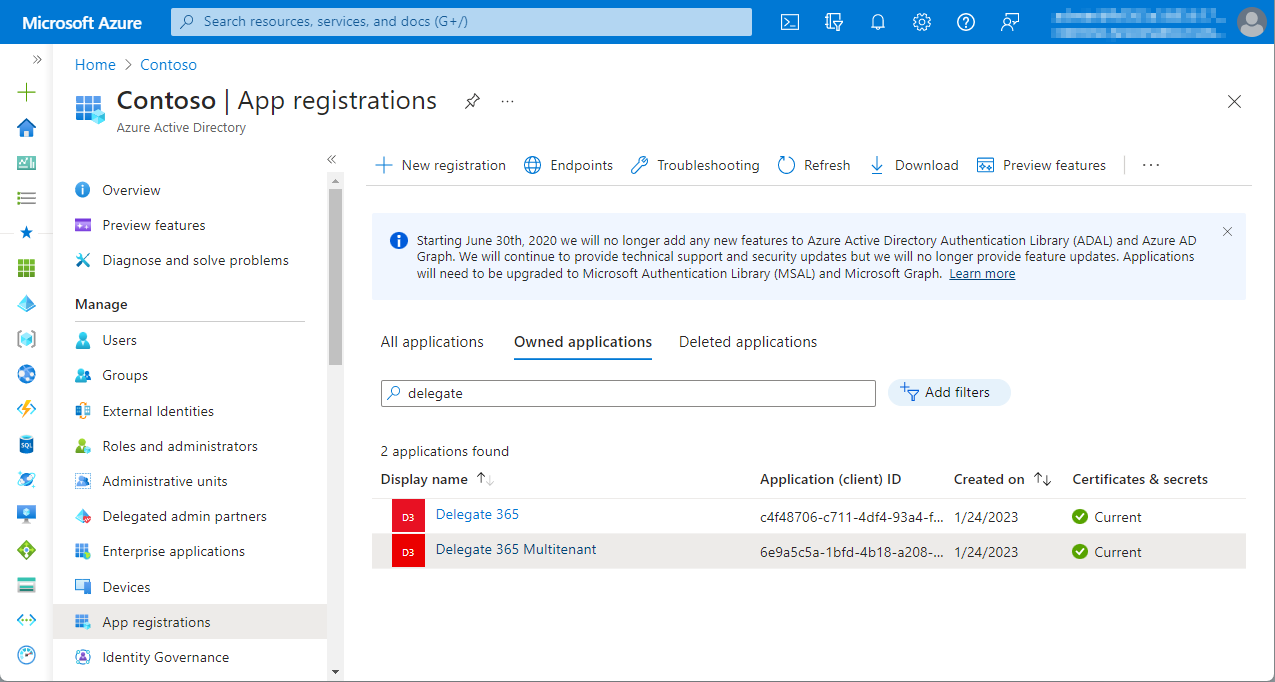
Delegate365 uses two Azure AD applications. They are created through the setup process. Application one is only used for the login process. The second application is used to perform the operations. To change application properties such as branding, terms or settings for multi-tenant apps, you can do this in your own Azure AD. Admins with application management roles such as global admins can change their tenant’s application settings in their Azure portal at Azure AD Active Directory/Registered Apps menu. Search for “Delegate 365”, as shown in the following screenshot. ...

April 25, 2023 · 2 min · Toni Pohl
Delegate365 changelog 9.5-Import group members

Delegate365 changelog 9.5-Import group members

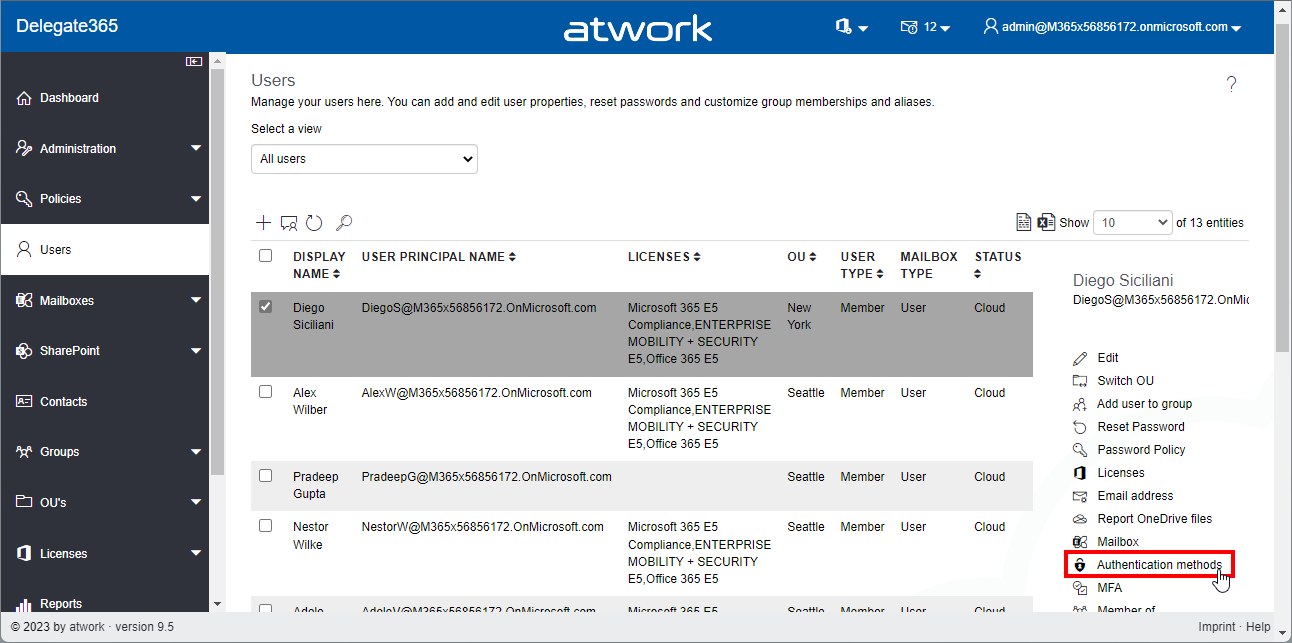
Delegate365 v9.5 brings some improvements for importing users from a list into groups, adding owners to groups, showing user authentication methods and some other benefits. See it here. User authentication methods: In the *Users *module, the panel has been extended and now shows all stored Authentication methods of the user. Select a user, and open the Authentication methods menu on the right. The Authentication methods panel opens and shows a list of all methods. Admins can remove outdated authentication methods here with the x-Icon. The question dialog “Do you really want to delete Password Authentication?” must be confirmed to delete a method. In this sample, we see some outdated authentication methods (without name, from 2017) that could be removed by the admin. *Cancel *closes the panel. Note: Users can modify or add their authentication methods anytime at https://aka.ms/mfasetup. ...

February 10, 2023 · 4 min · Toni Pohl
Delegate365 changelog 9.4-Dynamic Security Groups

Delegate365 changelog 9.4-Dynamic Security Groups

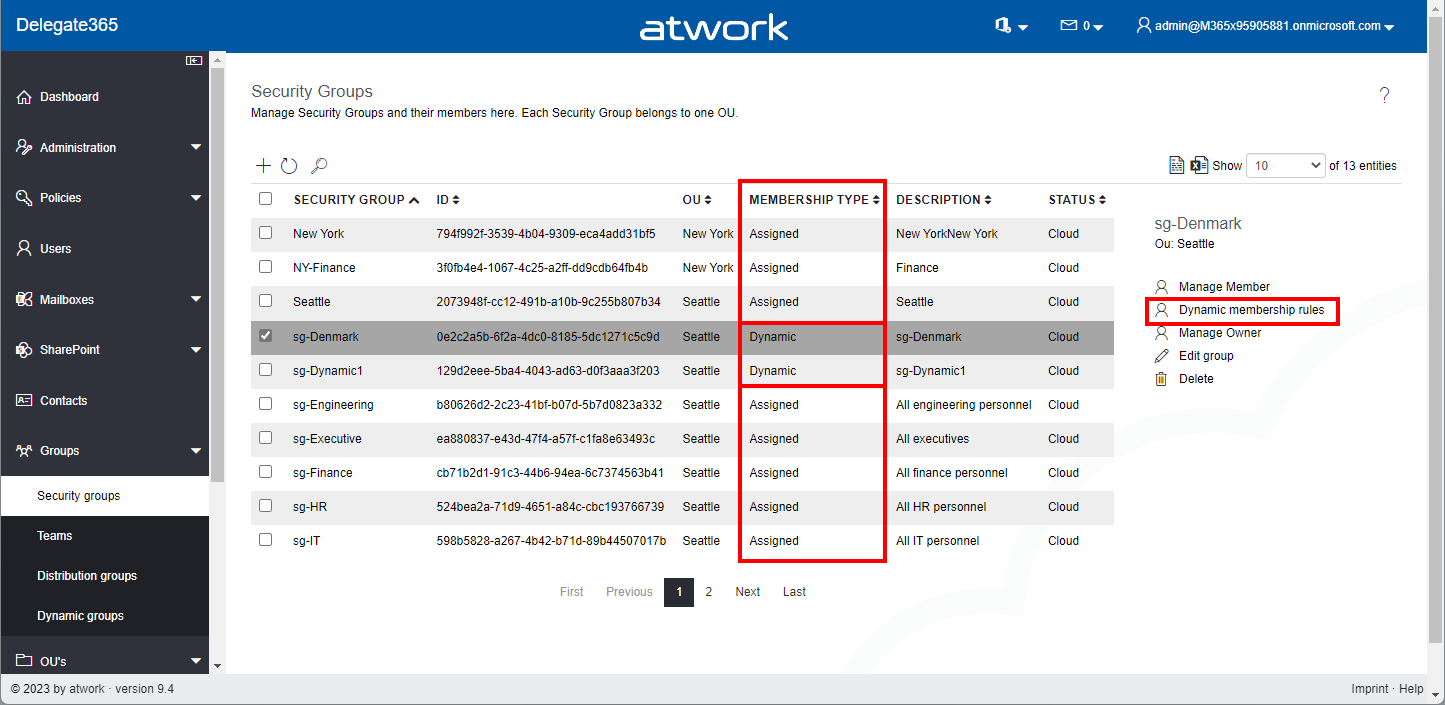
Delegate365 v9.4 brings support for managing dynamic security groups and some small fixes. See the details here. Dynamic Security Groups: In the Groups / Security Groups module, the list shows all security groups that are assigned to the administrator´s OU´s. In the list, there´s a new column Membership Type that shows if the security group is of type Assigned or Dynamic. Assigned means static users, Dynamic means a rule that includes all users whose properties match the condition (as in the M365 admin portal). The Membership Type cannot be changed for existing security groups. It must be defined when a new security group is created. If a security group is of type Dynamic, the menu on the right shows the option Dynamic membership rules. ...

January 13, 2023 · 3 min · Toni Pohl
Delegate365 changelog 9.3.1-Improvements

Delegate365 changelog 9.3.1-Improvements

We’ve developed a new update for Delegate365 with a number of useful improvements. All existing customers will be updated to Delegate365 version 9.3.1 in the next few days. See the details here. Licenses sorted by name: All licenses and plans are now sorted by name. This makes it easier for administrators to find the licenses and plans by name and adjust the corresponding license. Sorting is applied to both license names (SKU´s) and plans, in all modules. ...

December 21, 2022 · 3 min · Toni Pohl
Delegate365 new setup

Delegate365 new setup

Delegate365 v9.3 and later comes with a new setup. The new setup is required to use MFA enabled admins and to generate the Delegate365 app and certificate for authentication in the Microsoft 365 tenant. Follow the steps here to setup your Delegate365 tenant. Test Delegate365 These are the steps to open a new trial of Delegate365. Navigate to the Delegate365 website and click on the Trial link. Fill out the form and enter your Microsoft 365 tenant domain that you want to manage in Delegate365. ...

October 3, 2022 · 3 min · Toni Pohl