Delete unused Office Cache of OneDrive For Business and cleanup your Windows
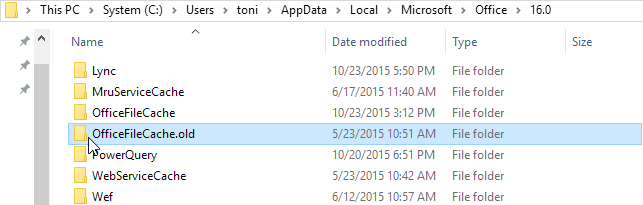
Today’s a quick tip: Get some more space on you local hard drive by deleting unused space of OneDrive For Business Synchronization. Navigate to your user directory and in the Microsoft Office version directory in Windows Explorer. The path is (for Office 2016 – otherwise use your installed Office version directory): C:\Users<username>\AppData\Local\Microsoft\Office\16.0 …check the size of the “OfficeFileCache.old” directory (which is 3GB in my case)… …and delete this directory. That’s it. ...