Forward emails from a Microsoft Account to a Work Account

Forward emails from a Microsoft Account to a Work Account

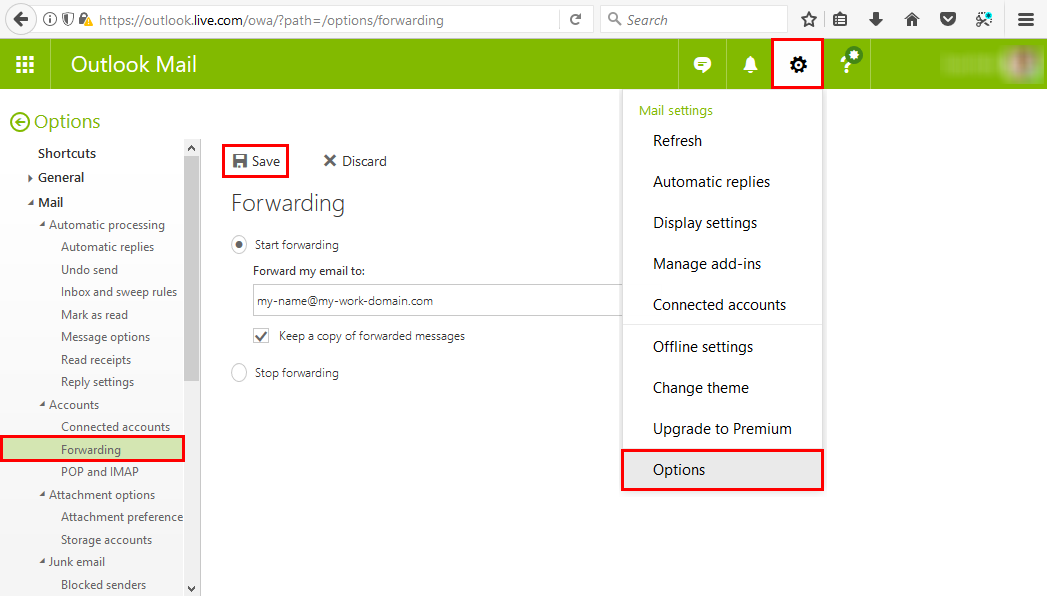
Many of us have a Microsoft Account (MSA) that we use for Microsoft Azure or similar Microsoft services. But in reality, with Office 365, we’re used to work with our Work-or-School Account (AAD). So, often it is helpful to forward all mails from one MSA to the work account primarily used. This can be accomplished easily! Login to https://outlook.com with your MSA. In Outlook for the web, open the settings icon and click Options. ...

October 9, 2017 · 1 min · Toni Pohl
Impressions of Microsoft Ignite 2017

Impressions of Microsoft Ignite 2017

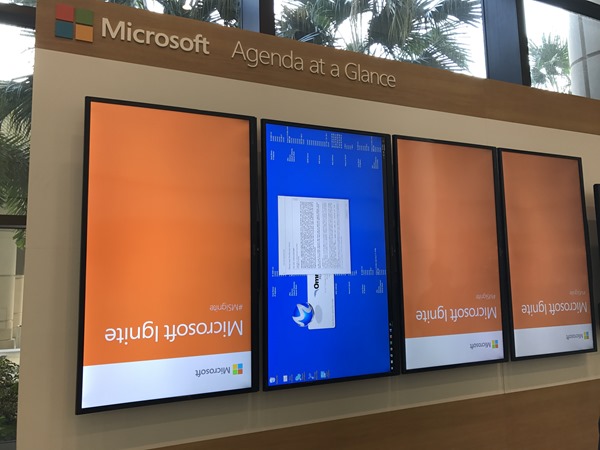
It was a busy week! Ignite is the largest and leading event for IT-Professionals and Decision-Makers in the Microsoft universe. This year, the conference took place in Orlando, Florida, from 25th to 29th September. With approximately 30,000 attendees and about 700 breakout, a lot of theater-sessions a large expo and a lot of networking this event was … big #dataoverflow. See my personal impressions here. Welcome to Florida After the first Ignite conference in Chicago in May 2015 and in Atlanta in September 2016, the event location this year was Orlando. From our company, atwork, five persons attended (see our colleagues Dominik, Andreas and Jens from Germany with the blue atwork T-Shirts below) and Martina Grom was a speaker. Florida did welcome us with hot and humid weather with a lot of sunshine and a bit of scattered rain showers – back in summer time. So, we used the weekend before Ignite for visiting a Disney Park and the Star Wars universe with our MVP pal Loryan. For us, the conference started on Sunday with a pre-day and a lot of technical information. ...

October 7, 2017 · 6 min · Toni Pohl
Provisioning an Office 365 group with an approval flow and Azure functions-part 2

Provisioning an Office 365 group with an approval flow and Azure functions-part 2

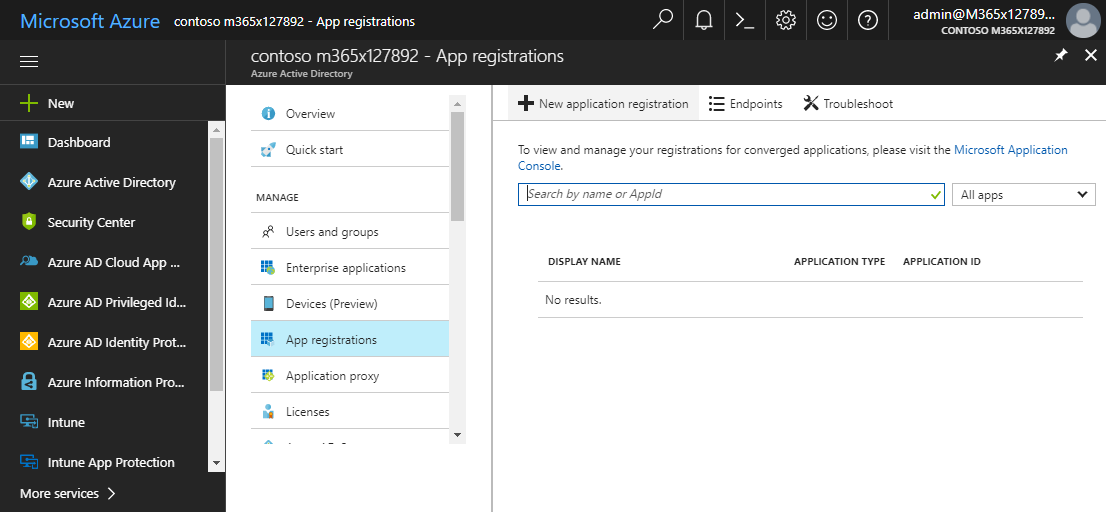
In part one, we saw how the Microsoft Graph API enables programmatic access to Office 365 groups. Now it’s time to let Azure Functions help us with the desired workflow. For the following steps, an Azure subscription and a Global Admin in the target Office 365 tenant is required. The plan We want our provision group function to be able to create a new Office 365 group without any user interaction. So, we need an app with the permission to accomplish the operations in our Office 365 tenant, in the same way as did for the administrator account in part 1. The key is, to create such an application first and to use that access data in our code. The workflow will execute our function, pass the parameters, and the function will do the work. So, these are the necessary steps. ...

October 1, 2017 · 6 min · Martina Grom
Provisioning an Office 365 group with an approval flow and Azure functions-part 1

Provisioning an Office 365 group with an approval flow and Azure functions-part 1

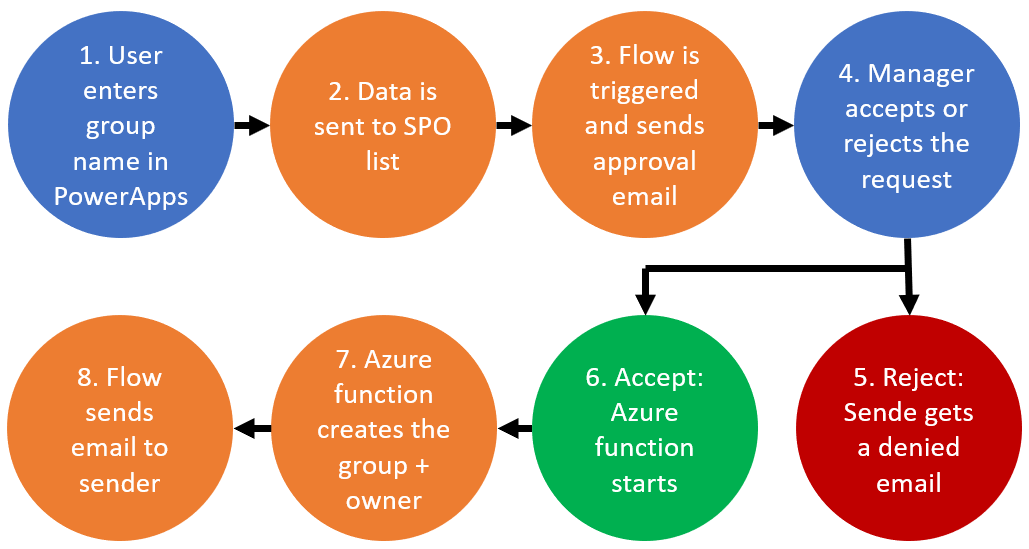
Office 365 groups span over various Office 365 services and provide a great way for collaborating. By default, every user can create an Office 365 group. While self-service is a good thing and many businesses adopted into that direction, some companies still prefer the controlled approach. In real world environments, organizations usually want to restrict the group provisioning so that IT can control the wild growth of groups. This article series shows how to create an Office 365 group with an attached approval process with SharePoint Online, Flow and Azure functions. See how this works here! ...

September 28, 2017 · 8 min · Martina Grom
How to move your OneNote notebook to a better place

How to move your OneNote notebook to a better place

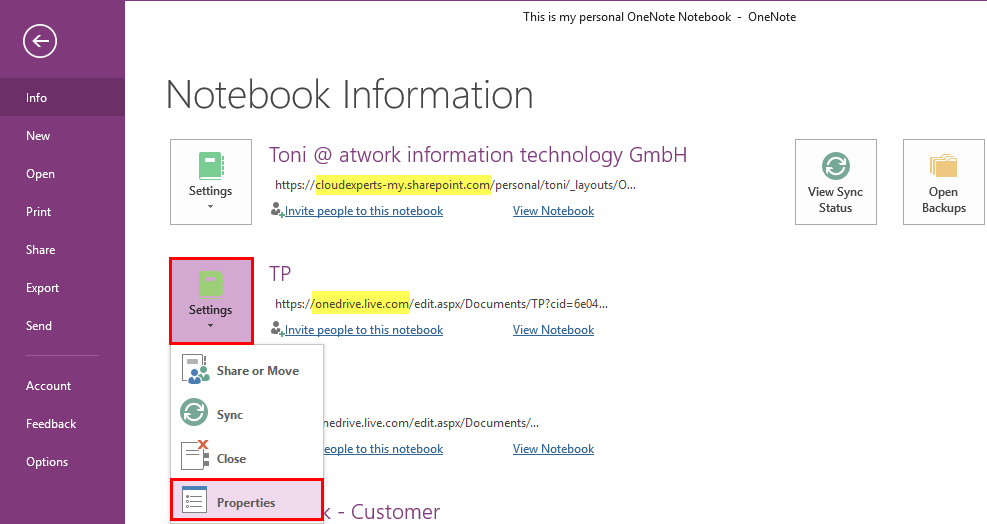
Many users including myself love OneNote. It’s quick and allows to store valuable but unstructured data very well. I wanted to change the storage location of my OneNote notebook from my personal OneDrive to OneDrive For Business. See the How-To here! You get Microsoft OneNote for free at https://www.onenote.com/download. By default OneNote is persisting notebooks in the personal OneDrive cloud storage and syncs changes between the local client (if installed) and the cloud. That’s ok for most scenarios and very convenient. ...

September 17, 2017 · 3 min · Toni Pohl
Delegate365 changelog version 6.6-Mailbox features and logging

Delegate365 changelog version 6.6-Mailbox features and logging

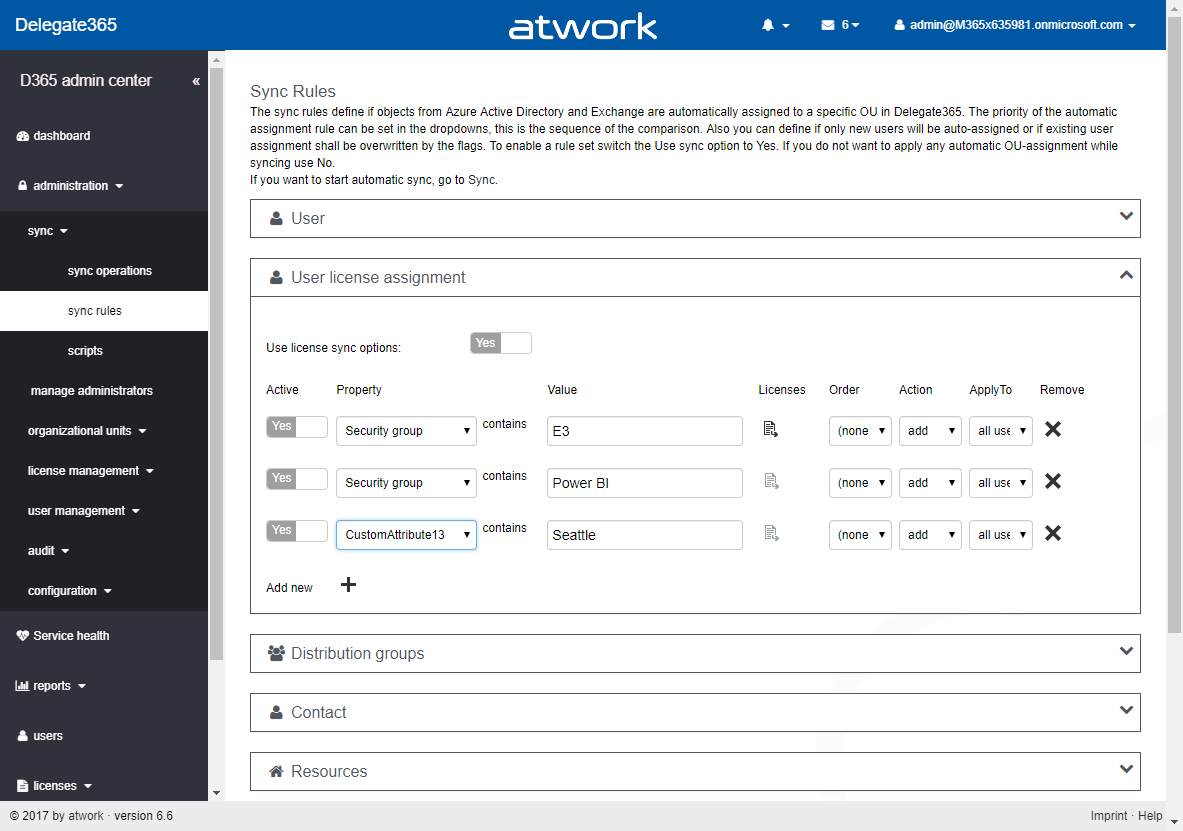
During summer time the next Delegate365 version was born that brings more mailbox and distribution group features, more sync rule options and some minor changes in logging and some fixes. See the details here. Delegate365 version 6.6 brings some improvements on the basis of version 6.5. New sync rules: The menu administration / sync / “sync options” has been renamed to “sync rules” in Version 6.5. Now, the “user license assignments” have been extended with additional options as in the screenshot below. A sync rule can now be switched on or off with the “Active” switch to simplify testing (“On” is the default setting for existing rules). The new “order” allows to reorder the rules. “Action” now allows not only to add Office 365 licenses, but also to remove the selected licenses, which was a often requested feature. “Apply to” allows to execute the rule against “all users”, “sign-in allowed” or “sign-in blocked” users. The new options deliver a much more granular control of license settings. The active sync rules are considered at each sync operation in Delegate365. Don’t forget to save any changes at the page bottom “Save” button! Remember, the more rules are enabled, the longer the sync operation will run, in large Office 365 tenants this might take hours, since every object must be checked and the operations will be executed. ...

September 12, 2017 · 4 min · Toni Pohl
Nachlese zum GDPR Workshop mit atwork, Microsoft und Grant Thornton

Nachlese zum GDPR Workshop mit atwork, Microsoft und Grant Thornton

atwork organisierte einen GDPR-Workshop, der diese Woche bei Microsoft in Wien stattgefunden hat. Als kompetenten Partner aus der Wirtschaftsprüfung und Steuerberatung konnten wir Philipp Mattes von Grant Thornton gewinnen, der den ersten Teil präsentierte. Unsere Security Expertin Martina Grom informierte in Teil Zwei über die technischen Möglichkeiten mit den Microsoft Cloud Services. Sehen Sie hier eine Nachlese. Die GDPR-Veranstaltung fand am 5. September 2017 im Microsoft Office in Wien statt. Veranstalter waren Microsoft, atwork und Grand Thornton. Rund 30 Teilnehmer folgten unserer Einladung zu dem kostenfreien Event. ...

September 7, 2017 · 8 min · Toni Pohl
Delegate365 and the Exchange issue update

Delegate365 and the Exchange issue update

In the last days, some customers of Delegate365 experienced a warning in the Delegate365 portal that informed about the failing communication to Exchange Online. This issue was caused by the Microsoft Exchange Online PowerShell endpoint. We are glad to announce that this issue should be fixed soon. Delegate365 informed users about the reduced functionality with a message “Access denied – please check the credentials of your Office 365 account…” when opening the yellow warning icon in the portal. ...

August 30, 2017 · 3 min · Toni Pohl

Use Azure AD app principal without user context

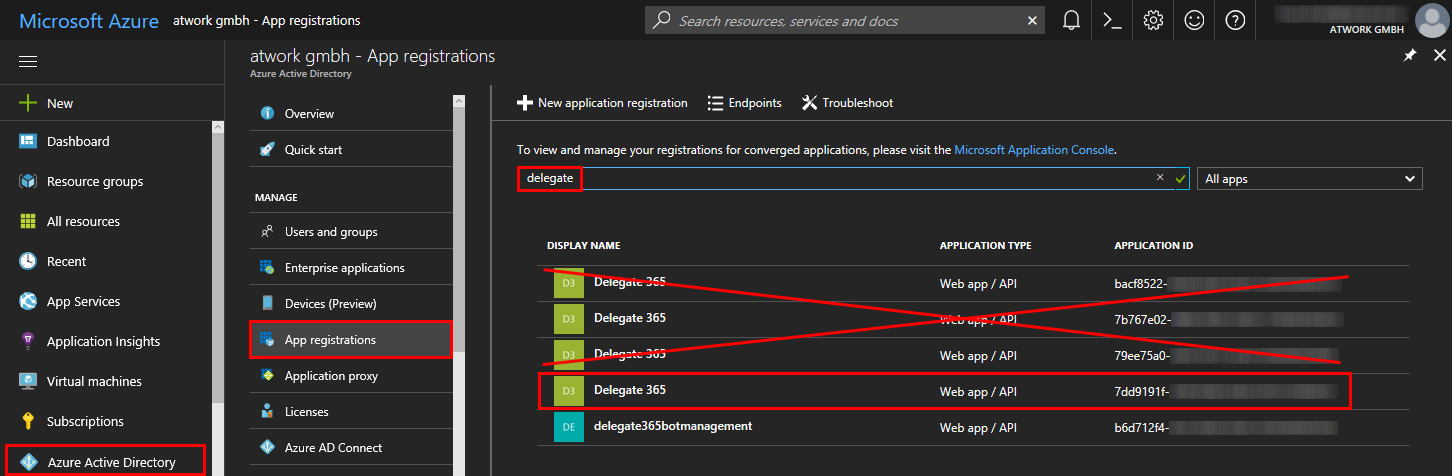
For an application registered in AAD to be able to run in application context only without a user context the “Company Administrator” role has to be assigned to the application in order to be able to access administrator endpoints for APIs like the Microsoft Graph. No additional permissions have to be assigned to the application after assigning this role. The assignment has to be done using PowerShell and looks like this: (the app registration has to be done beforehand) ...

August 21, 2017 · 1 min · Jörg Schoba

Martina Grom speaking at Microsoft Ignite 2017

We are delighted to announce that our CEO, Martina Grom, will be speaker at this year’s Microsoft Ignite conference. Ignite is Microsoft’s largest IT conference that will take place from September 25 - 29, 2017 in Orlando, Florida. Ignite will offer about 900+ sessions, insights and roadmaps from industry leaders, and deep dives and live demos on the products you use every day. As in the last years at Ignite Chicago 2015 and Ignite Atlanta 2016, Martina will deliver sessions about the Office 365 eco system. See more information at speaker Martina Grom. ...

July 26, 2017 · 1 min · Toni Pohl