Download the latest NGSC OneDrive SyncClient

Need the new OneDrive (and SharePoint) Next Generation Sync Client on your computer? Download the bits directly from here: Update 02. Nov. 2016: Download-Link replaced. Follow this following link to get the latest version of the NGSC client, since Microsoft is currently updating the client almost daily… https://go.microsoft.com/fwlink/?LinkId=823059 If you have an older version installed, this will be automatically overwritten by the new client. The NGSC client supports OneDrive for Business and SharePoint Online. ...

October 26, 2016 · 1 min · Toni Pohl

Impressions of ITDevConnections 2016

Last week, our third IT/DevConnections conference took place in Las Vegas. We had the pleasure to have several sessions there. The IT/DevConnections conference took place from 10th to 13th of October in the luxurious Aria resort that is located right in the middle of the famous Las Vegas strip. That’s a very cool location for obtaining KnowHow transfer during the day and enjoying the nightlife of Vegas. Besides the networking at the conference, there were social events and parties. ...

October 17, 2016 · 2 min · Toni Pohl

Recap and impressions of Microsoft Ignite Conference 2016

It has been a busy week when we’ve been at Microsoft Ignite conference 2016 which took place in Atlanta from 26th to 30th September. This was Microsoft’s second Ignite conference (the first one happened in Chicago in May 2015, see here) with more than 20.000 people attending and more than 1.000 sessions. For us, it was our first time in the US South (in Georgia) and we enjoyed it very much. ...

October 2, 2016 · 5 min · Toni Pohl

Exchange 2016 on Windows Server 2016

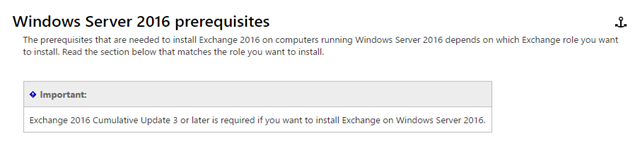
Nachdem ich schon einige Male gefragt wurde, wie das mit dem Support von Exchange 2016 auf Windows Server 2016 ist, hab ich mir erlaubt nachzusehen und folgendes entdeckt: Ihr findet in den offiziellen Exchange 2016 prerequisites den oben gezeigten Absatz zum Support von Exchange 2016. Nachdem die Exchange Server Updates: build numbers and release dates dafür bereits einen Download Link zur Verfügung stellt kann man behaupten – JA. Mit Release von Windows Server 2016 (nächste Woche bei der Ignite Conference) wird wohl auch Exchange 2016 diesen unterstützen! ...

September 21, 2016 · 1 min · Christoph Wilfing
Management capabilities for Office 365 Groups

Management capabilities for Office 365 Groups

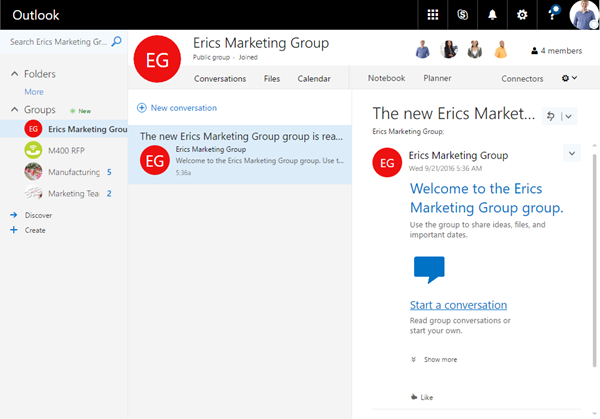
Office 365 Groups are THE connection between the different Office 365 services. Office 365 groups are very useful for team collaboration, collaboration on ideas and projects, sharing documents within teams, have a team calendar and a lot more. They span like an umbrella around all Office 365 services and are the key connection point in Office 365. What I like most about them from an architectural perspective – they are where they belong to: in Azure AD. In some practical examples with my customers I learned how they love groups because they are easy to create, offer self service and provide a lot of additional value within Office 365. But there are probably also some things which especially IT administrators don’t like and topics which are challenging especially in large tenants: everybody can create groups and naming policies are hard to implement. As a first workaround Microsoft provided a possibility to disable group creation out of Exchange Online, which is definitely one of the most common usecases. But this did not avoid Office 365 Groups creation through Planner or other services. ...

September 21, 2016 · 8 min · Martina Grom

atwork is now Microsoft Authorized Education Partner

We at atwork are now official Microsoft Authorized Education Partner (AEP). The AEP program authorizes atwork to purchase and re-sell academic priced products to Qualified Educational Users. Microsoft informs about the details on https://www.mepn.com/MEPN/AEPHome.aspx. The short description reads as follows: The AEP program authorizes partners to purchase and re-sell academic priced products to Qualified Educational Users. The program is designed to increase customer and partner satisfaction and to improve communication and service to our partners with a standard set of terms and conditions, improved training, and new resources and tools to keep the channel informed with up to date information on new products and events, in addition to guarding against channel miss-selling of academic licensing. ...

September 16, 2016 · 1 min · Toni Pohl
No more ORG email addresses for MSA

No more ORG email addresses for MSA

Today Microsoft announced that Microsoft Accounts “MSA” (formerly known as “Live-ID”) no longer can be created with a work email address. That’s important for millions of users. What does this mean? Well, this article Cleaning up the #AzureAD and Microsoft account overlap explains all the details: “Starting today, we’re blocking the ability to create a new personal Microsoft account using a work/school email address, when the email domain is configured in Azure AD.” ...

September 15, 2016 · 1 min · Toni Pohl
Delegate365 announcement about upcoming changes in version 6

Delegate365 announcement about upcoming changes in version 6

Delegate365 will receive a major update in October. This will be Delegate365 version 6 and will include a change in the audit logging system, a new license history and a preview for more custom automation features. Read the first details here. Change of logging: With the next update to version 6, the audit logging will be changed. There is a switch implemented which allows D365 to store logged data in various spaces and formats. The following graphics shows an overview at a glance about the planned features. Data will no longer be stored in the Web in CSV format, but in the D365 database for up to 90 days and in Azure storage in JSON format forever. Direct Access of Azure storage: Besides of the almost unlimited space in Azure storage, data in that storage can be accessed directly (if you have the permissions). This allows Portal Admins to generate a URL with a token with an expiration date to download the produced log files. The token is issued by D365, as tool you can download the logs with the cost free Microsoft Azure Storage Explorer. Daily Office 365 license statistics: To see the real usage of licenses per OU and per day, week, month or year, D365 stores daily data from now on. This data will be available for further usage. More Automation: We got a lot of feedback about implementing custom actions in D365, for example setting specific user properties, assigning custom licenses for specific users, setting Skype for Business policies for users in OU’s and so on. To avoid a cost intensive customization we decided to go another way: We are implementing scripts (like “Macros”) with a powerful editor with intellisense that can execute… PowerShell! Yes, you read correctly. D365 will support PowerShell commands and whole scripts for fulfilling custom tasks in Office 365! We are currently developing and testing and plan to update D365 with this module in mid to late October. The working title for this feature is “D365 Automation”. Any other suggestions? More: Improvements in the Sync operation, fixes and some more features… You see there are cool features coming to Delegate365 version 6. Stay tuned! ...

September 12, 2016 · 2 min · Toni Pohl

Snapshots of aOS community event in Aix-en-Provence

This week Martina and I have been part of the aOS community event in Aix-en-Provence in South France. See our session presentation and some snapshots of the event here. The aOS Community organizes and supports all types of events promoting the sharing and exchange of Microsoft technologies in various communities in public meetings, conferences and online meetings targeting primarily French speaking countries. The event took place in Aix-en-Provence on 6th September at the campus of YNOV, a school building with perfect infrastructure for such an event (rooms, space, seats, projector, aircondition and fast WiFi). The event web page is Journée aOS Aix en Provence. ...

September 11, 2016 · 1 min · Toni Pohl
Delegate365 Roles and Notifications

Delegate365 Roles and Notifications

Delegate365 can send notifications for specific operations. Here’s a short overview of roles and in which situations notifications are sent. Who can get notifications? In Delegate365 we have these roles a user can have for using the portal. Portal Admins: They have full access to all features and can configure D365. Scope Admins: They have administrative management features for “their” users, licenses and groups. The difference between Portal and Scope Admins is simply the switch “Is Portal Admin” in the administration / manage administrators and Edit admin feature (see the full screenshot below). License Admins: This can be Portal Admins or Scope Admins. They are defined in the administration / manage administrators and Edit admin feature with the switch “License Administrator” (see the full screenshot below). They can manage license requests. Users: Standard users who can use the D365 Self service password reset feature (SSPR). All user types can receive emails (or SMS) from D365, but their email notification must be configured. ...

September 10, 2016 · 3 min · Toni Pohl