Get more OneDrive for Business storage

Get more OneDrive for Business storage

Today´s another quick tip for Microsoft 365 users: If you are using OneDrive for Business (OFB) and encounter the default 1 TB storage limitations, there is a way to get more storage space. To do so, see the article by John Patrick White at Increase your OneDrive Storage Limit beyond 5 TB and Joel Olson´s blog post at Three tiers to increase to unlimited storage in OneDrive for Business. It is not very well known that the storage quota can be controlled and extended. Thank you guys, this is valuable for many Office 365 users with a lot of files! ...
April 1, 2020 · 1 min · Martina Grom
Check out Microsoft Graph PowerShell

Check out Microsoft Graph PowerShell

Microsoft Graph PowerShell module made it to the PowerShell Gallery! So, now you can try it out on your computer by simply running the Install-Module Microsoft.Graph.Authentication command. See more here. Microsoft Graph is the key to Microsoft 365 system. This OData interface allows to get and modify data of objects such as users, groups, their data and the tenant. Find out more at aka.ms/graph. Announced at the last Microsoft Ignite conference, admins can now use the Microsoft Graph PowerShell module directly from the PowerShell Gallery. See more details at Microsoft Graph PowerShell SDK (Preview) on GitHub. So let´s start our quick overview. ...

January 23, 2020 · 3 min · Toni Pohl

Use the PowerApps PowerShell modules to automate tasks with the Microsoft Power Platform

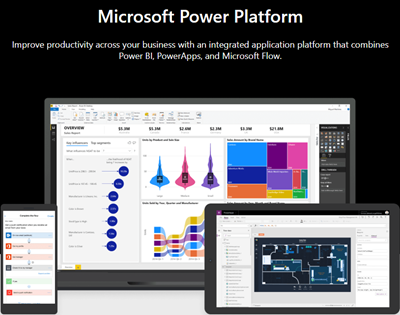
PowerShell helps automate processes, especially in the Microsoft 365 world. That´s true for the Microsoft Power Platform as well. See how to access PowerApps and Flow with PowerShell here. So, here´s a very quick introduction for using PowerShell with PowerApps and Flow. Find the full documentation at PowerApps cmdlets for administrators. Install the PowerShell modules Install the PowerApps (preview) module from the PowerShell Gallery once with the following PowerShell statements as Administrator on your machine: ...

September 22, 2019 · 2 min · Martina Grom
Instantly install your essential software with Chocolatey

Instantly install your essential software with Chocolatey

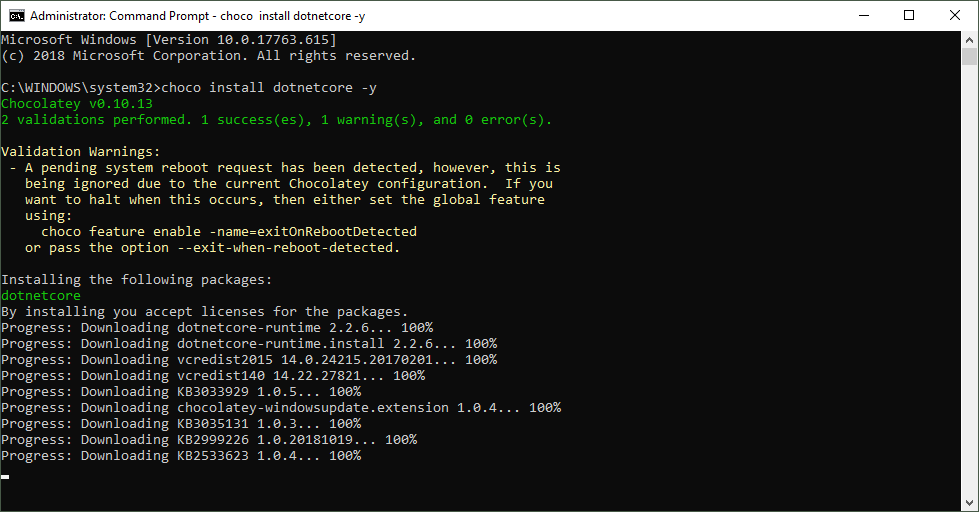
When installing a new computer, it takes some time to download and install the essential software. This is what Chocolatey is for. Chocolatey is a cost free package manager for Windows using NuGet infrastructure and PowerShell to quickly installing applications and tools that you need. I am using choco since a long time, now I wanted to show my current packaged software for my new computer. See the script here. About and Prerequisites Partly taken from About Chocolatey: Chocolatey CLI aka choco (or choco.exe) is a client that provides the core of Chocolatey and the installation store for locally installed packages. You need to have Windows 7+ or/ Windows Server 2003+ as Operating System and PowerShell v2+ (not PowerShell Core yet though) and the .NET Framework 4+ installed. Just to mention, the installation will attempt to install .NET 4.0 if you do not have it installed, see choco installation and Getting Started. Besides the client, there also exists a Chocolatey GUI and Chocolatey Agent (aka chocolatey-agent) for central administration. ...

August 2, 2019 · 3 min · Toni Pohl

Update a SPN in AAD with the Azure PowerShell Az module

Yesterday, I wrote how to Update your Azure CLI with Choco. Today, I needed to renew an existing Service Principal Name in an AAD. A SPN stands for Service Principal Name which is used for automation authentication. The PowerShell az module got some updates (v1.0.0). So, here´s the full step-by-step instruction for renewing a SPN with az ad sp credential. This updates the steps described at How to create or renew Service Principal Names in Azure Active Directory… ...

July 1, 2019 · 1 min · Toni Pohl

Groups Governance Toolkit-Working with group policies

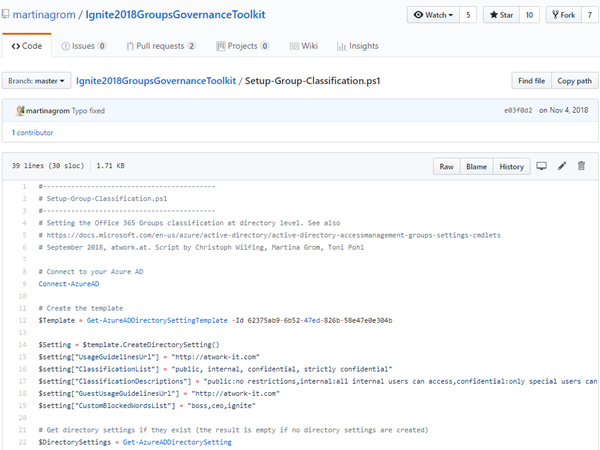
At Microsoft Ignite conference last September, we demoed an approach for a self-built Office 365 Groups Governance Toolkit. Since Microsoft 365 is an evergreen service and continues to evolve, today we have more group settings available and we extend our provisioning function to work with group naming policies as well. See here how this can be accomplished by including new Graph requests. Foreword You can find the previous articles of our governance story at Provisioning an Office 365 group with an approval flow and Azure functions-part 1, part 2, part 3, part 4, part 5 and part 6 and the source code at martinagrom/Ignite2018GroupsGovernanceToolkit. ...

May 2, 2019 · 6 min · Martina Grom
Groups Governance Toolkit Part 6-Groups statistics

Groups Governance Toolkit Part 6-Groups statistics

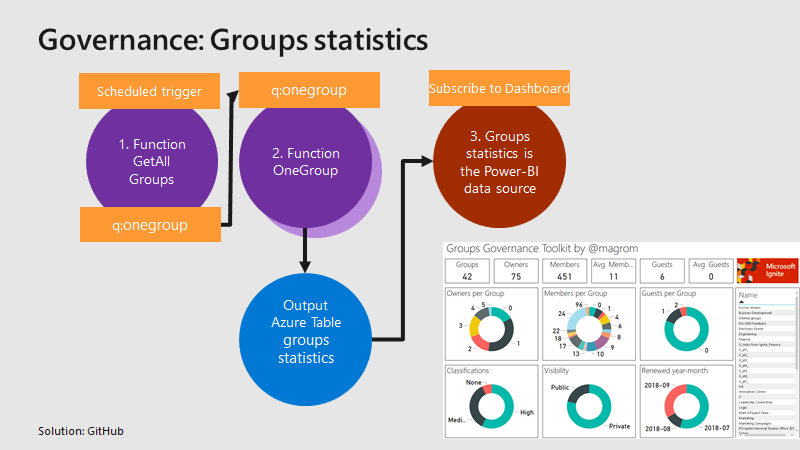
To apply governance in an organization, the responsible persons require data. See here, how we can get group data of an Office 365 tenant for further use, for example for a visualization with Microsoft Power BI and all the benefits of such an attractive and interactive tool. Get all groups and their properties Again, we use the same mechanism as before, for getting orphaned groups and external users. For example, a function runs every day in the night and reads all existing groups in the Office 365 tenant. Every group is written to a queue for further processing, in the same way as the other functions did before. A second function is triggered by that queue and reads all the required group data for one group and writes the data into an Azure table. The following graphics shows that process from a technical standpoint. ...

March 18, 2019 · 3 min · Toni Pohl
Groups Governance Toolkit Part 5-External Guests

Groups Governance Toolkit Part 5-External Guests

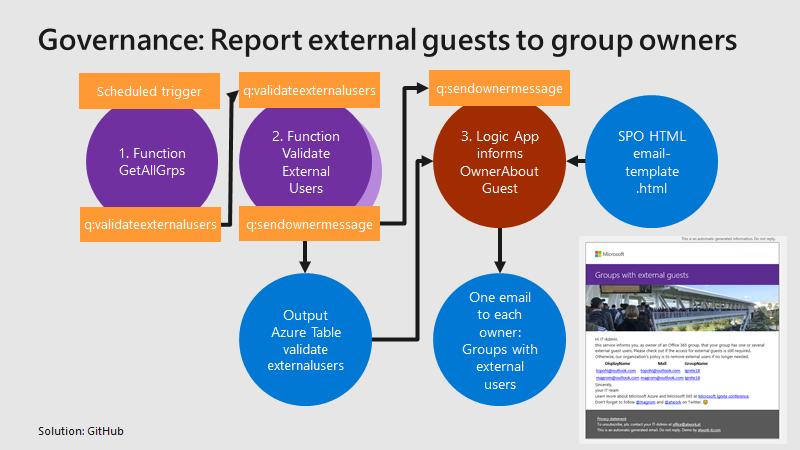
Governance specifies the rules for an organization. The Office 365 collaboration platform allows to invite external users for contributing in groups. In this part, we want to monitor all groups that have external guests and inform the group owners, who has access to a group or a team. See how this works here. Get all groups with external guests We use the same mechanism as before, see the article about Orphaned Groups. A function runs e.g. every day, reads all existing groups in the Office 365 tenant, and writes each group in a queue. A second function is triggered by that queue and reads all the external group members for one group. The following graphics shows that process from a technical standpoint. ...

March 15, 2019 · 4 min · Toni Pohl
Working with the new Azure PowerShell Az module

Working with the new Azure PowerShell Az module

PowerShell is both a command-line shell and scripting language and perfect for automating administrative tasks. When working with Microsoft Azure, Microsoft recommends to use the new Azure PowerShell Az module. See how to uninstall the outdated Azure PowerShell AzureRM , how to install the new Az module for PowerShell 5.x and 6.x and how to connect and to get a inventory of your resources and a little bit of Cloud Shell here. ...

February 26, 2019 · 4 min · Toni Pohl
Groups Governance Toolkit Part 4-Ownerless Groups

Groups Governance Toolkit Part 4-Ownerless Groups

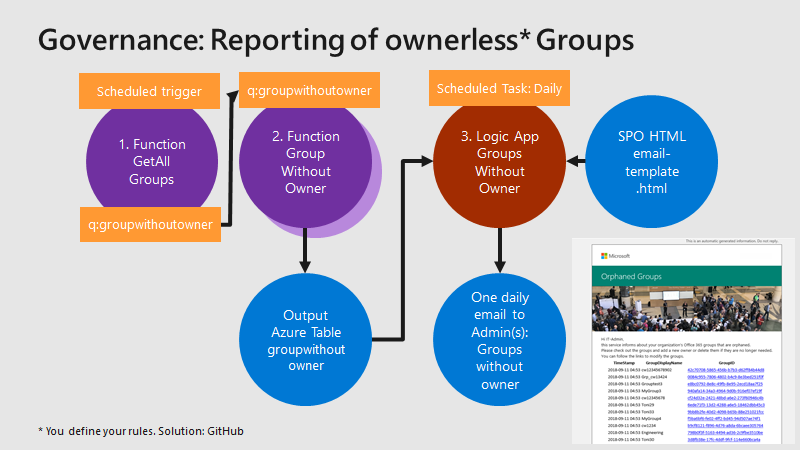
In this multi-part series we show you how to handle the Office 365 Groups and Microsoft Teams governance toolkit. The next article cover the governance part of our Groups Governance Toolkit.Imagine your company policy requires at least 2 owners per Office 365 Group or per Microsoft Team. In this part, we want to monitor all groups that are ownerless (orphaned), or do not comply with our organization’s policies. The IT department shall get the information of all groups and teams where there are no owners or not enough owners and the possibility to fix that. Read below how this can be accomplished. ...

February 13, 2019 · 5 min · Martina Grom