How to brand a SharePoint Online Site with CSS

How to brand a SharePoint Online Site with CSS

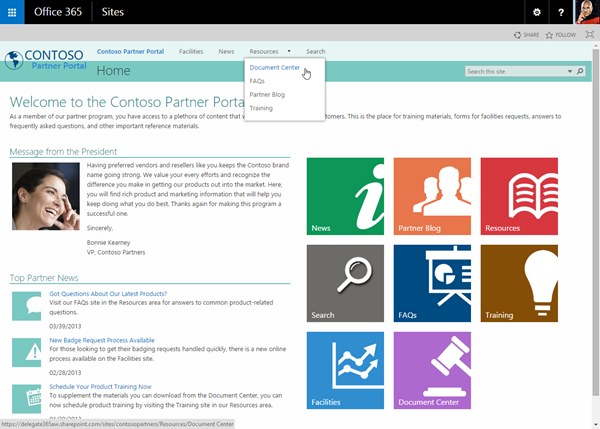
Do you want to change the design of your SharePoint site easily? This is just a quick introduction how to customize a SharePoint 2013 Site (SP on premises or Office 365) with custom CSS. With custom branding you can completely change the design of a SharePoint site, like in this sample of a Contoso SPO site. The steps to accomplish custom branding with CSS are: You need to be a site administrator (to activate the features and have full access to the site) The default site settings show not many options for *Look and Feel. *My demo site starts with the URL https://[tenant].sharepoint.com/sites/design1 so the URL for the Site Settings is similar like here: https://[tenant].sharepoint.com/sites/design1/_layouts/15/start.aspx#/_layouts/15/settings.aspx So first open Site Collection Administration / Site collection features. The page Site Settings : Site Collection Features follows, the URL goes like here: https://[tenant]sharepoint.com/sites/design1/_layouts/15/start.aspx#/_layouts/15/ManageFeatures.aspx?Scope=Site Active the SharePoint Server Publishing Infrastructure feature: This usually can take some minutes… When this is done the feature looks like here: No go back to Site Settings and open *Site Actions / Manage site features. (Alternatively you can simply delete the ?Scope=Site parameter from the Site Collection feature URL) 6. Now active the SharePoint Server Publishing feature in the Site: After the activation the feature looks like here: 7. When going back to the Site Settings the result is that the Look and Feel group includes more options. 8. We are almost done. Now it´s possible to open the *Master page *settings. https://[tenant].sharepoint.com/sites/design1/_layouts/15/ChangeSiteMasterPage.aspx In here the Master Page for this site can be selected. The important part is the *Alternate CSS URL *below. 9. When opening the Alternate CSS URL group you can specify your own customized CSS file. 10. When clicking Browse you can upload your own CSS file and then select it (as shown above). In this sample the path to the CSS file goes like /sites/design1/Style Library/mystyle.css ...
February 18, 2015 · 2 min · Toni Pohl
Why the new App Model in SharePoint 2013 outdates the old coding solutions

Why the new App Model in SharePoint 2013 outdates the old coding solutions

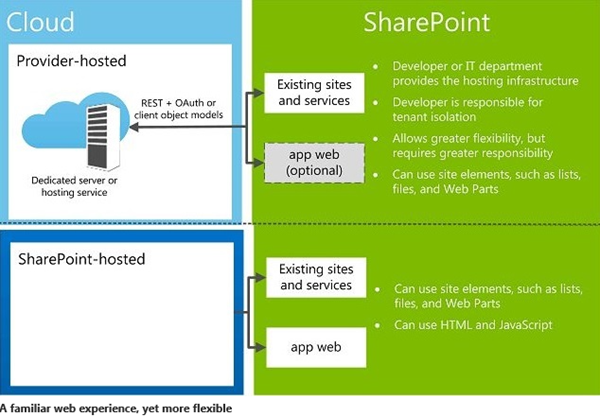
SharePoint 2013 is in the market since more than two years by now. And SharePoint 2016 is about to come soon. Beside all the standard features the SharePoint framework can be extended with custom solutions to automate processes within the system. In 2013 we have a new App Model which solves a lot of issues we had with custom solutions in the previous versions of SharePoint. In this article I want to point out why using the App Model is a good idea and why I recommend using it. But let´s have a look into that step by step. We start with the types of solutions developers can build on top of SharePoint. ...

February 17, 2015 · 4 min · Toni Pohl
Eigene Apps in den App Launcher von Office 365 integrieren

Eigene Apps in den App Launcher von Office 365 integrieren

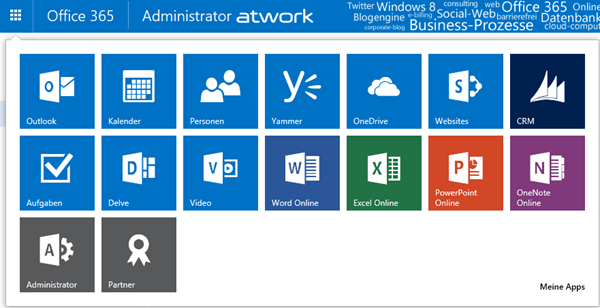
Seit kurzem ist in den Office 365 Webs der App Launcher (in deutsch das “App-Startfeld”) in der linken oberen Ecke verfügbar. Dieser zeigt jederzeit wichtige Apps für den angemeldeten Benutzer an, für die er berechtigt ist, ganz gleich welche Web-Anwendung geöffnet ist. Somit ist der App Launcher sozusagen das Office 365 “Startmenü” – bye bye Bookmarks. App Launcher erweitern Der App Launcher zeigt die wichtigsten Apps auf einen Blick und sieht standardmäßig - je nach Lizenzen und Berechtigungen - so aus: Jede App wird als Kachel angezeigt und kann mit einem Klick gestartet werden. ...

January 26, 2015 · 7 min · Martina Grom
Wrap-up Office 365 Konferenz in Köln

Wrap-up Office 365 Konferenz in Köln

Von 9. bis 10. Januar fand die Office 365 Konferenz (office365konferenz.net) in Köln statt. Die Veranstaltung war mit etwa 120 Teilnehmern ausgebucht. Die Konferenz An diesem Event waren einige Punkte besonders erwähnenswert: Die Office 365 Konferenz war die erste größere deutschsprachige Veranstaltung ganz zum Thema Microsoft Office 365. Veranstalter waren Mitglieder der Microsoft MVP Community, die das Event organisierten. Es gab hochkarätige Sprecher. Mit 16 MVPs, Spezialisten von Microsoft und Partnern aus der Praxis gab es qualitativ hochwertige und technische Vorträge mit einem guten Themen-Mix mit 25 Sessions. ...

January 12, 2015 · 9 min · Toni Pohl
office365konf on Twitter

office365konf on Twitter

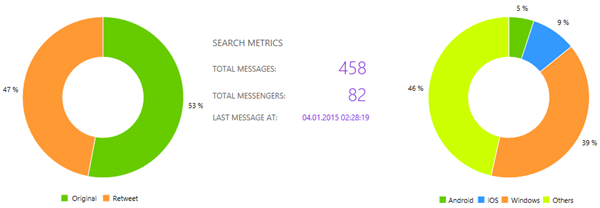
Unsere Office 365 Konferenz (office365konferenz.net) in Köln ist schon wieder vorbei. Hier einige Zahlen aus Twitter von der letzten Woche. Filter und Zeitraum Die folgenden Auswertungen wurden für den offiziellen Konferenz-Hashtag #office365konf erstellt. Andere Tweets sind hier nicht berücksichtigt – auch wenn wir doch viele weitere Twitter-Nachrichten (eben ohne Konferenz-Hashtag) gesehen haben. Die Daten zeigen den Zeitraum vom So., 4. bis zum So., 11.01.2015 etwa 16:00. Tweets und Plattform Insgesamt wurden in der letzten Woche 458 Nachrichten von 82 Personen getwittert. 57% davon waren Retweets. (Grafiken zum Vergrößern anklicken.) ...

January 11, 2015 · 2 min · Toni Pohl
Microsoft by the Numbers 2015

Microsoft by the Numbers 2015

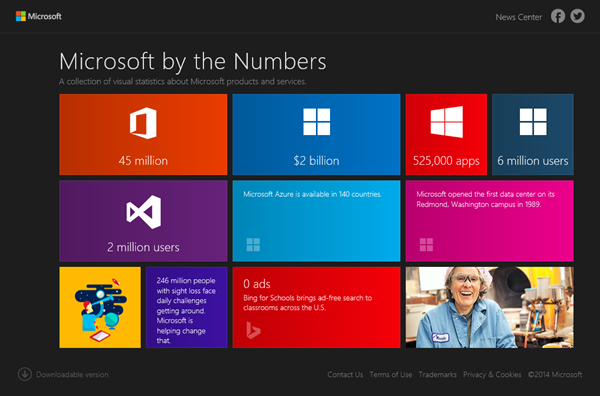
…as highlighted about almost a year ago here, see some impressive current numbers** published by Microsoft at https://news.microsoft.com/bythenumbers. Some highlights: In the last year Office for iPad apps have been downloaded more than 45 million times. SharePoint is now a $2 billion business for Microsoft. Microsoft has more than 430.000 partners. Microsoft Azure is available in 140 countries. On average more than 1000 customers sign up for Microsoft Azure daily. ...

January 5, 2015 · 1 min · Martina Grom
How to use external users in SharePoint Online with a cost-free Azure Active Directory

How to use external users in SharePoint Online with a cost-free Azure Active Directory

We are using SharePoint Online (SPO) in many scenarios: for our own Intranet and we often create SPO Sites in our Office 365 tenant to collaborate with partners and for projects. Many projects last only for some months and after the work is finished the SPO site will be deleted. Since we don´t want to create not-our-company-users in our own Active Directory (AD) or in our synced Azure Active Directory (AAD) and assign an Office 365 license from our tenant it´s convenient to use users from another AAD and share the SPO site with them. ...

December 6, 2014 · 8 min · Toni Pohl
Office 365 Office Graph Explorer

Office 365 Office Graph Explorer

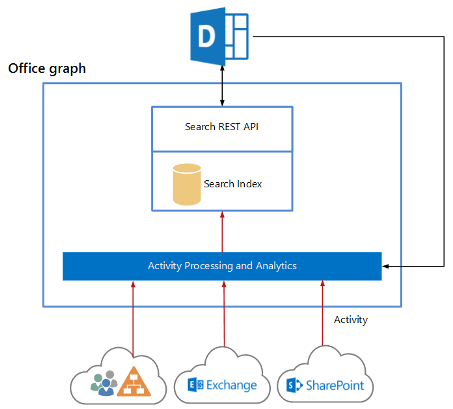
Seit kurzem kann in Office 365 Tenants der sog. “Office Graph” aktiviert werden. Dieser ist derzeit als Preview in den Plänen Enterprise (Academic, Governmental) E1 bis E4 enthalten. Martina hat im TechNet Blog Delve und der Office Graph über die Aktivierung und die Details geschrieben. Hier ein kurzer Überblick, was der Office Graph ist: (https://www.youtube.com/embed/FV1Sc6UW8-o). About Delve and Office Graph Für Developer ist natürlich interessant, wie man den Office Graph selbst anzapfen und verwenden kann. Apropos, der Begriff “Delve” (das Webportal in Office 365) steht für “vertiefen”, die Bezeichnung “Office Graph” (das Service, das Informationen sammelt, verknüpft und bereitstellt) hat Microsoft wahrscheinlich in Anlehnung an andere Systeme gewählt. Facebook App-Developer kennen etwa die “Facebook Graph-API”, die nach erfolgter Authentifizierung einer bekannten App genauso Informationen über Mitglieder liefert. ...

October 3, 2014 · 4 min · Toni Pohl
Time for SPC Adriatics 2014

Time for SPC Adriatics 2014

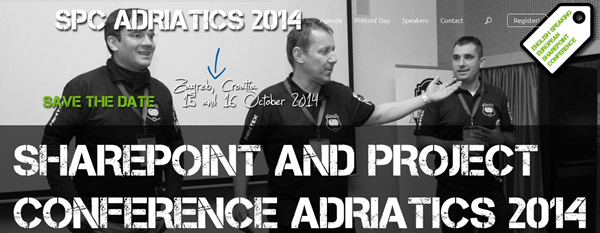
It´s almost time for SharePoint and Project Conference Adriatcs 2014! In about two weeks, SPC Adriatcs Conference 2014 will be held from 15th to 16th October in Zagreb/Croatia. This will be the third SPC Adriatics organized by the three MVPs Nenad Trajkovski and Toni Frankola from Croatia and Adis Jugo from Bosnia and Herzegovina. What once started as an (smaller) IT conference just for the Adriatics region became an international recognized and well known conference with speakers from whole Europe and America and attendees from all over the region. ...

October 2, 2014 · 1 min · Toni Pohl
Delve und der Office Graph

Delve und der Office Graph

Wer kennt bereits “Delve”? Das ist der neue Name von “Oslo”. Ok, wer von “Oslo” noch nichts gehört hat: “Project Oslo” wurde im März auf der Microsoft SharePoint Conference vorgestellt. Damit wird der “Office Graph” innerhalb von Office 365 bezeichnet. Es handelt sich um ein Service im Unternehmensumfeld, welches Daten aus verschiedenen Datenquellen sammelt und dann Informationen über einen Benutzer liefern kann. Der Office Graph “lernt” von den Daten und Aktionen von Benutzern innerhalb von Office 365 und bietet eine Schnittstelle zur Suche und Analyse von aktuellen Daten innerhalb eines Office 365 Tenants. Delve ist den Enterprise (Academic, Governmental) Plänen Office 365 E1 bis E4 enthalten (https://www.youtube.com/embed/FV1Sc6UW8-o). ...

October 1, 2014 · 4 min · Martina Grom