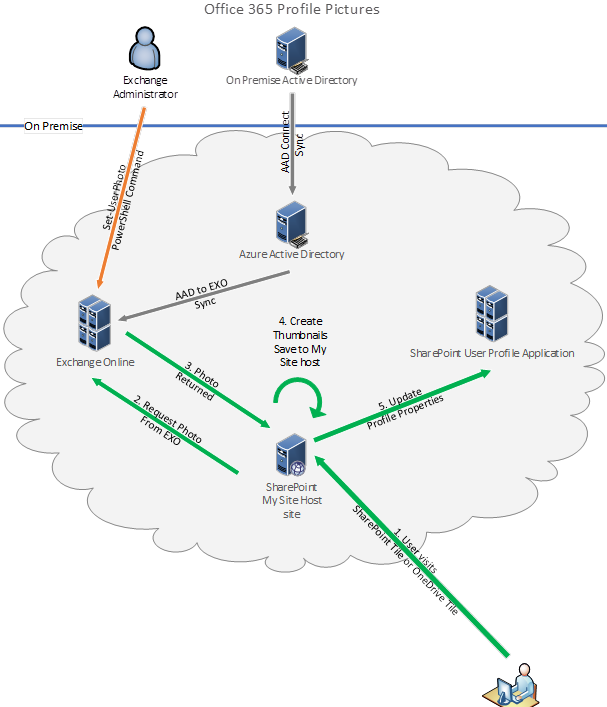
How user profile picture synchronization works in Microsoft 365

From an historical point of view, various single services such as Exchange and SharePoint Online have been integrated into Office 365, or as it´s named now, Microsoft 365. The platform shows user profile pictures, and syncs that between the services, depending on the service (licenses). Since this can be a little bit confusing, we now have a good article explaining the user profile sync. User profile picture sync is a important topic for every organization using Microsoft 365. In the end, you want to see users picture in people pickers, in Teams chats and calls, in Exchange, Delve, and so on. We have written some articles about that topic as well in the past, see SharePoint Online UserProfiles and the story about synchronizing with Azure Active Directory-Part 1, Part 2, How user profile synchronization works in Office 365 services and How the UserProfile in Azure Active Directory and how a Mailbox in Exchange Online looks like (using Microsoft Graph). We also have developed a solution for syncing user profile pictures from on premises systems to Microsoft 365. If you are interested in that, pls. contact us. ...

July 1, 2020 · 2 min · Toni Pohl
Delegate365-Working with guest users

Delegate365-Working with guest users

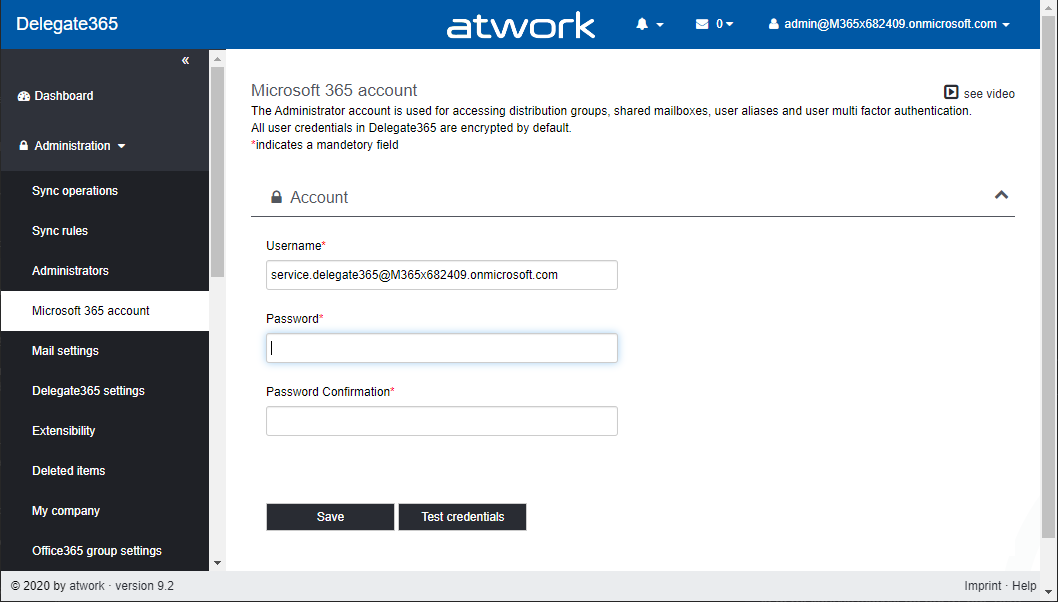
Delegate365 supports working with guest users. Guest users or external users are users that are invited to the company tenant by email. Once they accept the invitation, they get access to corporate resources. For example, a guest user can be a member of a Microsoft team or collaborate in Planner or in a SharePoint site or similar. See some samples here. Invite a guest user In Delegate365, admins can invite a guest user by clicking on the “Invite guest user” icon next to the “+” icon (new user). If you don´t see this icon, ask your Delegate365 Portal Admin to enable that feature in the permission policies. ...

June 26, 2020 · 5 min · Toni Pohl
Run a PowerShell script as a different user

Run a PowerShell script as a different user

Sometimes it´s required to run a script as a service user on a Windows machine, e.g. for reading file shares as a different user with different permissions or similar tasks. You can easily do this using the following two methods. Method 1: Run a task as different user with Scheduled Tasks The first method is to create a new basic task in Computer Management / System Tools / Task Scheduler / Task Schedule Library. ...

June 25, 2020 · 3 min · Toni Pohl

Check out the Microsoft Teams Best Practices for Remote Work podcast of Mary Jo Foley with guest Martina Grom

In June, our managing director Martina Grom had the pleasure of speaking to the renowned Microsoft journalist Mary Jo Foley in a podcast interview. Listen to the podcast in the MJF chat! Mary Jo Foley is a technology writer, author, podcaster and news editor. She regularly writes news, articles, and reviews for Microsoft’s strategy, products and technology. Martina is founder and CEO of atwork and a Microsoft Regional Director and MVP and a long-time community advocate and specialist in Microsoft 365, Azure, and security. The interview was all about best practices for Microsoft Teams in a world where more and more are working remotely. ...

June 18, 2020 · 1 min · Toni Pohl
Delegate365 changelog 9.2-SPO site auto-assign

Delegate365 changelog 9.2-SPO site auto-assign

Delegate365 v9.2 brings a new feature for auto-assigning existing SharePoint site to an OU. This follows the same principle as auto-assigning groups. See it here. Note: To use the SharePoint Online management feature, ensure you have configured the SPO access for Delegate365 as described at Delegate365 changelog 9.1-SharePoint Online. The following scenario describes how to use the new SPO site auto assign. A scenario In this demo tenant, there are some SharePoint Online sites with a prefix in their site name: There are two sites starting with “New York”, one site with “Paris” and three sites starting with “Seattle”. All site names are separated with an underscore between OU name and the following site name, as here in screenshot of the SharePoint admin center (open it with your tenant-name and a Admin at https://[yourtenant]-admin.sharepoint.com/). ...

June 15, 2020 · 3 min · Toni Pohl

Get or update your M365 developer tenant

In case you do not already have a Microsoft 365 developer subscription or if you have an old Microsoft 365 tenant with E3 licenses running: You can now get a new M365 developer subscription with 25 users with E5 licenses and demo content. See more here. You just need a MSA or a Microsoft 365 school or work account. Open the address aka.ms/o365devprogram, and click on the Join now link. ...

June 11, 2020 · 1 min · Toni Pohl
Delegate365 changelog 9.2-Group OUs

Delegate365 changelog 9.2-Group OUs

Delegate365 allows the separation of a single Microsoft 365 tenant with the OU concept. Every admin only sees and manages his own objects. Group OU´s allow administrators to add users from other organizational units to their managed groups without having access to manage those users. Until now, when using Group OUs, the domains had to be added to the administrators. That has now been changed with this version. Note: Article Delegate365 changelog version 8.0-Group OU’s also describes the basic concept of Group OU´s in Delegate365. This article describes the modification that the user´s domain must no longer be assigned to an administrator. ...

June 5, 2020 · 3 min · Toni Pohl

Listen to the podcast about Microsoft 365 Governance for Work From Home with Martina Grom

How are you managing working from home during the pandemic? Listen to Richard Campbell’s podcast from runasradio.com and our Martina Grom. Richard talks to Martina about the challenges around maintaining security and productivity with entire workforces doing their jobs from home with Microsoft 365 and governance tools. Open the podcast “Office 365 Governance for Work From Home with Martina Grom” at https://runasradio.com/Shows/Show/690. Martina mentions a bunch of tools as well as our Governance Toolkit 365. The tool runs as Software-as-a-Service and offers insights into your Microsoft 365 tenant, Power BI dashboards, newsletters, an API with custom workflows and a Bot with Teams integration. Check it out. ...

May 15, 2020 · 1 min · Toni Pohl
Watch our sessions of GlobalAzure Virtual Austria 2020

Watch our sessions of GlobalAzure Virtual Austria 2020

As in the previous years, we were proud to be part of the Global Azure Virtual - formerly known as the Global Azure Bootcamp - event on April 24, 2020. Because of the Corona pandemic, the word-wide event went virtual and was distributed as Microsoft Teams Live events, organized by the Coding Club Linz. If you could not attend live, you now can watch some sessions that are already uploaded to Youtube. Find them here! ...

May 10, 2020 · 2 min · Toni Pohl
Delegate365 changelog 9.1-more updates

Delegate365 changelog 9.1-more updates

With the many new functions in the latest version, Delegate365 has received even more updates in version 9.1. See more new features such as the new user sync property StateOrProvince, the notification license names lookups and logs and guest user modifications here. See an overview of all updates at Delegate365 changelog 9.1-many new features. The following features have been added to Delegate365 v9.1 including all existing versions: New user sync property StateOrProvince: In Administration / Sync rules, in the User section, there is a new property StateOrProvince available. This new property allows that all users with an OU name in that user property can be automatically assigned to the OU, in the same way as with the other user properties. Note: In general, it is recommended to use the Sync with security group feature from an organizational perspective if possible. See more at Sync with Security Group. ...

March 30, 2020 · 5 min · Toni Pohl