Groups Governance Toolkit Part 5-External Guests

Groups Governance Toolkit Part 5-External Guests

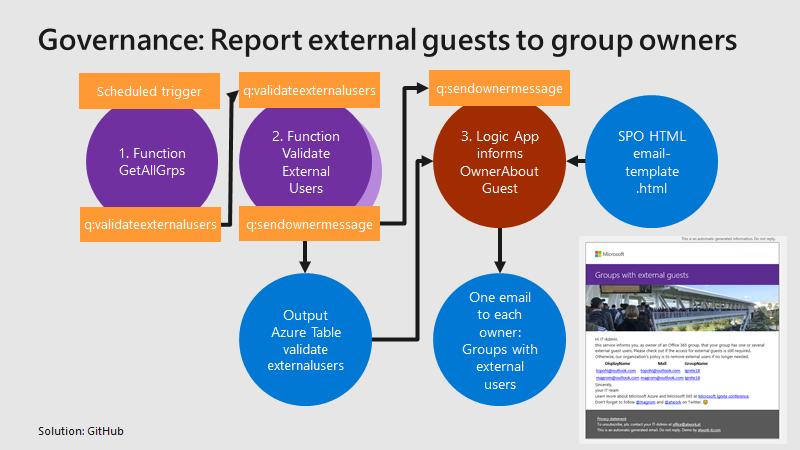
Governance specifies the rules for an organization. The Office 365 collaboration platform allows to invite external users for contributing in groups. In this part, we want to monitor all groups that have external guests and inform the group owners, who has access to a group or a team. See how this works here. Get all groups with external guests We use the same mechanism as before, see the article about Orphaned Groups. A function runs e.g. every day, reads all existing groups in the Office 365 tenant, and writes each group in a queue. A second function is triggered by that queue and reads all the external group members for one group. The following graphics shows that process from a technical standpoint. ...

March 15, 2019 · 4 min · Toni Pohl
Delegate365 changelog version 8.2

Delegate365 changelog version 8.2

After the major update that came with Delegate365 v8.1, v8.2 brings various improvements and fixes to optimize daily tasks in Delegate365. See the details here. Run a setup: Admins need to run the Delegate365 setup after the upgrade process from v8.1 to v8.2. See the How-To at (Re)run the setup. User license quick info: When hovering over a license checkbox in the user license panel, a new quick info informs about the license numbers that are available in the Office 365 tenant. This brings more transparency for admins to see if a license might be inactive because all licenses are assigned. In this sample above, there are 25 E5 licenses available, and only 3 licenses are left (which means that 22 licenses are already assigned to users). In that OU, there are 7 E5 licenses used, and there is no quota defined. ...

March 10, 2019 · 4 min · Toni Pohl
Secure a web on Azure with an Azure Active Directory Multi-Tenant App

Secure a web on Azure with an Azure Active Directory Multi-Tenant App

Azure offers a great platform for multiple types of apps and services, Web Apps are one of the PaaS service, we are using much. In some scenarios, it makes sense to host a static website on Azure, but to restrict access just for authenticated users. Well, AAD can help you with that by demanding a successful login with an Office 365 account. See how this works here. My sample static website My sample works with an Azure DevOps task that automatically generates a HTML website from a source control repository, processes the web with Jekyll in a container and saves the generated HTML artifacts to an Azure website. So, I picked a Jekyll Theme and started a documentation with Markdown files in Visual Studio Code. Then, I push the changes to my Azure DevOps repository and the build process generates the web in Azure. (That’s material for another article sometime.) Anyway, in the end there exists a static HTML website in an Azure web app that can be accessed with the https://[website].azurewebsites.net/ address. ...

March 1, 2019 · 3 min · Toni Pohl
Working with the new Azure PowerShell Az module

Working with the new Azure PowerShell Az module

PowerShell is both a command-line shell and scripting language and perfect for automating administrative tasks. When working with Microsoft Azure, Microsoft recommends to use the new Azure PowerShell Az module. See how to uninstall the outdated Azure PowerShell AzureRM , how to install the new Az module for PowerShell 5.x and 6.x and how to connect and to get a inventory of your resources and a little bit of Cloud Shell here. ...

February 26, 2019 · 4 min · Toni Pohl
Detect sentiment with Text Analytics

Detect sentiment with Text Analytics

Azure Cognitive Services offer a bunch of services. One is the Sentiment Analysis API that allows to analyze unstructured text for tasks such as sentiment analysis based on Microsoft machine learning algorithms. See the first steps how to use that here. The test works in the same way with Postman as in the previous article.The goal here is to analyze some text to get a positive or negative result of the meaning. ...

February 25, 2019 · 2 min · Toni Pohl

First steps with the Microsoft Vision API

Cloud services help to automate simple and complex processes. For analyzing a picture, the Microsoft Cognitive Services offer a bunch of services like the Vision API, (Custom) Computer Vision, Face API, Video Indexer an more. Follow this first sample with Postman to start with the Vision API. Azure Cognitive Services can be integrated easily in custom processes and apps. A good starting point is Cognitive Services APIs web page on Azure. ...

February 25, 2019 · 3 min · Toni Pohl
Troubleshooting Delegate365-Login

Troubleshooting Delegate365-Login

Sometimes support cases are opened because users cannot login to Delegate365 with their Office 365 account. In most cases, the browser cache automatically signs-in a user with wrong credentials. Please follow these simple steps to see how to achieve a successful login to the Delegate365 portal in such scenarios. 1. Use a browser in Private mode The most common stumbling block is that web browser log in users automatically. Also, often users are working with multiple accounts. Thus, there is a high probability that an incorrect sign-in will occur when opening the Delegate365 portal. ...

February 21, 2019 · 4 min · Toni Pohl
How to invite external users to your Azure subscription

How to invite external users to your Azure subscription

Modern collaboration allows to use shared resources and to give access to external users from other organizations. See how this works for shared Microsoft Azure subscriptions here! So, see this step-by-step process here with the following sample of an Admin giving access to an external guest and some troubleshooting tips. Check your source AAD and subscription Signing-in with admin@M365x321500.onmicrosoft.com to the Azure portal. Our source subscription 18e* and it’s bound to AAD M365x321500.onmicrosoft.com. ...

February 18, 2019 · 4 min · Toni Pohl
Troubleshooting Delegate365

Troubleshooting Delegate365

Delegate365 is a user-friendly tool to enable delegated management of users, licenses, and groups. This means that only objects assigned to a scope administrator are displayed in Delegate365. So, sometimes, we get questions as “I can’t see my users/shared mailbox or similar”. Here’s why and how to solve such issues. Why does Delegate365 not show users? Well, that’s the idea of the tool. Delegate365 shows only objects to which I am entitled to see and to manage. ...

February 13, 2019 · 7 min · Toni Pohl

Ready for European Collaboration Summit 2019!

Join us at the legendary European Collaboration Summit from May 27 to May 29, 2019 in Wiesbaden, Germany! #collabsummit is Europe’s largest community-driven conference with a focus on modern workplace technologies and digital transformation, with topics such as Microsoft 365, Azure, SharePoint, AWS, and Business Apps. The conference is organized for the community by the community. We from atwork are honored to be part of CollabSummit.eu as in the past years (see 2018 and 2017). Check out the first announced sessions at Collabsummit 2019 program is here!! ...

January 25, 2019 · 1 min · Toni Pohl