Troubleshooting Delegate365-Login

Troubleshooting Delegate365-Login

Sometimes support cases are opened because users cannot login to Delegate365 with their Office 365 account. In most cases, the browser cache automatically signs-in a user with wrong credentials. Please follow these simple steps to see how to achieve a successful login to the Delegate365 portal in such scenarios. 1. Use a browser in Private mode The most common stumbling block is that web browser log in users automatically. Also, often users are working with multiple accounts. Thus, there is a high probability that an incorrect sign-in will occur when opening the Delegate365 portal. ...

February 21, 2019 · 4 min · Toni Pohl
How to invite external users to your Azure subscription

How to invite external users to your Azure subscription

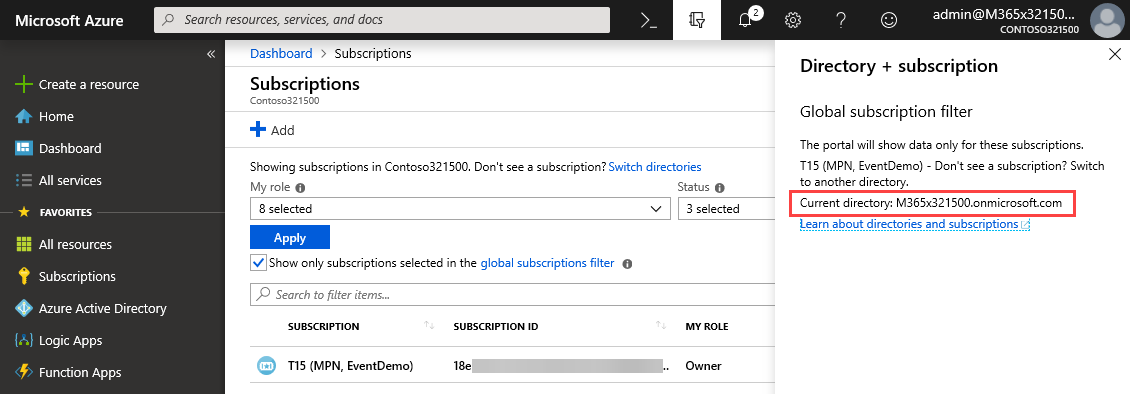
Modern collaboration allows to use shared resources and to give access to external users from other organizations. See how this works for shared Microsoft Azure subscriptions here! So, see this step-by-step process here with the following sample of an Admin giving access to an external guest and some troubleshooting tips. Check your source AAD and subscription Signing-in with admin@M365x321500.onmicrosoft.com to the Azure portal. Our source subscription 18e* and it’s bound to AAD M365x321500.onmicrosoft.com. ...

February 18, 2019 · 4 min · Toni Pohl
Troubleshooting Delegate365

Troubleshooting Delegate365

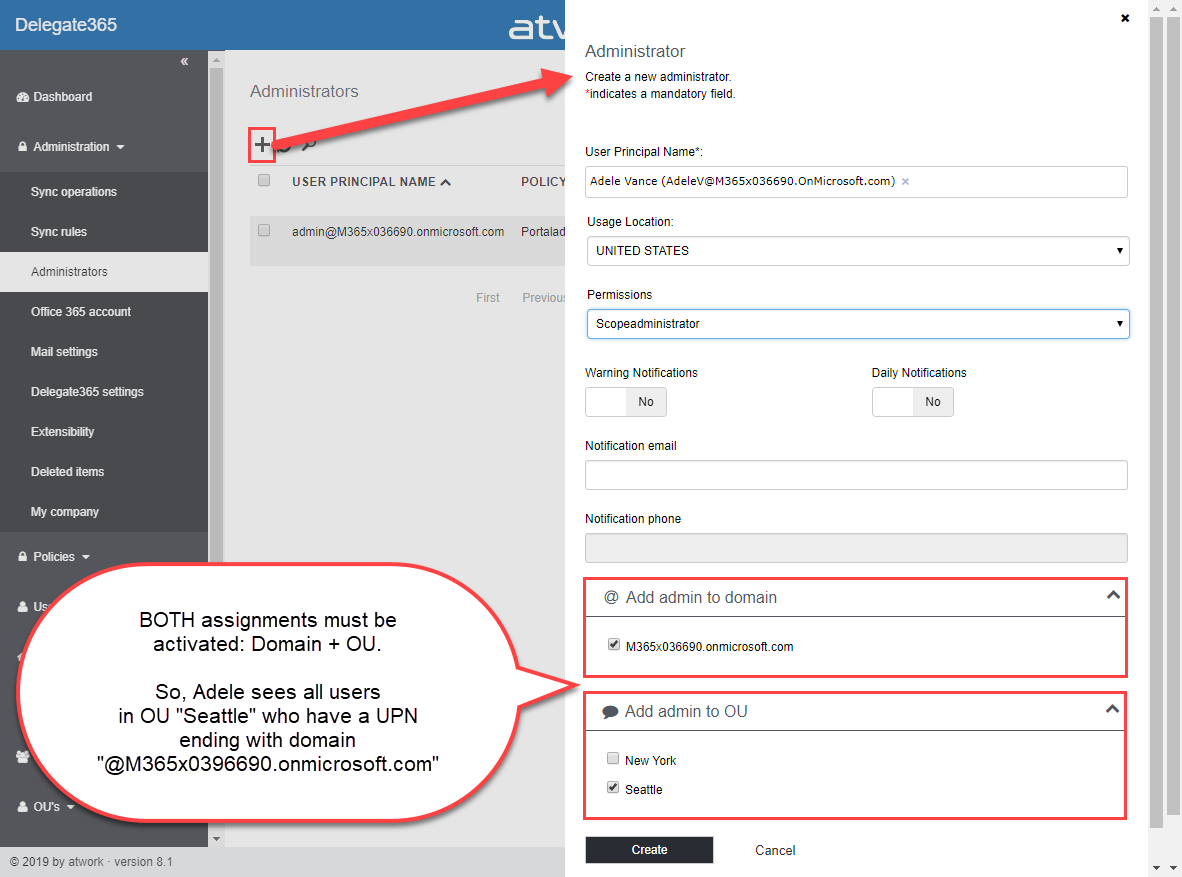
Delegate365 is a user-friendly tool to enable delegated management of users, licenses, and groups. This means that only objects assigned to a scope administrator are displayed in Delegate365. So, sometimes, we get questions as “I can’t see my users/shared mailbox or similar”. Here’s why and how to solve such issues. Why does Delegate365 not show users? Well, that’s the idea of the tool. Delegate365 shows only objects to which I am entitled to see and to manage. ...

February 13, 2019 · 7 min · Toni Pohl
Ready for European Collaboration Summit 2019!

Ready for European Collaboration Summit 2019!

Join us at the legendary European Collaboration Summit from May 27 to May 29, 2019 in Wiesbaden, Germany! #collabsummit is Europe’s largest community-driven conference with a focus on modern workplace technologies and digital transformation, with topics such as Microsoft 365, Azure, SharePoint, AWS, and Business Apps. The conference is organized for the community by the community. We from atwork are honored to be part of CollabSummit.eu as in the past years (see 2018 and 2017). Check out the first announced sessions at Collabsummit 2019 program is here!! ...

January 25, 2019 · 1 min · Toni Pohl
Delegate365-Working with Audit Logs and Power-BI

Delegate365-Working with Audit Logs and Power-BI

Delegate365 protocols operations in it’s audit logs. This log space can be accessed from entitled users and it’s simple to create a custom Power BI dashboard for your Delegate365 data. See how this works here step-by-step. Tip: The article Delegate365-Working with Audit Logs covers the methods for accessing the data and working with the audit logs as well. This article informs how to connect to your Delegate365 with Microsoft Power BI step-by-step and how create your custom dashboard. You need to have a Power BI license, see details at Power BI Pricing. ...

January 8, 2019 · 4 min · Toni Pohl
Convert a Markdown document to PDF easily

Convert a Markdown document to PDF easily

I am a big fan of the lightweight and super useful Visual Studio Code editor. Recently, I discovered another cool extension for creating PDF, HTML, PNG, and JPEG files from a Markdown document. Simply install the Markdown PDF extension by yzane.markdown-pdf. This cool extension exports a .md file to a PDF file as shown here. You can even with configure AutoSave by adding the "markdown-pdf.convertOnSave": true option to* settings.json* and restart Visual Studio Code. Then, when saving, the file gets converted automatically. That’s useful especially for documentation. Also, there are much more extensions to discover… ...

January 3, 2019 · 1 min · Toni Pohl
Join us at SPC19 North America!

Join us at SPC19 North America!

We from atwork will are looking forward to see you at SharePoint Conference North America 2019 that will take place in May 2019 in Fabulous Las Vegas. Check it out now and save $50 off your registration! SharePoint Conference North America 2019 will take place in the MGM Grand in Las Vegas, Nevada from May, 21st to 23rd, 2019. Add #SPC19 to your calendar! See the details at sharepointna.com. “The SharePoint conference returns to Las Vegas: the world’s biggest and most comprehensive event empowering you to achieve more in the modern workplace with Microsoft 365.” ...

December 27, 2018 · 1 min · Toni Pohl
Using Office 365 Home for up to 6 persons

Using Office 365 Home for up to 6 persons

Office 365 Home is a really cool offer for up to 6 users within your family. You get the Premium versions of Word, Excel, PowerPoint, Outlook, Publisher, 1 TB OneDrive cloud storage each for each person, the subscription includes 60 minutes of free Skype calls every month to phones in over 60 countries and more, as described here. Here’s how to invite your family members. We described the process at “How to use Office 365 Home for sharing or How to get 5 times 1 TB OneDrive storage and 5 times 60 Skype minutes per month” some years ago (and also in German). Anyway, since I keep forgetting how to invite family members to my (renewed) Office 365 Home subscription, here’s the documentation for that… ...

December 22, 2018 · 2 min · Toni Pohl
Use SharePoint view column formatting for displaying pictures and conditional formatting

Use SharePoint view column formatting for displaying pictures and conditional formatting

Today I want to share just a quick tip for custom formatting views in SharePoint lists. My goal was to show a picture of a text field that contains an URL and to use conditional formatting with a traffic light system to visualize the sentiment of tweets that are written to a SharePoint Online custom list from a Flow. See the formatting options here. The articles Use column formatting to customize SharePoint and Use view formatting to customize SharePoint basically explain how to work with the JSON object that describes the elements that are displayed, which is a good start. So, the ready formatted list shall look as here. Some fields in that list are rendered with custom formatting, you will spot them easily… ...

December 4, 2018 · 4 min · Toni Pohl
Delegate365 PowerShell

Delegate365 PowerShell

As announced in Delegate365 changelog version 8.1-Many new features, this version brings PowerShell support for administrators. All Delegate365 admins can use the PowerShell module if the access is granted by Portal Admins. See the How-To here. Note that for using the Delegate365 PowerShell module, Delegate365 version 8.1 (or higher) is required. The version number can be found in the status line at the end of the page in the Delegate365 portal, see the screenshot below. ...

November 7, 2018 · 5 min · Toni Pohl