Delegate365 changelog 9.5-Import group members

Delegate365 changelog 9.5-Import group members

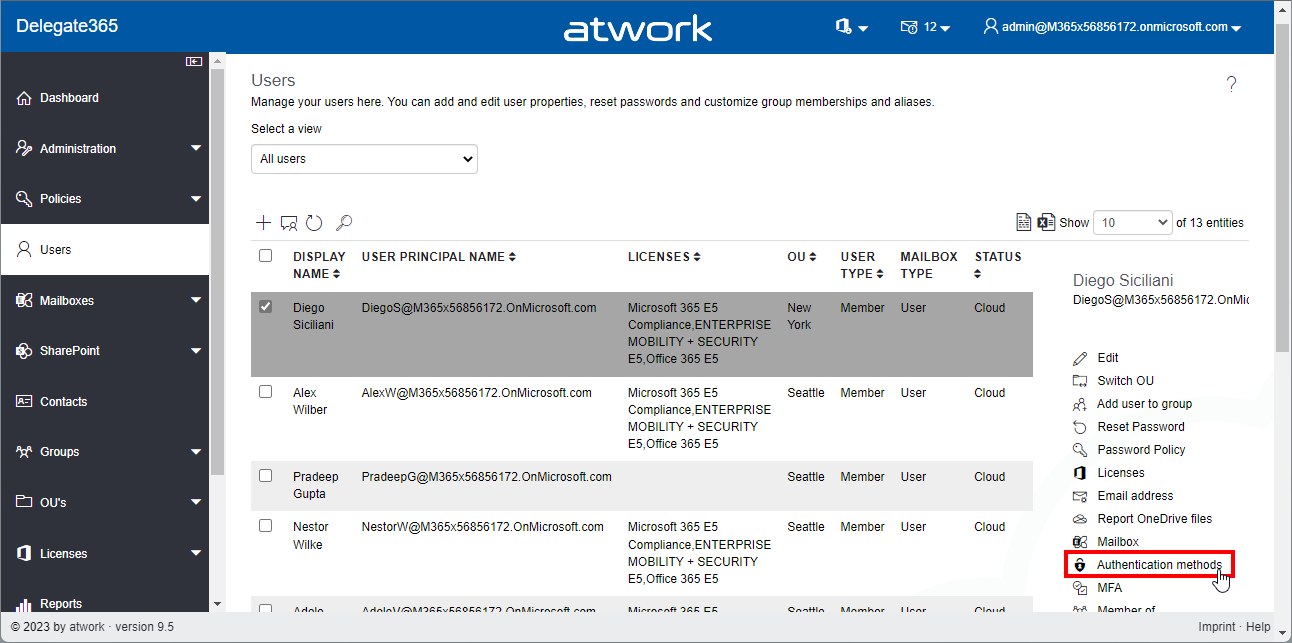
Delegate365 v9.5 brings some improvements for importing users from a list into groups, adding owners to groups, showing user authentication methods and some other benefits. See it here. User authentication methods: In the *Users *module, the panel has been extended and now shows all stored Authentication methods of the user. Select a user, and open the Authentication methods menu on the right. The Authentication methods panel opens and shows a list of all methods. Admins can remove outdated authentication methods here with the x-Icon. The question dialog “Do you really want to delete Password Authentication?” must be confirmed to delete a method. In this sample, we see some outdated authentication methods (without name, from 2017) that could be removed by the admin. *Cancel *closes the panel. Note: Users can modify or add their authentication methods anytime at https://aka.ms/mfasetup. ...

February 10, 2023 · 4 min · Toni Pohl
Delegate365 changelog 9.4-Dynamic Security Groups

Delegate365 changelog 9.4-Dynamic Security Groups

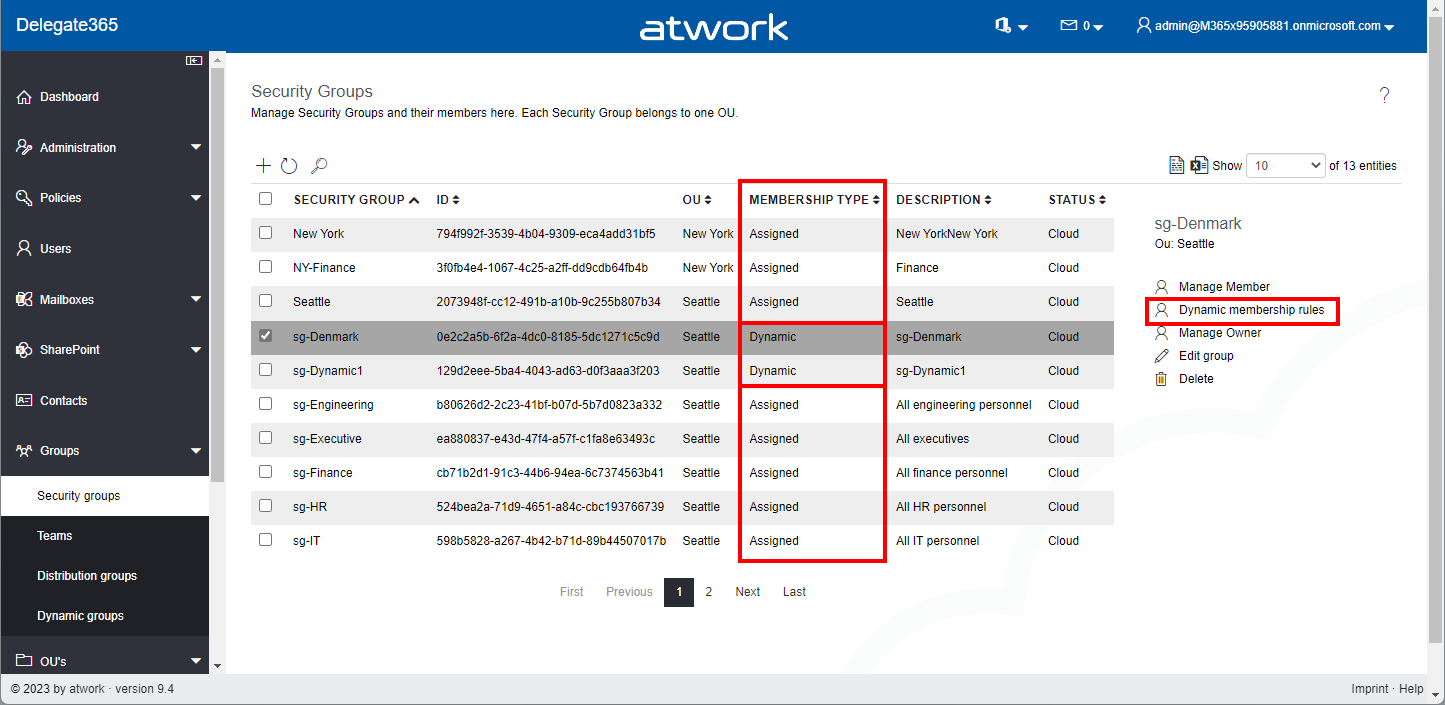
Delegate365 v9.4 brings support for managing dynamic security groups and some small fixes. See the details here. Dynamic Security Groups: In the Groups / Security Groups module, the list shows all security groups that are assigned to the administrator´s OU´s. In the list, there´s a new column Membership Type that shows if the security group is of type Assigned or Dynamic. Assigned means static users, Dynamic means a rule that includes all users whose properties match the condition (as in the M365 admin portal). The Membership Type cannot be changed for existing security groups. It must be defined when a new security group is created. If a security group is of type Dynamic, the menu on the right shows the option Dynamic membership rules. ...

January 13, 2023 · 3 min · Toni Pohl
Referenzprojekt für die Wiener Linien

Referenzprojekt für die Wiener Linien

Wir freuen uns über eine Microsoft-Referenz eines Projekts bei den Wiener Linien, das wir begleiten: Wiener Linien: Bau-Kollaboration als Fundament für Wiens Mobilität Foto: Architekt MossburgerOLN/Datenquelle Stadt Wien / news.microsoft.com atwork unterstützt die Wiener Linien bei der Umsetzung der hausinternen Datenablage und der Genehmigungsprozesse mit Microsoft 365 und der Power Platform. Die Lösung ermöglicht die Zusammenarbeit von Partnern und Baufirmen mit Gutachtern und den planungsverantwortlichen Mitarbeitern der Wiener Linien und ist sicher und flexibel. Nach der ersten erfolgreichen Projektumsetzung wird damit auch die Planung des Großprojekts Linienkreuz U2xU5 erfolgen. ...

January 4, 2023 · 1 min · Toni Pohl
Merry Christmas 2022 and Happy Holidays!

Merry Christmas 2022 and Happy Holidays!

Another year comes to an end. This year was also full of challenges and exciting projects. We would like to wish happy holidays and a happy new year to all of you. Once more, we say thank you for the good cooperation in 2022 and are looking forward to a healthy and successful 2023! Instead of Christmas presents, as in previous years, we support a selected charity project with a donation at Christmas. ...

December 24, 2022 · 2 min · Toni Pohl
Delegate365 changelog 9.3.1-Improvements

Delegate365 changelog 9.3.1-Improvements

We’ve developed a new update for Delegate365 with a number of useful improvements. All existing customers will be updated to Delegate365 version 9.3.1 in the next few days. See the details here. Licenses sorted by name: All licenses and plans are now sorted by name. This makes it easier for administrators to find the licenses and plans by name and adjust the corresponding license. Sorting is applied to both license names (SKU´s) and plans, in all modules. ...

December 21, 2022 · 3 min · Toni Pohl
Create an Adventcalendar for festive techcalendar 2022 with Power Apps

Create an Adventcalendar for festive techcalendar 2022 with Power Apps

Christmas is near. As a contribution to the festivetechcalendar.com, I describe here how to create an advent calendar with Microsoft Power Apps. You can download the Power App and use this app and this article to learn useful concepts in Power Apps. Here we go with the article for December 4th. Requirements The Power Apps Advent Calendar is designed to work like a real one, with the following rules. ...

December 4, 2022 · 10 min · Toni Pohl
Power Platform Environments and Governance tips using Solutions

Power Platform Environments and Governance tips using Solutions

The Microsoft Power Platform is great for quick and easy solutions and workflows. While developing a new Power App or flow is quick, governance and management can present some hurdles. Well, there is help for some topics, such as the use of solutions. Read more here. For a brief overview of governance for the Power Platform, have a look at Power Platform Environments and Governance Tips. Here we start with a very basic overview of administration and environments. ...

November 11, 2022 · 10 min · Toni Pohl
Tips for PowerApps-11 Make sure a value is selected in your dropdown

Tips for PowerApps-11 Make sure a value is selected in your dropdown

Working with Power Apps, have you seen that in the bound dropdown control the user can remove the selected item (even with single selection)? Well, there could be other solutions, but I want to make sure that a default value is always selected, even when the user clicks the button to remove the selection. In this sample Power App, I have a dropdown named *ProjectType *that is filled from a SharePoint list and a column with choices. When the user selects an item, they can remove the selection using the x-icon on the right. ...

November 2, 2022 · 2 min · Toni Pohl
Tips for PowerApps-10 Validate form input with RegEx

Tips for PowerApps-10 Validate form input with RegEx

Forms are simple. Forms are complex. Both are true depending on the functionality of the form. While you can create forms very quickly with Power Apps, it often takes a lot of time to make them as user-friendly as possible. In this article, we’ll look at how we can validate and simplify input using Regular Expressions. A sample form When creating a form, one often stumbles upon a few details designed to make it easier for the user to fill out the form. So, here´s my form with some fields. ...

November 1, 2022 · 5 min · Toni Pohl
Pay your CoE with Azure - for special use cases only

Pay your CoE with Azure - for special use cases only

The Center of Excellence (CoE), also known as the Microsoft Power Platform CoE Starter Kit, is a toolkit to gain insights into the use of the Microsoft Power Platform in an Microsoft 365 organization. While the installation has recently become a bit technically easier, a corresponding Power Platform license is also required for operation. Well, not every company owns or acquires the required license. We show how these license requirements can be solved with Azure temporary - for special use cases - and what are the benefits and the disadvantages of the PAYG billing. ...

October 10, 2022 · 7 min · Toni Pohl