Delegate365 changelog version 6-Menu restructuring

Delegate365 changelog version 6-Menu restructuring

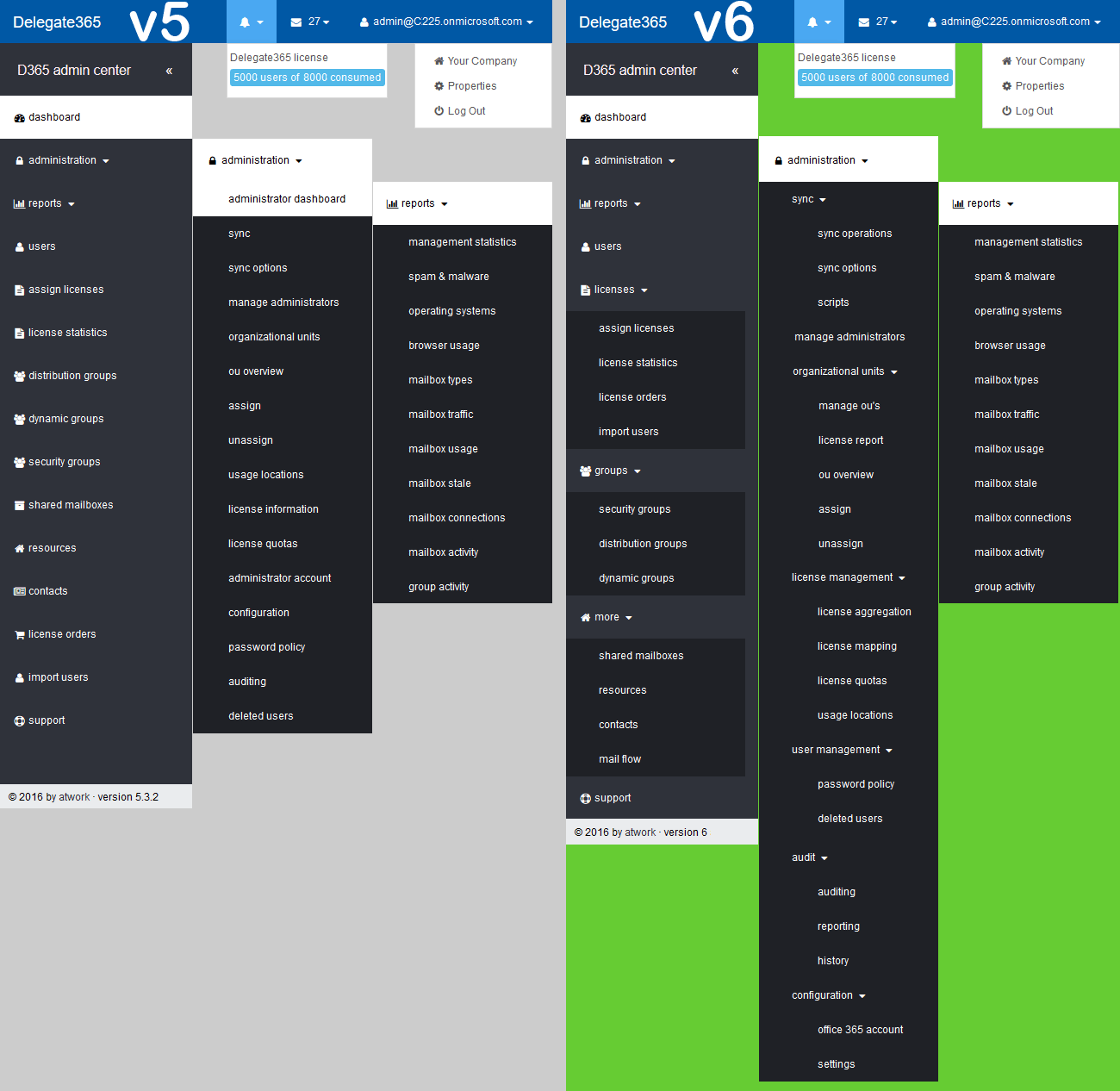
With Delegate365 version 6 there comes a slightly restructured menu. See the differences here. The existing left menu got a little bit disordered, so we reorganized it with groups to make it easier for admins to find related features. Enlarge the following graphics to see all menus and their new position. The left side (gray) shows the menu of D365 version 5, the right side (green) shows the new menu D365 version 6. ...

January 17, 2017 · 2 min · Toni Pohl
Speed up your old notebook with Pixel

Speed up your old notebook with Pixel

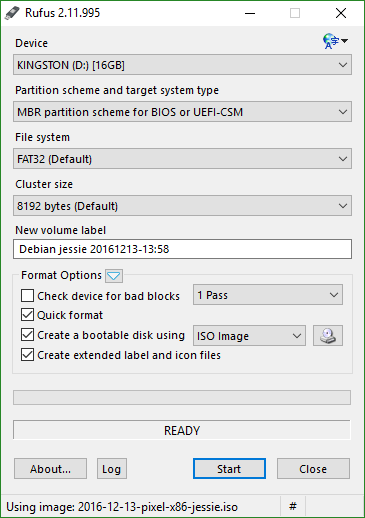
And now for something completely different: Recently, I stumbled upon the article at qz.com: Your old laptop can live again for the cost of a USB drive. The idea is to boot the free Debian “Pixel” OS from an USB stick and to work in that slim and fast environment. So I tried it out! PIXEL is a project of the the Raspberry Pi Foundation, see Introducing PIXEL. and get more details in the blogpost raspberrypi.org/blog: PIXEL for PC and Mac. ...

January 13, 2017 · 3 min · Toni Pohl
Gain access as delegated partner to another Office365 tenant with PowerShell

Gain access as delegated partner to another Office365 tenant with PowerShell

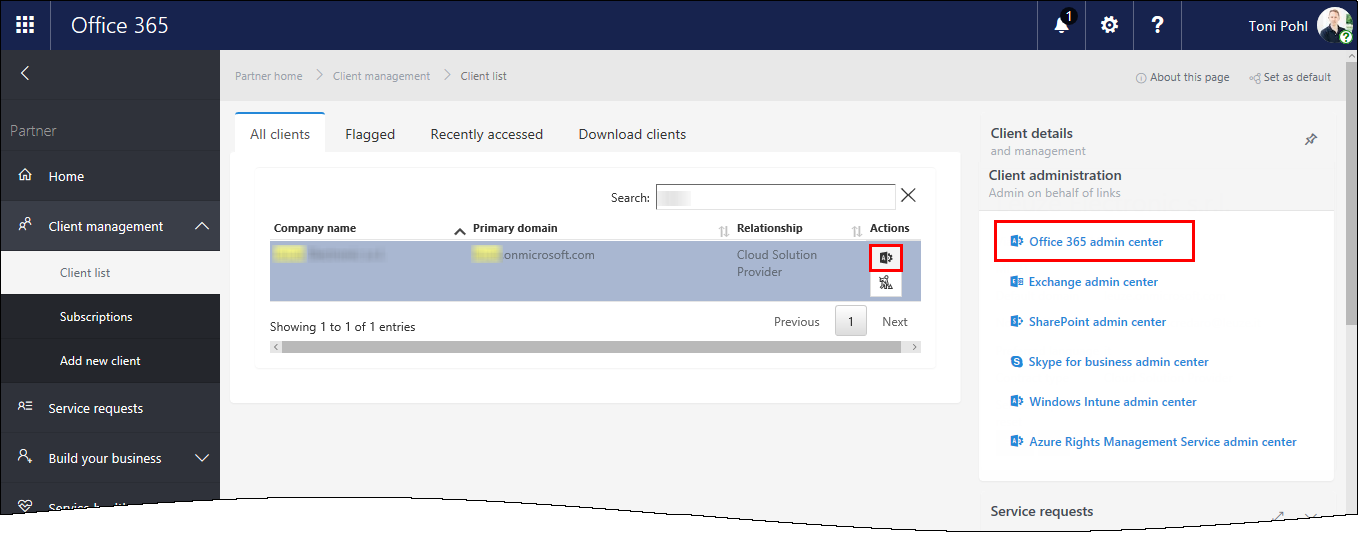
The goal was administer an Office365 tenant as delegated partner. But, currently I had difficulties to access another Office365 tenant in the Microsoft Partner Portal. When selecting a partner and opening the Office 365 admin center, not the partner tenant was opened but instead my own tenant. I didn’t figure out why this no longer was working. Anyway, I tried to use PowerShell instead… The red marked links opened the Microsoft Partner Portal, but not on behalf of the partner tenant, but only showing my own Office 365 tenant… ...

January 11, 2017 · 3 min · Toni Pohl
Azure Active Directory PowerShell Module V2 is available

Azure Active Directory PowerShell Module V2 is available

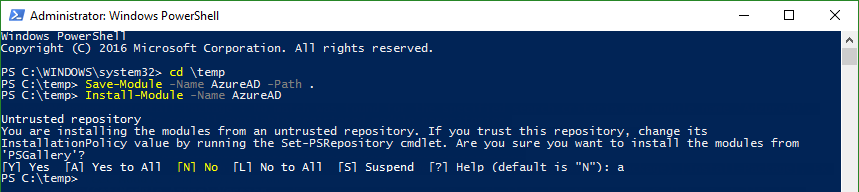
Today, just a short info for Azure Active Directory guys: #AzureAD PowerShell V2.0 is now GA! In this blogpost, Alex Simons and Rob de Jong inform that the PowerShell Azure AD v2.0 cmdlets are now generally available (GA). See the details at the Technet Blog and at Azure Active Directory V2 PowerShell Module - General Availability Release 2.0.0.33. Prerequisites Azure Active Directory V2 PowerShell Module can be installed on Windows starting with versions of Windows 7 SP1 and Windows Server 2008 R2 SP1 and up. ...

December 21, 2016 · 2 min · Toni Pohl
Delegate365 changelog version 6-Logging

Delegate365 changelog version 6-Logging

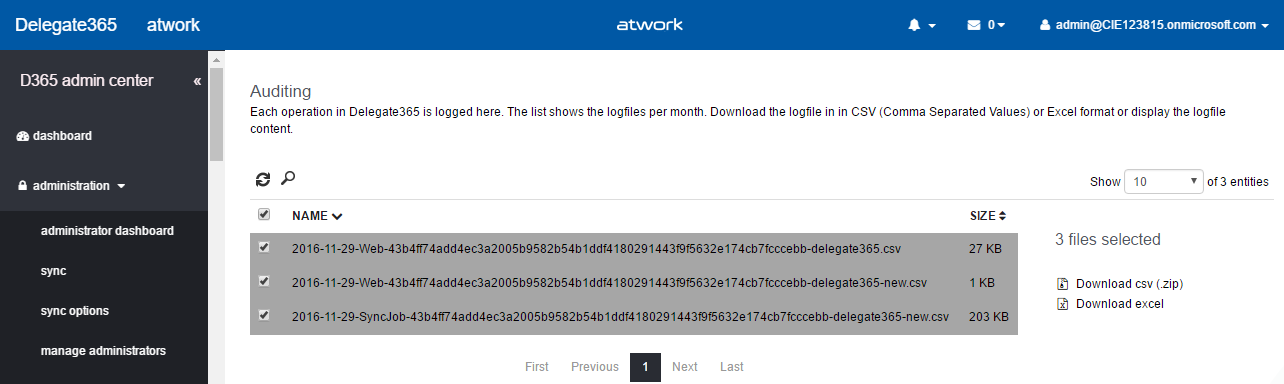
Large tenants and many operations can produce large audit logs in Delegate365 since every operation and every sync jobs is protocolled. To optimize the logging and to offer export and further use of the operations data, the audit logging changes with this version. See the details here. Previous versions: Let’s have a look back into the logging in the past. In the early versions of Delegate365, the logging was done in a database which blew up the database (unnecessarily). So, with version 2, we changed the logging to simple text files in CSV format to make it very easy to work with the protocolled data, for example, in Microsoft Excel. This format is used up to Delegate365 version 5.x. ...

December 1, 2016 · 5 min · Toni Pohl
Delegate365 changelog version 6-overview

Delegate365 changelog version 6-overview

As posted in September at Delegate365 announcement about upcoming changes in version 6, we will update Delegate365 to version 6 shortly. Actually, we wanted to update all Delegate365 tenants already this November, but we have been very busy, so this update comes a little bit delayed. See the details here. Delegate365 stays as it is. We just figured out some things we can improve and add to the existing functionality. So, no worries, Delegate365 will stay as it is, but you can benefit from improved and new features. ...

December 1, 2016 · 3 min · Toni Pohl
A new version of Microsoft Azure Storage Explorer is available

A new version of Microsoft Azure Storage Explorer is available

Azure-guys, there’s a new version of the cost free Microsoft Azure Storage Explorer available! Check it out here: https://storageexplorer.com! This is version Version 0.8.6 from 18th November 2016. And no, it’s not just a new logo and themes… The team included a lot of fixes and new stuff, as multiple editors in different tabs, search, modifications of data, improvements for uploads and downloads and more! See the details in the releasenotes! ...

November 30, 2016 · 1 min · Toni Pohl
Our Office-AddIns numbers

Our Office-AddIns numbers

Nice numbers of our two Office-AddIns “TagCloud Generator” and “Like for Outlook”. Both Apps are available in the Microsoft Office Store. TagCloud Generator is a simple to use tagcloud generator for Microsoft Word (working with Word 2013 and above) and delivers an overview of a document rapidly. Like for Outlook enables users to send a Like with one click and works in Outlook 2013 or later, Outlook 2016 for Mac, Outlook on the Web. ...

October 29, 2016 · 1 min · Toni Pohl
Delegate365 announcement about upcoming changes in version 6

Delegate365 announcement about upcoming changes in version 6

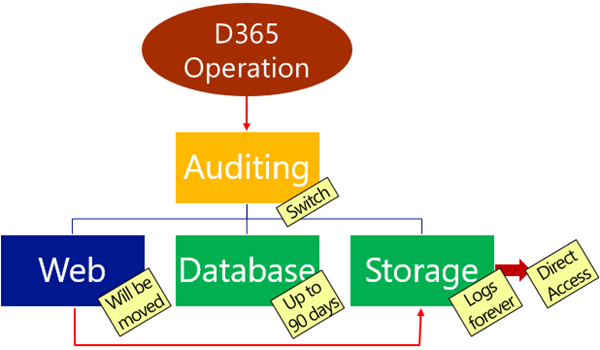
Delegate365 will receive a major update in October. This will be Delegate365 version 6 and will include a change in the audit logging system, a new license history and a preview for more custom automation features. Read the first details here. Change of logging: With the next update to version 6, the audit logging will be changed. There is a switch implemented which allows D365 to store logged data in various spaces and formats. The following graphics shows an overview at a glance about the planned features. Data will no longer be stored in the Web in CSV format, but in the D365 database for up to 90 days and in Azure storage in JSON format forever. Direct Access of Azure storage: Besides of the almost unlimited space in Azure storage, data in that storage can be accessed directly (if you have the permissions). This allows Portal Admins to generate a URL with a token with an expiration date to download the produced log files. The token is issued by D365, as tool you can download the logs with the cost free Microsoft Azure Storage Explorer. Daily Office 365 license statistics: To see the real usage of licenses per OU and per day, week, month or year, D365 stores daily data from now on. This data will be available for further usage. More Automation: We got a lot of feedback about implementing custom actions in D365, for example setting specific user properties, assigning custom licenses for specific users, setting Skype for Business policies for users in OU’s and so on. To avoid a cost intensive customization we decided to go another way: We are implementing scripts (like “Macros”) with a powerful editor with intellisense that can execute… PowerShell! Yes, you read correctly. D365 will support PowerShell commands and whole scripts for fulfilling custom tasks in Office 365! We are currently developing and testing and plan to update D365 with this module in mid to late October. The working title for this feature is “D365 Automation”. Any other suggestions? More: Improvements in the Sync operation, fixes and some more features… You see there are cool features coming to Delegate365 version 6. Stay tuned! ...

September 12, 2016 · 2 min · Toni Pohl
Delegate365 Roles and Notifications

Delegate365 Roles and Notifications

Delegate365 can send notifications for specific operations. Here’s a short overview of roles and in which situations notifications are sent. Who can get notifications? In Delegate365 we have these roles a user can have for using the portal. Portal Admins: They have full access to all features and can configure D365. Scope Admins: They have administrative management features for “their” users, licenses and groups. The difference between Portal and Scope Admins is simply the switch “Is Portal Admin” in the administration / manage administrators and Edit admin feature (see the full screenshot below). License Admins: This can be Portal Admins or Scope Admins. They are defined in the administration / manage administrators and Edit admin feature with the switch “License Administrator” (see the full screenshot below). They can manage license requests. Users: Standard users who can use the D365 Self service password reset feature (SSPR). All user types can receive emails (or SMS) from D365, but their email notification must be configured. ...

September 10, 2016 · 3 min · Toni Pohl